 Noctalia
About
Sonolith
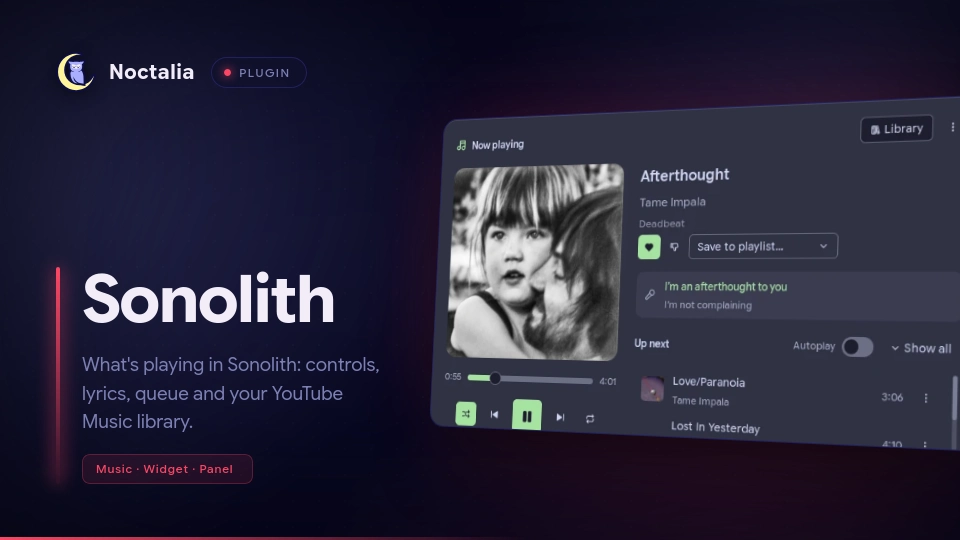
What's playing in Sonolith (a YouTube Music client), right in your bar: album art, title and artist, a Now Playing panel with every control you need, and your whole library a click away.
Plugin
| Field | Value |
|---|---|
| ID | opecko/sonolith |
| Entries | Bar widget: bar; panels: nowplaying, library; service: service |
Requirements
sonolith2.4 or newer, with Settings → Connected apps → Let other apps connect to Sonolith turned on.python3onPATH. The plugin talks to Sonolith through a small bridge script that uses only Python's standard library.imagemagick(optional,magickorconvertonPATH): scales album art down, which keeps the panels smooth. Without it the original covers are shown.libsecret(optional,secret-toolonPATH, with a Secret Service such as GNOME Keyring or KWallet): keeps the plugin's Sonolith token in your keyring. Without it the token is kept in a user-only file.
Usage
Bar widget
Add the bar widget to a bar from the bar settings, or in your config:
[widget.sonolith]
type = "opecko/sonolith:bar"
and add "sonolith" to one of the bar's start, center or end lists. It shows the album art, title and
artist, dimmed while paused. Left click opens Now Playing, right click plays or pauses, the mouse wheel changes
the volume (or skips, see scroll_action), and middle click opens the widget's settings. On a vertical bar it
shows the art only, with the song in the tooltip. When Sonolith isn't running or isn't connected, it shows an
icon and says so in the tooltip.
Connecting
Open Now Playing and press Connect to Sonolith. Sonolith shows a consent screen with what the plugin wants to do (see Notes); you can untick any optional permission. After you allow it, the plugin connects on its own every time Noctalia starts. It never asks Sonolith again without you pressing a button, and it never starts Sonolith by itself.
Disconnect from Sonolith is in the Now Playing panel's ⋮ menu. It removes the plugin from Sonolith and deletes its token, also when Sonolith isn't running.
Now Playing panel
noctalia msg panel-toggle opecko/sonolith:nowplaying
Art and controls on the left: seek, previous / play / next, shuffle and repeat, volume (click the speaker to mute). For podcast episodes, skip back 10 s / forward 30 s and the speed replace shuffle and repeat. On the right: like, dislike and save to playlist, the current lyric line (lit up word by word when Sonolith has word timings) with the next one under it, and what's up next with autoplay. A queue entry's ⋮ moves it to play next or removes it (right click on ⋮ for the same as a menu). Library in the header switches to the Library panel.
Library panel
noctalia msg panel-toggle opecko/sonolith:library
Your playlists, liked songs, albums, artists, podcasts, episodes for later and history, plus search with suggestions and filters. Click a playlist, album, artist or podcast to open it; click a song to play it in that playlist or album. ▶ on a card plays it; right click on ▶ or on a row's ⋮ for more (play next, add to queue, like, save to playlist, go to album or artist, remove from your own playlist). ← Now playing at the top of the rail switches back.
Service
The service entry runs in the background and needs no setup: it owns the connection to Sonolith and feeds
the bar widget and the panels.
Settings
Plugin settings (Settings → Plugins → the gear on this plugin):
| Setting | Type | Default | Description |
|---|---|---|---|
volume_step |
int |
5 |
Volume change per wheel step or keybind, in percent (1–20). |
osd_on_track_change |
bool |
false |
Show the shell OSD with the new song's title and artist. |
np_layout |
select |
compact |
Now Playing cover size: compact (260 px) or large_art (340 px). |
np_show_lyrics |
bool |
true |
Show the current lyric line in Now Playing. |
np_show_queue |
bool |
true |
Show what's up next in Now Playing. |
np_queue_preview |
int |
6 |
Queue entries shown before Show all (1–20). |
library_default_tab |
select |
last |
The tab Library opens on: last, playlists, liked, albums, artists, podcasts, later or history. |
Bar widget settings (per widget):
| Setting | Type | Default | Description |
|---|---|---|---|
show_art |
bool |
true |
Show the album art. |
show_title |
bool |
true |
Show the title. |
show_artist |
bool |
true |
Show the artist. With art, title and artist all off, the widget shows an icon. |
layout |
select |
inline |
inline (one line) or stacked (title over artist). |
text_format |
string |
{title} · {artist} |
For inline; placeholders {title}, {artist}, {album}. |
order |
select |
title_first |
For stacked: title_first or artist_first. |
art_size |
int |
22 |
Art size in px (14–40). |
art_radius |
int |
6 |
Art corner radius in px (0–20). |
max_width |
int |
240 |
Maximum text width in px (60–600); longer text ends with …. |
show_state_icon |
bool |
true |
Play/pause icon after the text. |
show_progress |
bool |
false |
A thin progress line under the text. |
when_idle |
select |
glyph |
When nothing plays: glyph (a music icon), hide, or last_track (keep the last song). |
when_unavailable |
select |
glyph |
When Sonolith isn't running: glyph or hide. |
scroll_action |
select |
volume |
Mouse wheel: volume, track (next / previous song) or none. |
scroll_long_text |
bool |
false |
Long text scrolls instead of being cut off (advanced). |
IPC
Bind these in your compositor:
noctalia msg plugin opecko/sonolith:service all toggle       # play / pause
noctalia msg plugin opecko/sonolith:service all next
noctalia msg plugin opecko/sonolith:service all previous
noctalia msg plugin opecko/sonolith:service all like         # like the current song, or remove the like
noctalia msg plugin opecko/sonolith:service all volume-up    # by volume_step
noctalia msg plugin opecko/sonolith:service all volume-down
noctalia msg plugin opecko/sonolith:service all open         # toggle Now Playing
noctalia msg plugin opecko/sonolith:service all library      # toggle Library
noctalia msg plugin opecko/sonolith:service all connect      # Connect to Sonolith (asks for your approval)
noctalia msg plugin opecko/sonolith:service all disconnect   # Disconnect from Sonolith
Notes
How it works
Noctalia plugins can't open Unix sockets, and Sonolith's API is JSON-RPC over one. The service entry runs a
small Python bridge (bridge/sonolith-bridge.py, standard library only) that holds the one connection to
Sonolith, prints status and events to the service as JSON lines, and runs the panels' commands through a
private control socket. The bar widget and the panels only read the service's shared state. The plugin uses
Sonolith's events, not polling; the only extra request is the queue preview after the queue changes.
Processes, files and network
- Processes:
python3(the bridge daemon, and one shortcallper command from the panels);secret-tool(from the bridge, to store, read and clear the token);magickorconvert(to scale album art);sonolith(only when you press Open Sonolith, once per click). - Files (all in the plugin's data directory,
~/.local/state/noctalia/plugins/data/opecko/sonolith/):sonolith-bridge.py(a copy of the bridge: Sonolith ties the token to the script's path, and this path stays the same across plugin updates, so an update never asks you to approve the plugin again);art/(album art, about 80 covers are kept);token(mode 0600, only without a Secret Service). The bridge also creates$XDG_RUNTIME_DIR/sonolith-noctalia/(mode 0700) with its control socket and a lock file. - Network: album art is downloaded from the
thumbnailUrls Sonolith reports (YouTube's image servers). Everything else goes to Sonolith over its local Unix socket. - The token is never logged, shown, or put on a command line or in shared state.
Permissions
What the plugin asks Sonolith for, as the consent screen shows it. Only the first is required; anything you untick is hidden in the plugin, and the Library panel offers to ask for library access later.
| Scope | Why |
|---|---|
player:read (required) |
To show the current song in your bar |
player:control |
To play, pause, skip and seek from your bar |
queue:read |
To show what's up next |
queue:write |
To add, move and remove songs in your queue |
lyrics:read |
To show the current lyric line |
library:read |
To browse your library |
search |
To search YouTube Music |
library:write |
To like songs and save them to playlists |
Troubleshooting
- "Sonolith isn't running, or Connected apps are off": start Sonolith and turn on Settings → Connected apps → Let other apps connect to Sonolith. The plugin notices within a second.
- "Python 3 is required": install
python3. - The panels feel slow with lots of covers: install
imagemagick. - Logs:
grep sonolith ~/.cache/noctalia/noctalia.log.
Sonolith integration checklist
From the Sonolith API spec:
- 1. Connects through
discovery.json, falling back to the default socket; checks the/tmpfallback directory is private - 2. One JSON message per line, at most 1 MiB; responses matched by id; unknown fields and notifications ignored
- 3. Registers only after a user action, with a stable appId, a clear name, description and publisher, and a plain reason per scope
- 4. Keeps the connection open while a request is pending; handles approved, denied (with the wait from
retryAfterMs), blocked and expired - 5. Token in the Secret Service (fallback: a 0600 file); never logged or shown
- 6.
session.hellofirst on every connection; handles Unauthorized, NotRegistered, Blocked, RegistrationPending (identity changed) and UnsupportedVersion - 7. Uses only granted scopes; follows
session.scopesChanged; hides features on PermissionDenied - 8. On
session.revoked, Unauthorized or NotRegistered: stops, deletes the token, shows "Disconnected from Sonolith" - 9. Never registers again on its own
- 10. "Disconnect from Sonolith" calls
app.unregisterand deletes the token - 11. "Uses Sonolith" next to Disconnect and on the connect screens
- 12. Reconnects with backoff (1 s doubling to 60 s, ±20% jitter, or at once when Sonolith reappears); never starts Sonolith on its own; subscribes again after reconnecting
- 13. Events, not polling
- 14. Respects rate limits: waits
retryAfterMs, debounces search and sliders - 15. Handles Unavailable, Timeout, NotSignedIn, NotFound and
cursorExpired - 16. Tested with Sonolith not running, the API off, and Sonolith quitting mid-session
- 17. Tested deny, block, expiry, an unticked optional scope, removal in Sonolith while connected, and disconnect
Uses Sonolith.
Versions
| Version | Plugin API | Updated |
|---|---|---|
| v1.0.0 latest | 43 | Oct 31, 2026 |
Older versions stay installable on a Noctalia release whose plugin API is below the latest version's.