 Noctalia
 Back to plugins 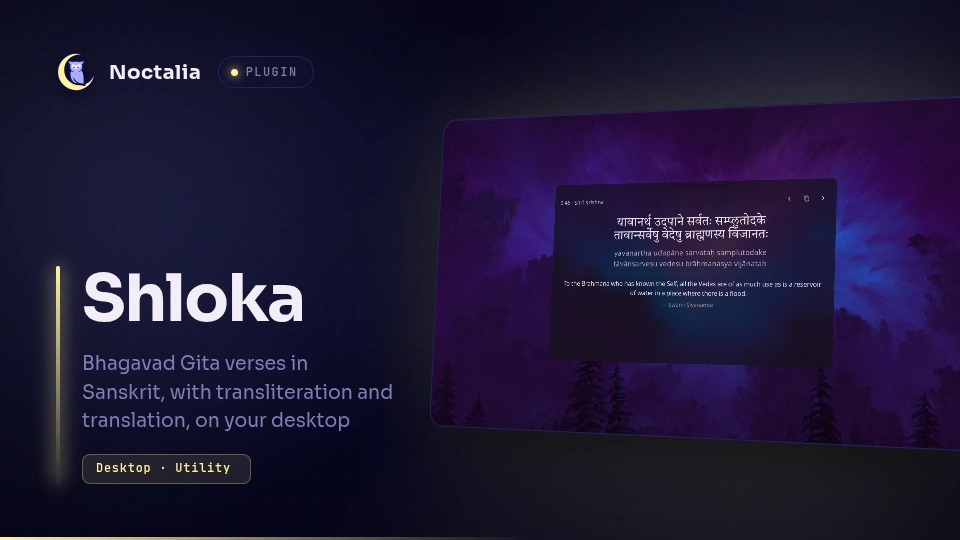
v0.1.0 AnkitKumar
About
Shloka
A desktop widget that shows Bhagavad Gita verses in Sanskrit with transliteration and English or Hindi translations, either at random intervals or one verse per day.
Plugin
| Field | Value |
|---|---|
| ID | ankitkumar/shloka |
| Entries | Desktop widget: verse |
Usage
Enable Shloka in Settings → Plugins, then open Settings → Desktop → Toggle Editor, choose Shloka in the toolbar, and click +.
The header shows the verse reference and speaker, with Previous, Copy, and Next buttons. Copy copies the visible verse text along with its reference.
Settings
| Setting | Type | Default | Description |
|---|---|---|---|
mode |
select |
random |
random rotates verses on a timer; daily shows one verse per local day. |
refresh_minutes |
int |
30 |
Minutes between random verses (0–1440). 0 disables rotation. Only used in random mode. |
language |
select |
en |
Translation shown: en, hi, both, or none. Verses without the chosen translation are skipped. |
show_sanskrit |
bool |
true |
Show the Sanskrit verse. |
show_transliteration |
bool |
true |
Show the Roman transliteration. |
show_reference |
bool |
true |
Show chapter, verse, and speaker. |
show_credit |
bool |
true |
Show the translator and grouped verse range. |
show_controls |
bool |
true |
Show the Previous, Copy, and Next buttons. |
teachings_only |
bool |
true |
Only show verses spoken by Shri Krishna. |
font_size |
int |
22 |
Base text size (12–48). Transliteration, translation, and credits scale with it. |
Notes
- No network access. Verses and the Devanagari font are bundled.
- Log lines are prefixed with
shloka:. - Verse data is from vedicscriptures/bhagavad-gita. English translation by Swami Sivananda (The Divine Life Society); Hindi translation by Swami Ramsukhdas (Gita Press, Gorakhpur).
- The Devanagari font is Tiro Devanagari Sanskrit, licensed under the SIL Open Font License 1.1 (
fonts/OFL.txt).
Versions
| Version | Plugin API | Updated |
|---|---|---|
| v0.1.0 latest | 12 | Oct 26, 2026 |
Older versions stay installable on a Noctalia release whose plugin API is below the latest version's.