 Noctalia
Back to plugins 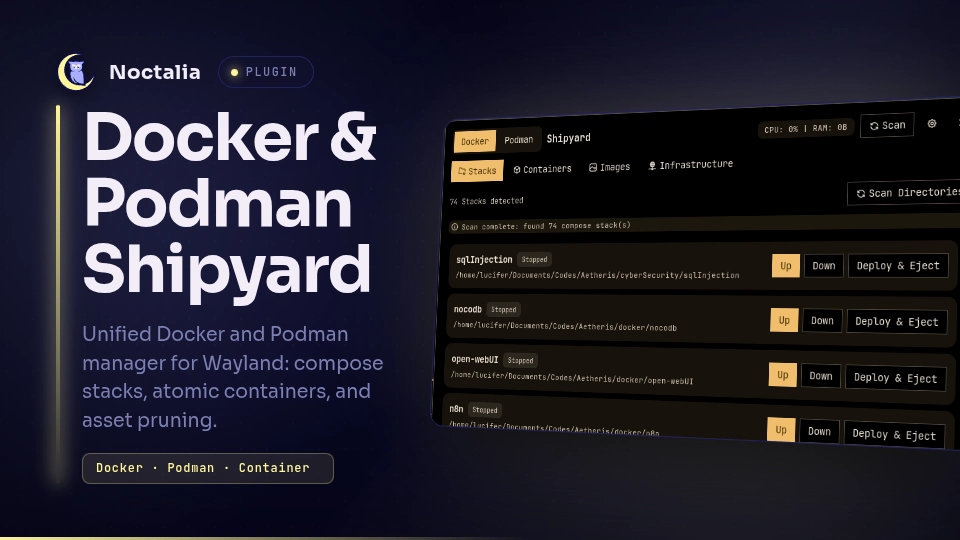
v1.1.0 Ishan0121
About
Docker & Podman Shipyard
A unified, zero-clutter Docker and Podman manager for Wayland. It bridges the gap between atomic container management and directory-based Docker Compose workflows, strictly inheriting all visual styling and design tokens from the Noctalia desktop environment.
Plugin
| Field | Value |
|---|---|
| ID | ishan0121/shipyard |
| Entries | Bar widget: shipyard; panel: manager; service: daemon; shortcut: toggle |
Requirements
Install docker or podman on PATH. For compose stack discovery and control, ensure docker compose or podman compose is installed. setsid (from util-linux) is used for process group management during long-running tasks.
Usage
Open the Shipyard management panel with:
noctalia msg panel-toggle ishan0121/shipyard:manager
Features
- Persistent Header: Seamless toggle switch between Docker and Podman, with live daemon-wide CPU and RAM aggregation.
- Stacks Tab (Compose Director): Scans configured directories for
docker-compose.ymlorcompose.yaml. ProvidesUpandDowncontrols alongside a Deploy & Eject action that starts a stack and switches directly to the Containers view for atomic container inspection and management. - Containers Tab (Atomic View): Live event-stream-driven container inspection. Displays live CPU and memory usage, status badges, and inline Start, Stop, Restart, and Remove buttons.
- Images Tab (Asset Manager): Lists downloaded images with tags, size, and container reference count, with a one-click Prune Unused Images action.
- Infrastructure Tab (Volumes & Networks): Split view for volumes and networks, highlighting unattached orphans for quick deletion.
Settings
| Setting | Type | Default | Description |
|---|---|---|---|
daemon_type |
select |
"docker" |
Active container engine ("docker" or "podman"). |
compose_scan_dirs |
string_list |
["~/docker", "~/Projects", "~/Labs", "~/compose"] |
Directories scanned recursively for Compose files. |
refresh_interval |
int |
3 |
Interval in seconds for live container CPU and memory stats while panel is viewed. |
confirm_destructive |
bool |
true |
Whether to confirm before removing containers, volumes, networks, or pruning images. |
show_stats |
bool |
true |
Bar widget setting: Display live CPU and RAM percentages directly in the status bar. |
glyph |
glyph |
"ship" |
Bar widget setting: Icon displayed on the top bar. |
IPC
Refresh state snapshot or switch daemons externally:
noctalia msg plugin ishan0121/shipyard:daemon all refresh
noctalia msg plugin ishan0121/shipyard:daemon all toggle_daemon
Notes
- Runtimes run asynchronously using
noctalia.runAsyncto ensure no blocking operations occur on the compositor thread. - Decoded rows are batched per Luau tick to maintain 60 FPS compositor smoothness.
Versions
| Version | Plugin API | Updated |
|---|---|---|
| v1.1.0 latest | 43 | Nov 19, 2026 |
Older versions stay installable on a Noctalia release whose plugin API is below the latest version's.