
About
Shift

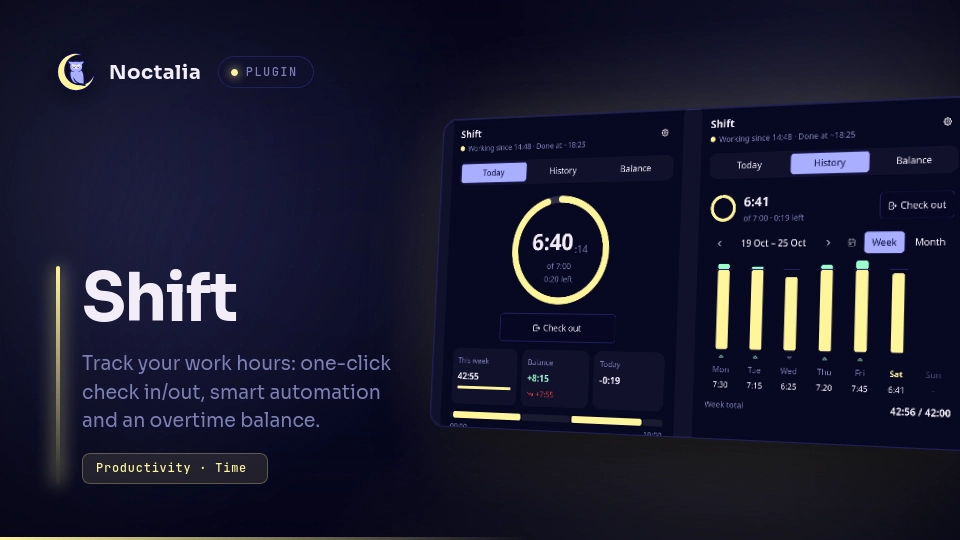
Track your working hours from the Noctalia shell: one-click check in / check out, a live daily counter against your contract, and an overtime balance you can adjust. Automation can suggest or do check-ins within your work hours, and asks what to do with the time you were away.
Source code and issues · User guide · Changelog
Plugin
| Field | Value |
|---|---|
| ID | hbollon/shift |
| Entries | Service: core; bar widget: bar; panel: dashboard; shortcut: tile |
Requirements
None of these is required: Shift tracks your time without them, with less automation.
swayidle(optional): detects when you are away from the keyboard. Without it, Shift still follows the session lock and system sleep, and shows a hint in the dashboard.gdbus(optional, from GLib:libglib2.0-binon Debian and Ubuntu): session lock and sleep detection through systemd-logind.loginctl(optional, from systemd or elogind): withoutgdbus, Shift polls it for the lock state; sleep is still detected when the computer wakes up.
Usage
Bar widget: add
Shiftfrom the bar's Add-widget picker (or configure a widget withtype = "hbollon/shift:bar"). It shows your status, today's worked time and a progress ring toward your daily target; hover it for the details.- Left click: open the dashboard.
- Right click: check in, or check out when working.
Dashboard panel: today's counter and target, the check in / check out button, and three tabs:
- Today: this week's total, the balance and today's delta, then the day's timeline and sessions;
- History: a week of bars against the target, or a month calendar; click a day to edit it;
- Balance: the balance until yesterday and its breakdown, adjustments (time off, corrections), and the tracking start and initial balance.
The day editor changes a day's sessions (times like
9:30,930,9h30or9.5), including the start of the running one, and marks days off (no target), ahead of time too. Cards at the top ask about absences, suggestions, days closed automatically and days without sessions: such a day stays out of the balance until you review it (day off, add a session, or not worked). The footer summarises automation, and its details show the signal sources and this week's work hours. Recent actions can be undone for 10 minutes (header button orCtrl+Z). It opens from the bar widget or the control-center tile, or with:noctalia msg panel-toggle hbollon/shift:dashboardControl-center tile: add
Shiftfrom Settings → Control Center shortcuts. Click it to check in or out; right-click it to open the dashboard.IPC, for keybinds and scripts:
noctalia msg plugin hbollon/shift:core all checkin
noctalia msg plugin hbollon/shift:core all checkout
noctalia msg plugin hbollon/shift:core all toggle
noctalia msg plugin hbollon/shift:core all undo
noctalia msg plugin hbollon/shift:core all resolve keep     # or remove: the oldest absence to review
noctalia msg plugin hbollon/shift:core all adjust -2:00 Dentist   # a balance adjustment dated today
noctalia msg plugin hbollon/shift:core all dayoff 2026-12-24 # toggle a day off (today without a date)
noctalia msg plugin hbollon/shift:core all holidays-refresh # fetch the public holidays again
noctalia msg plugin hbollon/shift:core all signal idle      # idle, active, lock, unlock, sleep, resume
Balance
Your weekly hours are split evenly over your workdays (35 h over Monday–Friday is 7:00 a day). Public holidays and days off have no target; time worked on them is overtime. A change of contract applies from the day you make it, never to past days. The balance counts every day from the tracking start to yesterday, plus the initial balance and the adjustments; today's delta is shown apart until the day ends.
Automation
Automation acts only within your work hours (the window), on your workdays:
- Check in / check out: with the Assisted preset, Shift suggests checking in when you start using your computer within your work hours, and checking out when they end. Automatic does it for you. A manual check-out holds automatic check-ins until the end of the current work-hours period; a session started outside your work hours is never closed by them.
- Absences: when you come back after being inactive, with the screen locked or the computer asleep for at least 15 minutes, Shift asks whether that time was work (a meeting, a call) or should be removed. Removing it splits your session: checked out when you left, checked in when you came back. Shorter breaks count as work.
- End of day: a session still open when the workday ends (at 04:00 by default) is closed at your last activity, and unreviewed absences count as work.
Additional rules add or remove time from the work hours, one per line: + or -, then *, days (mon-fri, sat,sun), a date (2026-12-24) or a date range (2026-12-24..2027-01-02), and an optional time range:
- * 12:00-13:30        lunch break
- fri 16:00-24:00      short Fridays
+ sat 09:00-12:00      Saturday mornings
With Idle detection set to External, send the idle signals yourself, for example from hypridle:
listener {
  timeout = 300
  on-timeout = noctalia msg plugin hbollon/shift:core all signal idle
  on-resume  = noctalia msg plugin hbollon/shift:core all signal active
}
Settings
| Setting | Default | Description |
|---|---|---|
| Weekly hours | 35 | Contract hours per week, split evenly over your workdays (35 h over Monday–Friday is 7:00 a day). |
| Work week | Monday to Friday | Your workdays: Monday–Friday, Monday–Saturday, or a custom set of days. |
| Workday starts at | 4 | Advanced. Hour at which a new workday begins; work after midnight and before it counts toward the previous day. |
| Duration format | 7:30 | How durations are displayed: 7:30, 7h 30m or 7.50 h. |
| Automation | Assisted | Manual, Assisted (suggests check-ins and check-outs, asks about absences), Automatic (checks in and out for you, asks about absences) or Custom. |
| Work hours start / end | 08:00 / 19:00 | The automation window on your workdays (24:00 allowed as the end). |
| Not on public holidays | On | Public holidays and days off are outside the work hours. |
| Additional rules | none | Rules that add or remove time from the work hours (see Automation above). |
| Check in / Check out | Suggest | Custom only: off, suggest, or automatically. |
| When inactive / locked / asleep or offline | Ask me | Custom only: count it as work, ask me, remove it, or check out. |
| Inactive after (minutes) | 5 | Minutes without input before you count as away. |
| Shortest absence (minutes) | 15 | Shorter breaks count as work. |
| Unreviewed absences | Count them as work | Advanced. What happens at the end of the day to absences you did not review. |
| Idle detection | Auto | Advanced. Auto (swayidle when installed), swayidle, External (IPC) or Off. |
| Public holidays | On | No target on public holidays. Fetched from date.nager.at (see Notes). |
| Holiday country | from your locale | Two-letter country code, such as FR; empty reads it from LC_TIME / LANG. |
| Holiday region | none | Advanced. A subdivision code for regional holidays, such as FR-67 or DE-BY. |
| Notify when the daily target is reached | On | Once a day, when your worked time reaches today's target. |
| Notify about absences to review | On | When you come back from an absence that asks whether it was work. |
| Notify about suggestions | On | Assisted or Custom: when Shift suggests checking in or out, once per work-hours period. |
Each bar widget also has its own settings (middle-click the widget to open them):
| Setting | Default | Description |
|---|---|---|
| Style | Icon, time and progress ring | Or icon and time, or time only. The ring is hidden on days without a target. |
| Value | Worked today | Or the time remaining today (overtime shows as +0:23). |
| When checked out | Dim | Show normally, dim, or hide the widget until the next check-in. |
Notes
The core service starts automatically when the plugin is enabled. Shift stores its data as JSON files in ~/.local/state/noctalia/plugins/data/hbollon/shift/ (state.json, balance.json and one ledger/<year>.json per year), plus cached public holidays in holidays/ and generated progress-ring images in cache/. Disabling or removing the plugin never deletes them.
Every workday, Shift copies its data files into backups/daily/<date>/ (the 30 most recent days are kept) and, on the first one of a month, into backups/monthly/<month>/ (12 months kept). If a file is damaged, Shift sets it aside with a .corrupt suffix, restores the newest backup that reads, and tells you its date. To go back to a backup yourself, disable the plugin, copy the files from a backup directory over the ones in the data directory, then enable it again.
Shift's only network access is the public holidays: GET https://date.nager.at/api/v3/PublicHolidays/<year>/<country> for each year from the tracking start to next year, once for past years and at most once a week for the current and next ones. It honors Noctalia's offline mode and uses the cache when offline. Turn Public holidays off to disable it.
Unless automation is set to Manual, the service runs these processes:
swayidle -w timeout <minutes × 60> 'echo idle' resume 'echo active', for idle detection;gdbus monitor --system --dest org.freedesktop.login1, andgdbus callonce at startup to find the session and its lock state; orloginctl show-session <id> -p LockedHintevery 15 s whengdbusis missing;/bin/sh -c 'kill -TERM -- -<pid>'to stop swayidle when its settings change.
Noctalia stops them when the plugin is disabled or reloaded.
Versions
| Version | Plugin API | Updated |
|---|---|---|
| v1.0.1 latest | 32 | Oct 24, 2026 |
Older versions stay installable on a Noctalia release whose plugin API is below the latest version's.