 Noctalia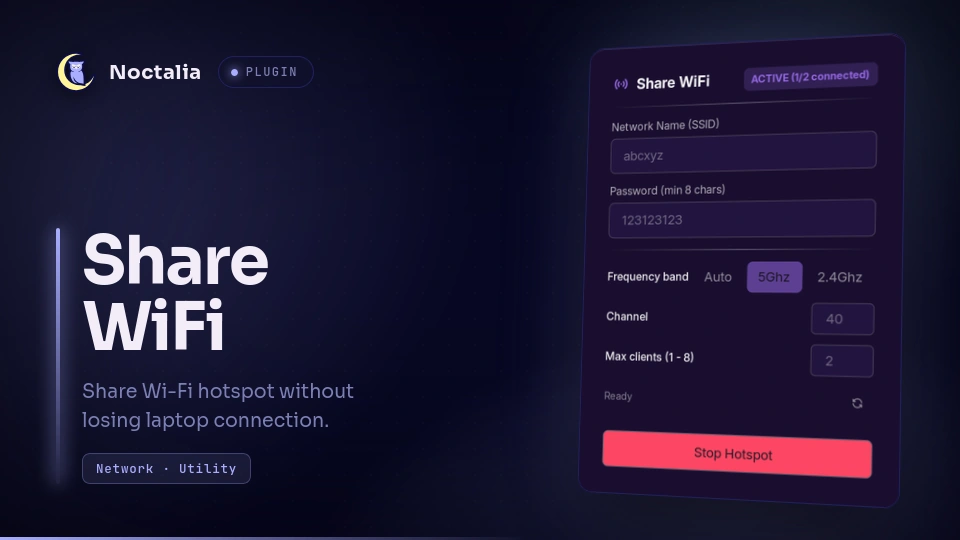
About
Share WiFi
Share a Wi-Fi hotspot from your Linux laptop without dropping your current Wi-Fi connection, featuring auto-detected frequency band & channel, and hardware-enforced client limits.
Plugin
| Field | Value |
|---|---|
| ID | conqazht/share-wifi |
| Entries | Bar widget: widget; panel: panel; shortcut: shortcut |
Requirements
Install create_ap, nmcli, iw, ip, and pkexec on PATH.
- Arch Linux (AUR):
yay -S create_ap iproute2 # or with paru: paru -S create_ap iproute2 - Debian / Ubuntu (install from source —
create_apis not available viaapt):# Install runtime dependencies sudo apt install hostapd dnsmasq iproute2 iw network-manager iptables policykit-1 # Build & install create_ap from source git clone https://github.com/lakinduakash/linux-wifi-hotspot.git cd linux-wifi-hotspot make sudo make install
Authentication & Permissions
Starting and stopping the hotspot requires root privileges to configure virtual wireless interfaces and manage create_ap. The plugin delegates privileged operations through PolicyKit (pkexec) by default, prompting for authentication via your desktop environment's graphical agent only when required.
Settings
| Setting | Type | Default | Description |
|---|---|---|---|
refresh_interval |
int |
3 |
Refresh interval in seconds for checking hotspot status and connected clients. |
Usage
Bar Widget
Add widget to your bar configuration in Noctalia settings.
- Click: Open or close the hotspot configuration panel.
- Right-Click: Turn off the hotspot immediately if active.
- Badge: Displays the active connection count and maximum limit (e.g.
0/2or1/2).
Panel
Open the configuration panel using IPC:
noctalia msg panel-toggle conqazht/share-wifi:panel
Inside the panel:
- SSID & Password: Configure your hotspot network name and WPA2 passphrase (minimum 8 characters).
- Frequency band: Choose
Auto,5Ghz, or2.4Ghz. - Channel: Specify an exact channel number or leave blank for Auto.
- Max clients (1 - 8): Set a connection limit (default
2, maximum8) to prevent laptop Wi-Fi hardware saturation. - Auto-detection & DFS Warning: Automatically detects your current active Wi-Fi channel and frequency band. If a 5GHz DFS radar channel (channels 52–144) is detected, the plugin alerts you to switch to 2.4GHz or non-DFS channels to prevent hostapd driver crashes.
- Mesh Session Locking: During active hotspot sharing, the plugin temporarily locks the active NetworkManager Wi-Fi connection profile to the current BSSID/band. This prevents mesh networks from abruptly disconnecting your laptop via 802.11v Band Steering or AP roaming. When the hotspot stops, original settings are automatically restored.
Shortcut
Add shortcut to your Control Center in Noctalia Settings for quick toggling.
Notes
- Simultaneous Wi-Fi & Hotspot: Uses Linux kernel virtual interface
ap0on top of your physical Wi-Fi interface (wlan0), allowing your laptop to remain connected to the internet while simultaneously sharing it. - Client Limit: Enforced at the 802.11 MAC management frame level via
hostapd(max_num_sta). - Configuration & Persistence: Hotspot credentials and preferences (SSID, passphrase, frequency band, channel, max clients) are persisted in
config.jsoninside the plugin's data directory upon starting the hotspot so they do not need to be re-entered. If no saved configuration exists on initial launch, defaults are pre-populated from/etc/create_ap.confif present on the system. - Credential Storage: The WPA2 passphrase is stored in cleartext in the plugin's data directory (
$XDG_STATE_HOME/noctalia/plugins/data/conqazht/share-wifi/config.jsonor~/.local/state/noctalia/...). If this is a concern, deleteconfig.jsonafter stopping the hotspot.
Versions
| Version | Plugin API | Updated |
|---|---|---|
| v1.1.1 latest | 43 | Oct 25, 2026 |
| v1.1.0 | 3 | Oct 1, 2026 |
Older versions stay installable on a Noctalia release whose plugin API is below the latest version's.