 Noctalia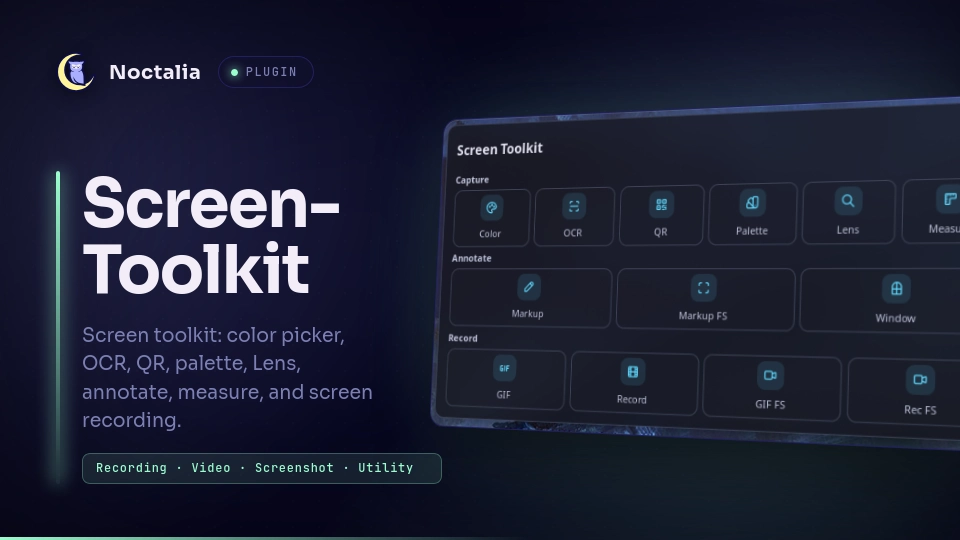
About
Screen Toolkit
A Noctalia v5 plugin for color picking, OCR, QR/barcode scanning, palette extraction, Google Lens search, annotation, pixel measuring, screen recording, and image sharing.
Attribution
Screen Toolkit was originally created for Noctalia v4 by the author(s) of the
legacy screen-toolkit plugin.
This repository is an independent Noctalia v5 remake/port by alexander; it is
not the original implementation.
Plugin
| Field | Value |
|---|---|
| ID | alexander/screen-toolkit |
| Entries | Bar widget: widget; control-center shortcut: toggle; panels: panel (tools, reused by every tool + layout), result (result view, reused by every result), pick (Umbriel window picker); service: service |
Requirements
Install the tools used by the features you want on PATH. Missing tools are
reported when that feature is started. Screenshots, region selection, and
annotation run through the shell's own screenshot stack (no extra binaries);
only pixel processing and recording need external tools.
slurp— region crosshair for region recording; invisible click waiter for Annotate Windowhyprpicker— pixel color pickingtesseract— OCR engine (plus your language packs, e.g.tesseract-data-eng)imagemagick— image processingzbar— QR / barcode scanning (zbarimg)qrencode— QR image for shared links (phone handoff); skipped if missingcurl+jq— image uploads (uguu.se / x02.me) and Google Lensffmpeg+ffprobe— recording / GIF conversion and thumbnail generationstat— recording file sizepkill— stopping active recording backendsxdg-open— opening URLs, recording previews, and shared-link targetspactl— resolve the default audio source for single-source wf-recorder / wl-screenrec recording
Recording requires at least one backend:
gpu-screen-recorder— recommended for fullscreen recording, especially on NVIDIA (NVENC)wl-screenrec— preferred for region recording and microphone audiowf-recorder— fallback recorder for region and fullscreen capture
Optional:
translate-shell(trans) — OCR translationhyprctl— window geometry for Annotate Window snapping (Hyprland)niri— Annotate Window on Niri captures the focused windowumbriel— Annotate Window on Umbriel shows a window picker
Screenshots and annotation use the shell's own screenshot stack
(screenshot-region, screenshot-fullscreen, annotate). On Noctalia
builds with per-call screenshot options, every intermediate capture (OCR,
QR, palette, Lens, measure, and the raw frame behind Markup) is forced into
a plugin-owned temporary file — no clipboard copy, no annotation editor, and
nothing in your screenshots folder — so these tools work even with file
saving disabled in Settings → Screenshot. On older builds the plugin falls
back to the shell's global capture policy (file saving must be enabled) and
moves the file out of the screenshots folder afterwards. Annotate Window
snaps to the clicked window on Hyprland. Umbriel shows a window picker,
Niri captures the focused window, and other compositors fall back to a region.
Usage
Add the Screen Toolkit widget to a bar, and/or the shortcut tile in
Settings → Control Center shortcuts. Left-click either one opens the main panel
(or stops a recording); right-clicking the bar widget quick-picks a color. While
a recording is active, the widget and shortcut show a pulsing red dot.
The main panel has two layouts, selected by the panel-mode setting (default:
Standard) — both render inside the single reused panel entry:
- Standard — a dense grid grouped into tinted sections (380×260).
- Legacy — recreates the Noctalia-v4 layout (same 380×260 entry).
Legacy mode
Legacy mode recreates the original Noctalia v4 screen-toolkit layout:
Note: The features below are exclusive to the Legacy layout.
- Dedicated Markup and Recording subpanels.
- Preview and one-click access to the most recent screenshot or recording.
- Quick microphone and system audio toggles in the
Recordsubpanel.
The widget and shortcut always open the single panel entry; the
panel footnote under Settings → Plugins shows placement/position options.
Toggle the tools panel (single reused entry):
noctalia msg plugin alexander/screen-toolkit:service all toggle
For example, bind it to SUPER+P in Hyprland:
bind = SUPER, P, exec, noctalia msg plugin alexander/screen-toolkit:service all toggle
Open the tools panel (single entry, reused for standard + legacy layouts):
noctalia msg panel-toggle alexander/screen-toolkit:panel
Open the result panel (single entry, reused for every tool output):
noctalia msg panel-toggle alexander/screen-toolkit:result
The Umbriel window picker is normally populated and opened by Markup Window. Its panel IPC command is:
noctalia msg panel-toggle alexander/screen-toolkit:pick
The tools panel contains the capture actions. When a capture tool finishes, a result panel opens with the output and its actions; close it to return to the tools panel.
Region tools (OCR, QR, Palette, Lens, Measure, Markup) use the shell's
interactive region overlay — drag to select a region, then release. Region
recording draws a slurp crosshair instead, to get a geometry for the
external recorder. Recording starts immediately and the bar widget
shows the pulsing dot with elapsed time; open the panel and use its Stop
button to end it. Unless "Skip Save Confirmation" is on, the panel then
offers Save MP4, Save GIF, Copy, and Discard with a GIF size
hint. Closing the card without choosing discards the recording as if it
never happened; Save/Copy is the explicit way to keep it. The preview
thumbnail is deleted on save or discard.
The hide-cursor setting excludes the cursor from recordings (default:
hidden). Screenshots follow the shell's own screenshot cursor setting.
gpu-screen-recorder and wl-screenrec receive their corresponding cursor
options. wf-recorder does not expose a portable cursor flag, so its behavior
depends on the compositor.
- Markup captures the region into a temporary file and opens it in the shell's annotation editor; Copy and Save deliver the annotated PNG per the shell's screenshot policy, so only what you explicitly keep leaves a file behind. Enable Keep Raw Markup Captures to also save the un-annotated capture to your screenshots folder (the v2.0 behavior). This setting applies to region and fullscreen captures. Markup FS captures the focused monitor. Markup Window snaps to the clicked window (Hyprland), shows a window picker (Umbriel), or captures the focused window (Niri). Other compositors fall back to a region. The uncropped monitor frame used for window crops is always temporary and never kept.
- Measure reports the region's pixel size and copies it to the clipboard.
- OCR extracts text and copies it to the clipboard. The result includes the capture preview and an editable multiline text area, so you can correct, trim, or extend the OCR output, plus a single tool row (retry with PSM 3/6/7/11 + language on the left, translate on the right) that re-runs on the same pixels without recapturing. Detected URLs can be opened directly and detected email addresses can open a mail composer.
- QR decodes a code and copies the text to the clipboard.
- Palette copies the extracted hex colors (one per line) to the clipboard.
- Share uploads the current capture and opens a share card: QR code for phone handoff, expiry countdown, and upload history (uguu.se by default, or up.x02.me with an API key).
Results are delivered to the clipboard with a notification — the panel itself
only holds the tools. Results persist across restarts in the plugin's data
directory. Intermediate captures (text-only tools and markup raws) go
straight to a temporary file, so nothing is left in your screenshots folder;
with Keep Raw Markup Captures on, markup raws are saved there. Window
crops and recording thumbnails live in /tmp.
Settings
All settings live in Settings → Plugins (gear on the plugin's row).
| Setting | Type | Default | Description |
|---|---|---|---|
video-path |
folder |
~/Videos |
Where recordings are saved. |
filename-format |
string |
%Y-%m-%d_%H-%M-%S |
Filename template; the extension is added automatically. |
selected-ocr-lang |
string |
eng |
Tesseract language code; combine with + (e.g. eng+fra). |
x02-api-key |
string |
(empty) | up.x02.me key for longer-lived, larger uploads. |
x02-expiry |
select |
7d |
Link lifetime when an x02 key is set: 1h, 1d, 7d, 30d, or permanent. |
share-skip-popover |
bool |
false |
Compatibility setting retained from v4. The v5 result panel copies share links directly. |
annotate-keep-raw |
bool |
false |
Save the un-annotated capture to the screenshots folder before the annotation editor opens. Off by default: the raw stays in a temporary file and only the editor's Copy / Save output is kept. |
record-audio-out |
bool |
false |
Record the desktop's audio output. |
record-audio-in |
bool |
false |
Record the default microphone. |
hide-cursor |
bool |
true |
Exclude the cursor from recordings. Screenshots follow the shell's screenshot cursor setting. |
record-codec |
select |
h264 |
Codec for gpu-screen-recorder fullscreen capture: h264, hevc, or av1. h264 is the safest NVIDIA NVENC default; av1 needs a recent GPU. |
record-fps |
int |
60 |
Frame rate for gpu-screen-recorder fullscreen capture (15–240). |
record-skip-confirmation |
bool |
false |
Save automatically when a recording ends, skipping the save dialog. |
record-copy-to-clipboard |
bool |
false |
Finalize to MP4 and copy the file URI when recording ends. |
gif-max-seconds |
int |
30 |
Cap for GIF recordings (1–600 s). |
panel-mode |
select |
standard |
Main panel layout: standard (dense grid, 380×260) or legacy (4×2 legacy grid, 380×260). |
IPC
The service is a singleton with no output, so the IPC target is all:
noctalia msg plugin alexander/screen-toolkit:service all toggle
noctalia msg plugin alexander/screen-toolkit:service all colorPicker
noctalia msg plugin alexander/screen-toolkit:service all ocr
noctalia msg plugin alexander/screen-toolkit:service all qr
noctalia msg plugin alexander/screen-toolkit:service all palette
noctalia msg plugin alexander/screen-toolkit:service all lens
noctalia msg plugin alexander/screen-toolkit:service all measure
noctalia msg plugin alexander/screen-toolkit:service all annotate
noctalia msg plugin alexander/screen-toolkit:service all annotateFullscreen
noctalia msg plugin alexander/screen-toolkit:service all annotateWindow
noctalia msg plugin alexander/screen-toolkit:service all record
noctalia msg plugin alexander/screen-toolkit:service all recordMp4
noctalia msg plugin alexander/screen-toolkit:service all recordFullscreen
noctalia msg plugin alexander/screen-toolkit:service all recordFullscreenMp4
noctalia msg plugin alexander/screen-toolkit:service all recordStop
noctalia msg plugin alexander/screen-toolkit:service all recordSave
noctalia msg plugin alexander/screen-toolkit:service all recordDiscard
noctalia msg plugin alexander/screen-toolkit:service all ocrRetry
noctalia msg plugin alexander/screen-toolkit:service all clearResult
noctalia msg plugin alexander/screen-toolkit:service all clearHistory
noctalia msg plugin alexander/screen-toolkit:service all clearShareHistory
toggle opens the single reused tools panel. The bar widget and
control-center shortcut use the same logic.
Commands that take a payload:
# Translate the current OCR text into a language (language code payload)
noctalia msg plugin alexander/screen-toolkit:service all ocrTranslate en
# Share a file on disk (absolute path payload)
noctalia msg plugin alexander/screen-toolkit:service all share /path/to/image.png
# Save the finished recording (payload format: "gif" or "mp4")
noctalia msg plugin alexander/screen-toolkit:service all recordSave mp4
Summary of every service command:
| Command | Payload | Action |
|---|---|---|
toggle |
— | Open/close the single reused tools panel |
colorPicker |
— | Pick a color from the screen (hyprpicker magnifier) |
ocr |
— | Extract text from a region |
qr |
— | Decode a QR / barcode from a region |
palette |
— | Extract hex colors from a region |
lens |
— | Google Lens search on a region |
measure |
— | Report a region's pixel size |
annotate |
— | Open a region in the annotation editor |
annotateFullscreen |
— | Annotate the full screen |
annotateWindow |
— | Hover-aim and capture a window (Hyprland) / focused window (Niri) |
record |
— | Record a region as GIF |
recordMp4 |
— | Record a region as MP4 |
recordFullscreen |
— | Record the full screen as GIF |
recordFullscreenMp4 |
— | Record the full screen as MP4 |
recordStop |
— | Stop the active recording |
recordSave |
"gif" / "mp4" |
Save the finished recording |
recordDiscard |
— | Discard the finished recording |
ocrTranslate |
language code | Translate OCR text |
ocrRetry |
{psm, lang} |
Re-run OCR on the same capture with a forced PSM (3/4/6/7/11) and/or language |
share |
file path | Upload a file, copy the link, open the share card (QR + history) |
clearResult |
— | Clear the current result panel state |
clearHistory |
— | Clear the color history |
clearShareHistory |
— | Clear the upload history |
Notes
- One tools panel, one result panel. Panel size is host-owned: the host
sizes each
[[panel]]entry from itswidth/height, and there is no runtime resize. So both layouts (standard + legacy, plus the annotate/record subviews) render inside the single reusedpanelentry (380×260); thepanel-modesetting only switches the layout inside it. Every tool result reuses the singleresultentry. An already-open panel keeps its current size until closed. - This is a port of the legacy v4 screen-toolkit plugin. Tools that relied on freeform v4 QML overlays are adapted: region selection and annotation go through the shell's screenshot stack, window snapping clicks straight to the window under the cursor (Hyprland), and measure reports region dimensions instead of drawing a line overlay. Pin (floating screen overlays) and Webcam Mirror could not be ported — the v5 plugin UI has no canvas or always-on-top surfaces — so they are not included.
- Recording auto-detects its backend: fullscreen uses
gpu-screen-recorderwhen installed (NVENC hardware encoding — the best option on NVIDIA GPUs, where wl-screenrec's VAAPI path is unreliable), falling back towl-screenrecthenwf-recorder. Region capture useswl-screenrecthenwf-recorder, becausegpu-screen-recordercannot record an arbitrary sub-region. Microphone audio is only supported bywl-screenrec; withwf-recorderonly a single audio source (system or microphone) is available, and gpu-screen-recorder's audio follows its own source selection. - Region coordinates are captured in physical pixels;
recordFullscreenmultiplies the focused output's logical geometry by its scale. - Intermediate captures (OCR, QR, palette, Lens, measure, markup raws, and
the monitor frame behind Markup Window) never touch your screenshots
folder on Noctalia builds with per-call screenshot options: they are
forced into a temporary directory under
$TMPDIR(stale captures older than a day are pruned automatically). On older builds the plugin falls back to the shell's global capture policy — file saving must be enabled there — and moves the picked-up file to a temporary one immediately after. Your ownscreenshot-region/screenshot-fullscreenkeybinds are never affected. - Per-call intermediate captures disable region confirmation so its Copy
action cannot replace the required file output with a clipboard image.
Region captures use Noctalia's
-regionfilename suffix. Keep Raw resolves the merged shell configuration and uses the XDG Pictures directory when the screenshot directory is empty. - The current screenshot IPC acknowledges launch, without reporting when selection finishes or is cancelled. Region selection must complete within the capture script's roughly ten-second file-pickup window (five seconds on the legacy path). Cancelling can therefore show the no-file hint after that window; reliable cancellation handling needs host IPC support.
- Files are written to your configured screenshot/video directories and the
plugin's persistent data directory (state, color history). Captures in
/tmpare transient. - Network calls: Google Lens upload (uguu.se), share uploads (uguu.se or
up.x02.me), and
xdg-openfor search/URL results.
Development checks
Run python3 -m unittest discover -s screen-toolkit/tests -v from the
repository root. These regression tests run the real capture script and
ImageMagick against simulated Noctalia IPC, covering filename suffixes,
annotation handoff, output routing, directory resolution, and legacy fallback.
They do not replace a live capture and annotation test on a Noctalia build
with per-call screenshot options.
License
This remake is released under the MIT license. It is an independent v5 port of the original legacy plugin; see Attribution for the original project and source.
Versions
| Version | Plugin API | Updated |
|---|---|---|
| v2.1.0 latest | 43 | Oct 26, 2026 |
| v2.0.0 | 42 | Oct 25, 2026 |
| v1.5.4 | 13 | Oct 23, 2026 |
| v1.1.0 | 9 | Aug 3, 2026 |
Older versions stay installable on a Noctalia release whose plugin API is below the latest version's.