
About
Screen Capture
Record the screen, a single window or a region, with desktop and microphone audio and a webcam overlay, from a Noctalia bar or the Control Center.
Plugin
| Field | Value |
|---|---|
| ID | amaurisd97/screen-capture |
| Entries | Bar widget: widget; Control Center shortcut: toggle; panel: menu; service: service |
| Tags | recording, video, utility |
Requirements
Install these commands on PATH. Every one is declared in plugin.toml:
gpu-screen-recorder— the recorder.slurp— interactive region and window picker.jq— parses thehyprctlJSON.hyprctl— resolves monitors and windows and drives the webcam overlay.hyprpicker— freezes the screen while you drag the region.ffmpeg— trims the opening frame and normalizes audio.ffprobe— inspects audio streams during normalization.flock— serializes start and stop.
For the webcam overlay: mpv (renders the camera) and v4l2-ctl (picks a
capture resolution the device actually offers).
This is a Wayland plugin tested on Hyprland. Region and monitor capture go straight to the compositor; the XDG desktop portal is not used (see Notes).
Usage
Left click the bar widget (widget) or the Control Center shortcut (toggle)
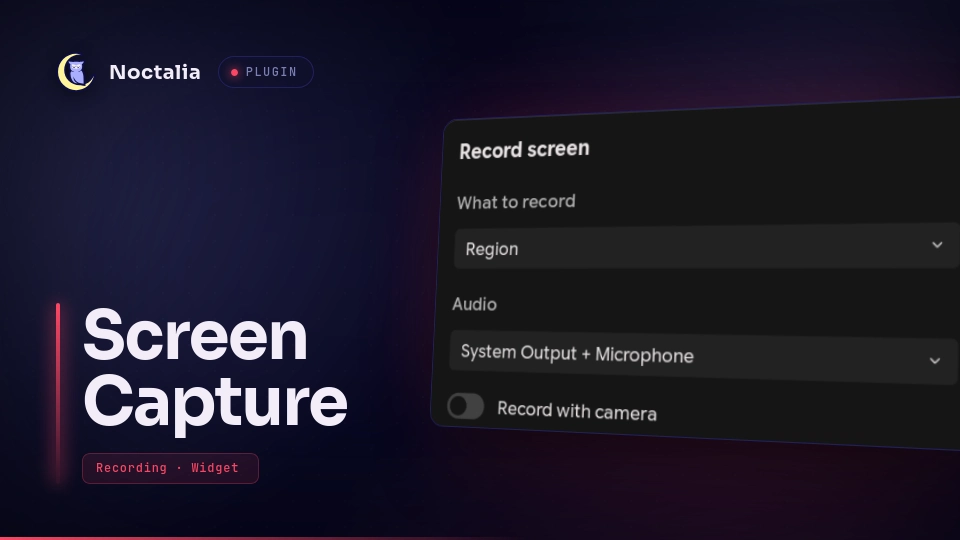
to open the menu panel. It asks before every recording:
- What to record — Region, Application (window), or Full screen.
- Audio — None, Desktop, Microphone, or Desktop + microphone.
- Record with camera — a toggle, shown only when a camera is present.
Record closes the panel (so nothing of the menu is captured), runs the picker for region and window targets, and starts the capture. Right click skips the panel and records again with the last choice, or stops an active recording.
Add the widget from Settings → Bar and the shortcut from Settings → Control Center → Home (the home grid holds six shortcuts, so you may need to make room).
The panel is a normal Noctalia surface and can also be opened with:
noctalia msg panel-toggle amaurisd97/screen-capture:menu
Capture targets
| Mode | Result |
|---|---|
| Region | Freeform selection; a full monitor snaps to a native monitor capture |
| Application | Click a window to record exactly its rectangle |
| Full screen | The focused monitor, no interaction |
Keyboard while the picker is open (bind these to compositor shortcuts):
scripts/pick-region.sh --take-fullscreen        # take the focused monitor
scripts/pick-region.sh --take-window            # take the rectangle under the cursor
Both helpers stop only the picker this plugin started, so another slurp
selection on the system is left alone.
Without opening a picker, cycle to a window and print its rectangle:
scripts/pick-region.sh window next # also prev|left|right|up|down
window starts from the window under the cursor and prints the target
rectangle; it does not move a selection that is already open.
Webcam
The camera is a floating mpv window cropped to a 8:9 portrait bubble, sized
from the region being recorded and anchored to its bottom-right corner. Because
the recorder captures the screen, the camera is baked into a single encode: one
encoder pass, no compositing.
float, pin, resize and move are dispatched at runtime, so the plugin needs
no Hyprland window rules of its own.
Settings
| Setting | Type | Default | Description |
|---|---|---|---|
directory |
folder |
~/Videos/Recordings |
Where recordings are saved. |
filename_pattern |
string |
capture_%Y-%m-%d_%H-%M-%S |
strftime pattern for the file name; .mp4 is appended. |
audio_source |
select |
both |
Seeds the menu's audio choice: none, desktop, microphone or both. |
frame_rate |
int |
60 |
Target frames per second (1–240). |
framerate_mode |
select |
cfr |
cfr keeps a constant rate for editors; vfr stores frames only when the screen changes. |
quality |
select |
high |
Named gpu-screen-recorder preset: medium, high, very_high or ultra. |
show_cursor |
bool |
true |
Include the mouse cursor in the recording. |
normalize_audio |
bool |
true |
Trim the first frame, mute the first 400ms, add a fade and normalize to −14 LUFS. |
webcam_size |
select |
medium |
Webcam frame size, scaled from the region being recorded: small, medium or large. |
webcam_device |
string |
empty | Empty uses the first available camera, for example /dev/video0. |
hide_inactive |
bool |
false |
Hide the bar widget while nothing is recording. |
copy_to_clipboard |
bool |
false |
Copy the file:// path when a recording completes. |
Audio and webcam are chosen per run in the menu; audio_source and
webcam_size only seed the menu's defaults.
IPC
The service answers external IPC:
noctalia msg plugin amaurisd97/screen-capture:service all toggle
noctalia msg plugin amaurisd97/screen-capture:service all start
noctalia msg plugin amaurisd97/screen-capture:service all start region
noctalia msg plugin amaurisd97/screen-capture:service all start window
noctalia msg plugin amaurisd97/screen-capture:service all start fullscreen
noctalia msg plugin amaurisd97/screen-capture:service all record-last
noctalia msg plugin amaurisd97/screen-capture:service all record-fullscreen
noctalia msg plugin amaurisd97/screen-capture:service all stop
start <source> overrides the capture source for that run; any other value uses
the last choice. record-last and toggle start with the last choice, or stop
when something is already running.
Notes
The capture logic lives in scripts/ and talks through files in a runtime
directory. The Luau entries orchestrate it: menu.luau is the panel,
service.luau owns the run and drives the picker, and the widget and shortcut
are thin clients that only mirror state.
| Script | Role |
|---|---|
pick-region.sh |
Prints the capture target: monitor:NAME or X,Y WxH |
record.sh |
start / stop / status, serialized on its own lock |
run-detached.sh |
Runs a picker or a stop with no deadline and records its result |
webcam-list.sh |
Lists /dev/video* nodes that can actually capture |
webcam-resize.sh |
Sizes and places the webcam overlay |
Files and processes
- Writes recordings to
directory(default~/Videos/Recordings). - Writes run state, the log and detached-job results next to
$XDG_RUNTIME_DIR/screen-capture(overridable withSCREEN_CAPTURE_RUNTIME_DIR), including the picker and slurp PIDs thatpick-region.sh --canceluses to dismiss only this plugin's selection. - Spawns
gpu-screen-recorder,slurp,hyprctl,hyprpicker,jq,ffmpeg,ffprobeandflock; with the webcam,mpvandv4l2-ctl. - Makes no network calls.
Why not the portal
gpu-screen-recorder -w portal cannot pick a window on Wayland: -w window
and -w focused are X11-only, and the portal is the only Wayland path to a
window target. It also does not work on the machines this was tested on — the
dmabuf modifiers the compositor offers fail EGL import and PipeWire ends with
alloc buffers: Invalid argument. This plugin does not use the portal at all.
Audio
The intermediate audio codec is Opus, not AAC: gsr 6.1.x's AAC path hands the
mp4 muxer two frames with the same dts (Application provided invalid, non monotonically increasing dts to muxer in stream 1) and then fails to write
frame index 1. The affected frames fall inside the 400ms that finalize mutes, so
the glitch is inaudible, but the error is real and Opus shows no such warning.
On stop the file is finalized: the first frame is trimmed, the first 400ms muted
(PipeWire's capture open pops there), a 50ms fade added, and loudness normalized
to −14 LUFS. The audio is re-encoded to AAC there (ffmpeg's default for mp4), so
normalize_audio = false still skips the trim, mute, fade and loudness pass but
keeps AAC output.
Codecs
On the tested machine only H.264 and HEVC encode in hardware; VP9 is
decode-only and there is no AV1 hardware at all. -fallback-cpu-encoding yes
keeps an unsupported codec from failing the recording, and the quality setting
is a named preset because gpu-screen-recorder's -q rejects a number outside
CBR mode.
Known limitations
- The capture target is frozen at selection time; moving the window afterwards does not move the recorded rectangle.
no_dimis only available as a Hyprland window rule, so the webcam overlay may dim while it is unfocused. Dimming is cosmetic.- Region coordinates are the compositor's logical space, matching
slurp. - A reload or disable stops an active recording and dismisses an open picker.
Testing the scripts without the plugin
Set SCREEN_CAPTURE_RUNTIME_DIR so nothing lands in the real runtime directory.
Do not override XDG_RUNTIME_DIR for this: hyprctl derives its socket
path from it and loses the compositor connection.
export SCREEN_CAPTURE_RUNTIME_DIR=/tmp/sc-test
./scripts/record.sh start --target=monitor:eDP-1 --directory=/tmp/sc-test/out
./scripts/record.sh status
./scripts/record.sh stop
Versions
| Version | Plugin API | Updated |
|---|---|---|
| v0.1.0 latest | 24 | Oct 21, 2026 |
Older versions stay installable on a Noctalia release whose plugin API is below the latest version's.