 Noctalia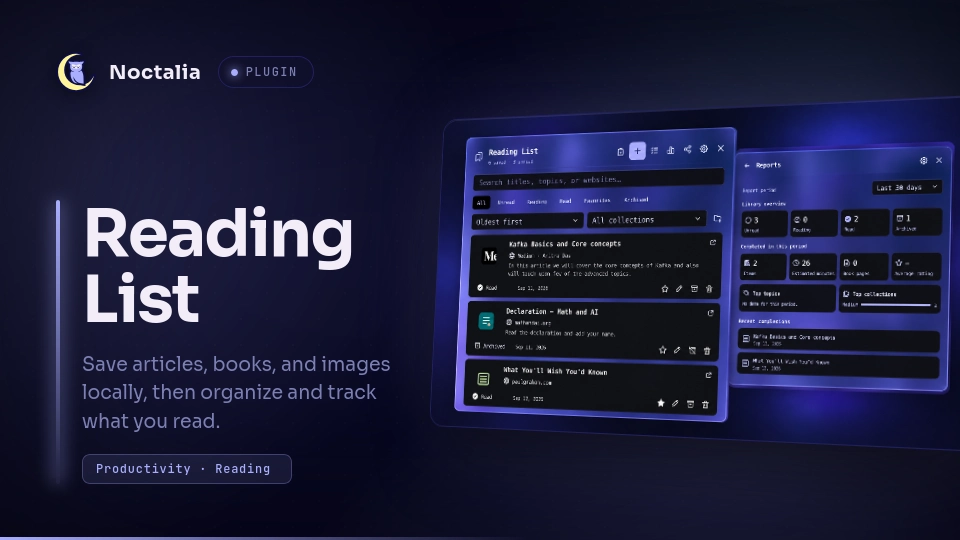
About
Reading List
Save articles, books, and images from the Noctalia bar, then organize and track them without sending your library to a third-party service. Reading List stores each item locally as an Obsidian-friendly Markdown note.
Plugin
| Field | Value |
|---|---|
| ID | ahmedhossamdev/reading-list |
| Entries | Bar widget: bar; panel: panel; service: service |
Requirements
- Noctalia Shell v5 with plugin API 26 or newer.
xdg-openonPATHto open saved links and Markdown notes.python3onPATHfor the image and import file pickers.- PyGObject (
gi) and an activexdg-desktop-portalfile chooser backend for the desktop file picker.
Usage
- Enable Reading List in Settings → Plugins.
- Add its
barwidget to a bar section. - Click the bookmarks icon to open the panel.
- Copy a web URL and press the clipboard button to save it immediately, or press + to add an article, book, or image manually.
Open or close the panel directly:
noctalia msg panel-toggle ahmedhossamdev/reading-list:panel
Add and edit items
- URLs can fetch their title, website, author, description, favicon, and preview automatically. YouTube and Vimeo use their lightweight oEmbed metadata; other pages fall back through Open Graph, Twitter Card, JSON-LD, standard meta, itemprop, and the visible HTML title or heading. When no field declares a preview image, the first content image is used, and a page that cannot be fetched still gets a readable title and its domain instead of staying empty.
- Use More details in the editor to add a cover, reading progress, book pages, estimated reading time, rating, review, or private notes.
- Covers and image entries can be selected with the desktop file picker. If the attached panel closes while the picker is open, the draft is preserved and the editor reopens after a file is selected.
- Click an item's title to open its website. Use the edit button to change its details or open the corresponding Markdown note.
Organize and track reading
- The status button cycles through Unread → Reading → Read → Unread. Archiving is handled separately by the archive button.
- Search titles, topics, authors, descriptions, and websites, or filter by status, favorites, and collection.
- Create reusable collections from the library or editor, then select them from a list instead of entering collection names manually.
- Sort by newest, oldest, title, rating, progress, or queue order. In Queue order, use the arrow buttons to move items up or down.
- Select multiple items to change their status, add them to a collection, or delete them together.
Reports, sharing, and backups
- Reports show library status, completed items, estimated reading time, book pages, average rating, top topics and collections, and recent completions. Reports can cover the last 7 days, last 30 days, or all time.
- Share the current filter or selected items by copying Markdown or exporting Markdown, HTML, or JSON. Private notes are excluded unless explicitly included.
- Import a Reading List JSON export, an exported Markdown list, an HTML bookmarks file, or a plain-text URL list.
Settings
| Setting | Type | Default | Description |
|---|---|---|---|
save_path |
string |
~/Documents/Reading List |
Folder containing the Markdown library, collections, exports, and cached images. It can point inside an Obsidian vault. |
show_unread_count |
bool |
true |
Shows the number of unread items beside the bar icon. |
fetch_metadata |
bool |
true |
Fetches website details automatically after a URL is added. |
download_previews |
bool |
true |
Caches Open Graph preview images locally. Favicons are still cached when metadata fetching is enabled. |
sync_external_changes |
bool |
true |
Reloads the library every 30 seconds so external Markdown edits appear in Noctalia. |
Notes
The default library layout is:
Reading List/
├── Collections.md
├── Exports/
├── Items/
│   └── 17890600000001234.md
└── .assets/
    ├── 17890600000001234-favicon.ico
    └── 17890600000001234-cover.webp
Every item is a standalone Markdown note with YAML frontmatter. Notes written below the frontmatter remain editable from both Noctalia and Obsidian.
Adding or refreshing a URL makes a direct request to that website. The plugin does not use a third-party favicon service.
Downloaded favicons and previews are stored in
.assets. A manually selected image outside the library is referenced but never modified or deleted.The plugin writes only inside the configured library folder, apart from files the user explicitly selects. It runs
xdg-openonly when the user chooses to open a saved HTTP(S) link or Markdown note.Reports use each item's saved
finished_attimestamp. Older read items that do not have this timestamp appear in the library totals but not in historical completion reports.Duplicate URLs are rejected, and common tracking parameters such as
utm_*,fbclid, andgclidare removed before saving.Run
./reading-list/tests/run.shfrom the repository root to check Markdown persistence, queue ordering, import/export, collection deletion, report UI, and other panel interactions without touching the real reading-list folder.
Versions
| Version | Plugin API | Updated |
|---|---|---|
| v1.1.1 latest | 43 | Oct 25, 2026 |
| v1.1.0 | 26 | Oct 17, 2026 |
Older versions stay installable on a Noctalia release whose plugin API is below the latest version's.