
About
Quill
Markdown notes and todos in the Noctalia bar, with AI capture, summaries,
rewriting and Q&A over your own files. Todos are plain - [ ] checkboxes, so
the same notes work in any editor, in git, and with tools like Obsidian or
Logseq.
Plugin
| Field | Value |
|---|---|
| ID | fel/quill |
| Entries | Bar widget: status; panel: panel; service: index; shortcut: toggle; launcher provider: capture; desktop widget: tile |
| Launcher Prefix | /nt |
Requirements
Notes and todos work with no dependencies. The optional extras are:
git— only for Git history (off by default). Enabling it runsgit initin the notes folder if it is not already a repository, then commits after changes. It never pushes.opencode— only for the opencode CLI AI provider. Every other provider talks HTTP directly and needs no binary.- An API key for whichever AI provider you pick, unless you use the opencode CLI or a local Ollama. See AI providers.
Usage
Add the bar widget to your bar in Settings → Bar (widget fel/quill:status).
Widget gestures:
| Gesture | Action |
|---|---|
| Left click | Toggle the panel |
| Right click | Capture the clipboard (one line → todo, multi-line → note) |
| Middle click | Open the inbox in $EDITOR |
| Scroll | Cycle through open todos in the bar for 15s, then back to the count |
Toggle the panel from anywhere:
noctalia msg panel-toggle fel/quill:panel
Panel
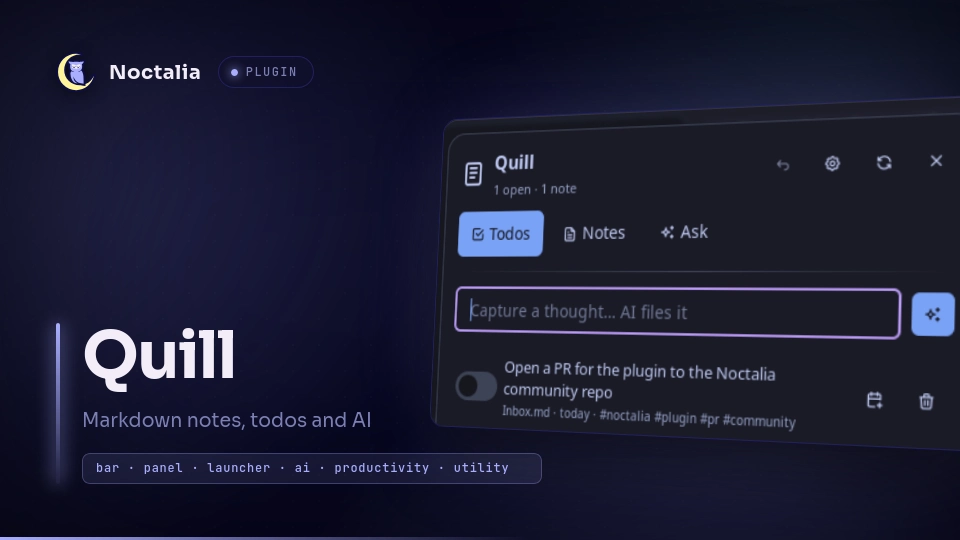
- Todos — capture box, open/overdue counts, per-todo check, due-date
cycling, delete (click twice), and a click-through to the note a todo lives
in.
Clear donemoves completed todos into the archive file. - Notes — search (titles and contents), create, open, edit inline, copy,
open in
$EDITOR, delete, and a Today button for the daily note. In a note you also get Summarize, Extract todos, AI edit (type an instruction likeimproveorfix grammarand review the rewrite before saving), and clickable[[wikilink]]targets. - Ask — ask a question over your notes and open todos, plus Plan my day and Weekly review one-click prompts. Answers cite the note titles used.
The Ask box also takes slash commands — type /help for the list: /clear,
/plan, /review, /todo <text>, /note <title>, /daily,
/save [title], /copy, /undo.
Every change is undoable from the panel header (one step, whole operation).
Capture with AI
With AI capture on, typing a sentence in the capture box sends it to the
model, which returns a cleaned-up todo (with due date, tags and priority) or a
note. Example: buy milk tomorrow → - [ ] Buy milk 📅 2026-09-23 #groceries.
Turn it off to append the raw text as a todo.
Launcher
Type /nt followed by a query. Results include matching todos (activating one
completes it) and notes (activating one opens it), plus fallbacks to add a todo,
create a note, or ask AI. Prefixes inside the query: + or todo to force a
todo, # or note to force a note, ? to ask AI. Example:
/nt dentist
/nt + call the dentist tomorrow
Desktop widget
Place fel/quill:tile from Noctalia's desktop-widget editor. It lists the next
open todos and opens the panel when clicked.
Shortcut
Add fel/quill:toggle from Settings → Control Center → Shortcuts. It shows
the open count and lights up when something is due or overdue.
Daily notes, recurrence, reminders
- Today creates
Daily/YYYY-MM-DD.mdfrom a small template and opens it. - A todo with
@daily,@weeklyor@monthlyis rescheduled automatically when you tick it, in the same file. - When something becomes due or overdue, the service sends one notification (re-armed daily, and at most every 30 minutes).
Data layout
Everything lives in a normal folder of Markdown files (default ~/notes):
~/notes/
  Inbox.md          # quick captures land here
  project-ideas.md
  Daily/2026-09-22.md
  subfolder/...
A note is one .md file; the first # heading is its title and optional
YAML frontmatter can set title and tags. A todo is any - [ ] or * [x]
line anywhere in the folder; ticking a box rewrites that line in place. Inline
metadata is parsed and hidden in the UI: 📅 2026-09-23 (also due: or @),
@daily/@weekly/@monthly, #tags, and !!/#urgent or !p1/#important.
Nothing is stored in a database.
AI providers
Pick one under AI provider. Everything except the CLI uses the provider's
HTTP API directly; the key is resolved from the API key setting, then the
API key environment variable setting, then the provider's usual environment
variable, then (OpenCode Go only) opencode's own auth.json.
| Provider | Endpoint | Key from |
|---|---|---|
| OpenCode Go | opencode.ai/zen/go/v1 |
OPENCODE_API_KEY, OPENCODE_GO_API_KEY, OPENCODE_ZEN_API_KEY, or ~/.local/share/opencode/auth.json |
| opencode CLI | — | the CLI's own configuration |
| OpenAI | api.openai.com/v1 |
OPENAI_API_KEY |
| Anthropic | api.anthropic.com |
ANTHROPIC_API_KEY |
| Google Gemini | generativelanguage.googleapis.com |
GEMINI_API_KEY / GOOGLE_API_KEY |
| OpenRouter | openrouter.ai/api/v1 |
OPENROUTER_API_KEY |
| Groq | api.groq.com/openai/v1 |
GROQ_API_KEY |
| Ollama (local) | localhost:11434/v1 |
none |
| OpenAI-compatible | your API base URL | OPENAI_API_KEY or API key env |
Model ids are free text; set the provider's own model (for example
gpt-4o-mini, claude-sonnet-4-5, gemini-2.0-flash, llama3.2). OpenCode Go
defaults to deepseek-v4-flash.
Settings
| Setting | Type | Default | Description |
|---|---|---|---|
notes_dir |
folder |
~/notes |
Folder scanned for .md files; created if missing. |
inbox_file |
string |
Inbox.md |
File inside the notes folder that quick captures are appended to. |
poll_interval_ms |
int |
5000 |
How often the folder is checked for changes, in milliseconds. |
scan_depth |
int |
3 |
How many levels of subfolders to scan. |
ai_backend |
select |
opencode-go |
Provider: opencode-go, opencode-cli, openai, anthropic, google, openrouter, groq, ollama, openai-compatible, off. |
ai_model |
string |
deepseek-v4-flash |
Model id for the selected provider. |
ai_base_url |
string |
(empty) | Provider API base URL override; required for a custom OpenAI-compatible endpoint. |
api_key |
string |
(empty) | Explicit API key. Stored in plain text in Noctalia's settings file. |
api_key_env |
string |
(empty) | Environment variable to read the key from, e.g. OPENAI_API_KEY. |
ai_max_tokens |
int |
0 |
Max tokens per reply; 0 uses the provider default. |
ai_capture |
bool |
true |
Let the model turn a captured sentence into a todo or note. |
max_context_notes |
int |
4 |
How many notes are sent along with a question. |
daily_dir |
string |
Daily |
Subfolder where the Today button creates YYYY-MM-DD notes. |
archive_file |
string |
Archive.md |
Completed todos are moved here by Clear done; hidden from the index. |
due_reminders |
bool |
true |
Notify once when a todo becomes due or overdue. |
git_history |
bool |
false |
Commit the notes folder after changes (runs git init if needed). |
git_debounce_ms |
int |
8000 |
How long to wait after the last change before committing. |
desktop_items |
int |
6 |
How many open todos the desktop widget shows. |
show_label |
bool |
true |
Widget: show the open count. |
hide_when_empty |
bool |
false |
Widget: hide with no todos and no notes. |
icon_color |
color |
primary |
Widget: icon color; turns red when something is overdue. |
IPC
noctalia msg plugin fel/quill:index all refresh
noctalia msg plugin fel/quill:index all capture '{"text":"book a haircut friday"}'
noctalia msg plugin fel/quill:index all commit
noctalia msg plugin fel/quill:panel all ask     '{"text":"what is due this week?"}'
noctalia msg plugin fel/quill:panel all open    '{"path":"Inbox.md"}'
noctalia msg plugin fel/quill:panel all rewrite '{"path":"Inbox.md","text":"shorten"}'
noctalia msg plugin fel/quill:panel all daily
noctalia msg plugin fel/quill:panel all clear_done
noctalia msg plugin fel/quill:panel all plan
noctalia msg plugin fel/quill:panel all review
noctalia msg plugin fel/quill:panel all undo
The panel entry only has a runtime while the panel is open, so panel events
should follow a panel-open/panel-toggle. capture uses AI structuring when
AI capture is on. open, rewrite and clear_done accept paths relative
to the notes folder only.
Notes
- Network: the only requests are to the AI provider you selected, and only when you use an AI feature. For questions, the open todos and up to Notes in AI context notes chosen for that request are sent as context; nothing else leaves the machine. There is no telemetry.
- Keys: the API key setting is stored in plain text in Noctalia's
settings.toml, so an environment variable is preferable. The key is only ever sent in the provider's own auth header. If no key setting or environment variable is set, the OpenCode Go provider reads the key from opencode'sauth.json; set a key or switch provider to avoid that read. - Files written: only inside the notes folder (notes, the inbox, the daily
folder, the archive) and the plugin's own data folder (an AI session id and
reminder state). Every read and write is resolved through a containment check
that rejects absolute paths,
~and.., so a note path cannot escape the notes folder. - Processes spawned:
git(only with Git history) and theopencodeCLI (only with that provider) run with argument arrays, never a shell string. The only shell command is opening$EDITORin a terminal, with the path shell-quoted. - AI output is sanitised before it is written into notes: due dates must
match
YYYY-MM-DD, tags[A-Za-z0-9_-/], recurrence is a fixed set, and titles have whitespace collapsed, so a model cannot inject extra lines or frontmatter. - Debugging: logs go to
~/.cache/noctalia/noctalia.log; parse failures are logged with the file that failed.
Development
ln -s ~/dev/quill ~/.local/share/noctalia/plugins/quill
noctalia plugins lint ~/dev/quill
tail -f ~/.cache/noctalia/noctalia.log | grep -iE "plugin|luau"
plugin.toml changes need a config reload; adding or removing an entry needs a
Noctalia restart. .luau edits hot-reload.
License
MIT
Versions
| Version | Plugin API | Updated |
|---|---|---|
| v1.0.0 latest | 24 | Sep 23, 2026 |
Older versions stay installable on a Noctalia release whose plugin API is below the latest version's.