 Noctalia
About
QuickAsk
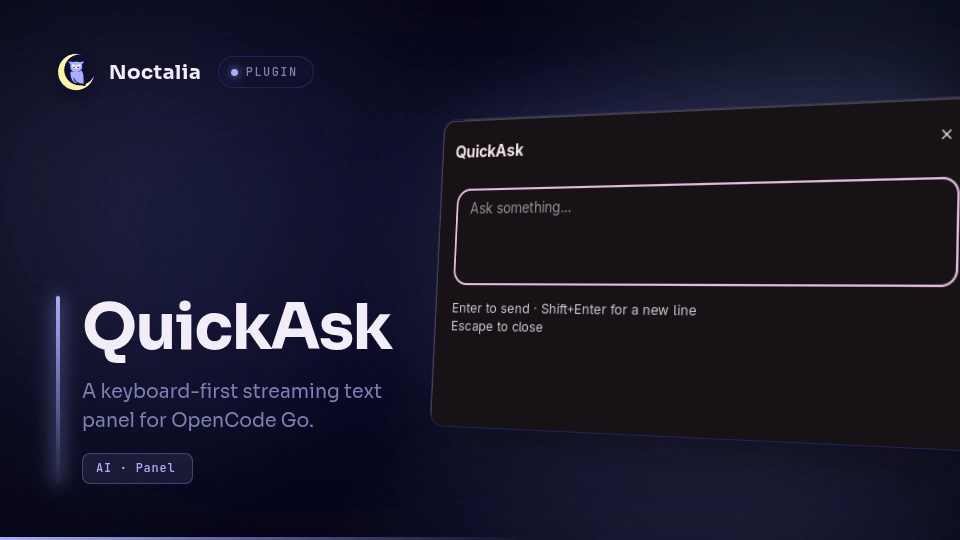
A keyboard-first Noctalia popup for streaming text answers from OpenCode Go or an OpenAI-compatible API.
Plugin
Plugin ID: yusuferdemyamali/quickask. Floating panel entry: panel.
A minimal, keyboard-first text popup for Noctalia v5. Ask a question, read a streaming Markdown answer, and optionally ask a follow-up in the same conversation before closing. QuickAsk supports OpenCode Go and explicitly configured OpenAI-compatible Chat Completions APIs.
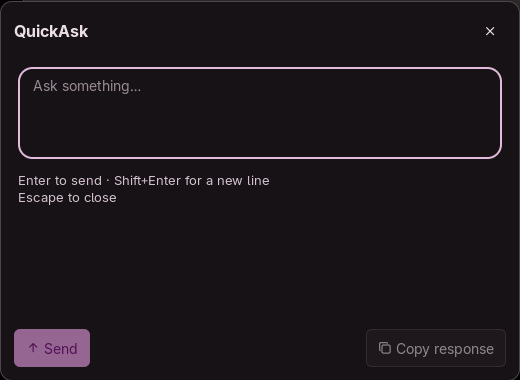
The panel opens at the bottom center (520 × 380), follows your Noctalia theme, and focuses the input. It has no saved conversation history, uploads, audio, agents or background service.
Requirements
- Noctalia Plugin API 24 or newer, with a working Wayland desktop.
secret-tool(Arch/CachyOS package:libsecret) and an unlocked Linux Secret Service keyring, such as GNOME Keyring or KeePassXC with Secret Service enabled.- An account and API key authorized for your chosen endpoint, model and use case; network access to that endpoint.
- For compatible mode: an HTTPS Chat Completions endpoint that accepts Bearer authentication,
system/usermessages and streamschoices[].delta.contentas SSE followed bydata: [DONE]. This is not a guarantee that every provider or model works. Responses-only models, tool calls, local HTTP endpoints, custom authentication and extra request parameters are unsupported.
OpenCode Go requirements: Go is a subscription service with documented coding-agent traffic requirements, model availability, region restrictions and usage limits. QuickAsk is a standalone text client. General-chat permission has not been established by this project. Verify that your intended usage is permitted before sending a request; if it is not, do not use Go with QuickAsk. Community catalog hosting does not imply OpenCode approval or permission. See OpenCode Go and your account terms. Go uses deepseek-v4.1-flash, with non-reasoning requested by thinking.type = "disabled"; current model access may require Privacy → Regions → Global. QuickAsk never changes account settings or imitates another client.
For OpenAI or another compatible service, use that service's API credentials, terms, model permissions and billing. A Go subscription key is not an OpenAI API key. OpenAI's Chat Completions reference is here.
Usage
- Install QuickAsk from the Noctalia plugin catalog and enable it in Settings → Plugins. For a source checkout, run
noctalia plugins install ./quickask, thennoctalia msg plugins enable local/quickask; local installs uselocal/quickaskin all commands below. - Open QuickAsk's Settings button, or run
noctalia msg settings-open-plugin yusuferdemyamali/quickask. Select OpenCode Go or OpenAI compatible. Compatible mode requires a full endpoint URL and an exact model ID that your account can use. OpenAI's URL ishttps://api.openai.com/v1/chat/completions; no model is selected automatically. - Store the matching key interactively in your own terminal. Never put a key in Noctalia settings, a command argument, a URL or a chat message.
For OpenCode Go, existing credentials continue to work:
secret-tool store --label='QuickAsk OpenCode Go' application quickask provider opencode-go
For OpenAI compatible, the endpoint attribute must match the complete URL in Settings exactly (including case, port and path). For OpenAI:
secret-tool store --label='QuickAsk OpenAI API' application quickask provider openai-compatible endpoint https://api.openai.com/v1/chat/completions
For another compatible service, use its authorized HTTPS Chat Completions URL in both Settings and the command. secret-tool prompts for the secret; enter your key there. A changed endpoint requires a separately stored key. QuickAsk never falls back to a Go key or another provider. The keyring must already be unlocked. Do not run secret-tool lookup in a recorded terminal; it prints the key.
- Open the panel using the IPC command or shortcut below. Its status line shows the selected service and model. An invalid configuration disables Send and links you to Settings through the gear button.
- Enter sends, Shift+Enter inserts a newline, Escape or an outside click closes the panel. After a response completes, a follow-up box appears so you can continue in the same conversation; disable it with the
follow_upsetting. Use Stop to cancel and preserve received text, Copy for the plain Markdown answer, and Retry to repeat a failed question manually. Opening Settings cancels the current request and clears that panel session. To change providers for a new question, close and reopen the panel.
Removing a stored key is optional and does not change the selected provider:
secret-tool clear application quickask provider opencode-go
secret-tool clear application quickask provider openai-compatible endpoint https://api.openai.com/v1/chat/completions
Settings
| Key | Default | Description |
|---|---|---|
provider |
opencode-go |
opencode-go or openai-compatible. Selection is explicit; no automatic fallback. |
endpoint |
https://api.openai.com/v1/chat/completions |
Compatible mode only. Full HTTPS URL ending in /chat/completions; no embedded credentials, query or fragment. Keys are bound to this exact URL. |
model |
empty | Compatible mode only. Set the exact text model ID supported by the endpoint. |
follow_up |
true |
Show a follow-up box after a completed answer. Conversation context is kept in memory for the panel session only (last 10 turns). |
OpenCode Go retains its preset endpoint and model. Settings contain no secrets. The minimum API stays at 24: settings and openSettings() predate the existing argv subprocess API requirement.
IPC
Catalog installation:
noctalia msg panel-toggle yusuferdemyamali/quickask:panel
noctalia msg settings-open-plugin yusuferdemyamali/quickask
Hyprland Lua example for ~/.config/hypr/hyprland.lua (check the shortcut is available before adding it):
hl.bind("SUPER + A", hl.dsp.exec_cmd("noctalia msg panel-toggle yusuferdemyamali/quickask:panel"))
For local source installations, substitute local/quickask:panel and local/quickask respectively. QuickAsk does not modify compositor configuration.
Notes
- Network: Only the explicitly selected HTTPS endpoint receives a POST. Common JSON fields are
model,messagesandstream. The Go preset additionally sendsthinking.type = "disabled"and its required per-questionx-opencode-session; compatible mode sends neither. A QuickAsk User-Agent identifies the client. TLS verification is enabled and redirects are disabled. There is no background traffic or automatic retry. - Follow-up context: When
follow_upis enabled, each follow-up sends the completed user and assistant turns from the current panel session (up to 10 turns) inmessages. This history exists only in memory and is discarded when the panel closes or the plugin reloads. Disable the setting to send each question as a single user message, as before. - Credentials and subprocesses: Only
secret-tool lookupruns, through native argv execution without a shell. Attributes areapplication=quickask, provider=opencode-goorapplication=quickask, provider=openai-compatible, endpoint=<exact URL>. Keys stay in memory for request setup and are not logged or saved. Raw service errors and credential subprocess output are never displayed. Prompts and model responses are sent to your chosen service under its data policy; clipboard writes happen only on Copy. - Filesystem: Runtime reads its shipped Luau modules/translations and declared host settings. It writes no chat or credential files. Noctalia persists non-secret plugin settings; the user's keyring persists credentials.
- Failures: Credential, HTTP, SSE, cancellation and timeout errors are shown safely. Partial output is preserved when possible. The displayed connection is captured when the panel opens and retained for submission/retry; reopen after changing settings. Timeout is 45 seconds idle / 180 seconds total; response text is capped at 256 KiB. No provider fallback, bypass or alternative transport is attempted.
- Validation: Production-source mock tests, Luau compilation and Noctalia lint cover both connection modes. Compatible-provider live inference requires separate account permission and has not been exercised for this update; mocks do not establish provider compatibility or permitted use.
- Maintenance: If a provider disallows this usage, update or disable that connection. Users must meet provider requirements; catalog inclusion supplies no provider endorsement.
- Troubleshooting and rollback: For 401, check the key for the exact selected URL; for 403, check model access and permitted usage; for 429, wait and check billing/quota. Missing-key errors require an unlocked keyring and the exact attributes above. To roll back, disable QuickAsk, restore the previously installed plugin directory/version, then enable it again. To remove it, disable/uninstall it in Noctalia and optionally clear its keyring entries using the commands above.
Development checks (Luau CLI is a development tool only):
noctalia plugins lint ./quickask
python3 quickask/tests/run.py --runtime /path/to/luau
luau-compile --null quickask/panel.luau quickask/lib/api.luau quickask/lib/credentials.luau quickask/lib/config.luau
MIT licensed. The test-only JSON codec retains its upstream MIT notice in tests/vendor/LICENSE.
Versions
| Version | Plugin API | Updated |
|---|---|---|
| v0.3.0 latest | 24 | Oct 28, 2026 |
Older versions stay installable on a Noctalia release whose plugin API is below the latest version's.