 Noctalia
About
Proton VPN + WireGuard
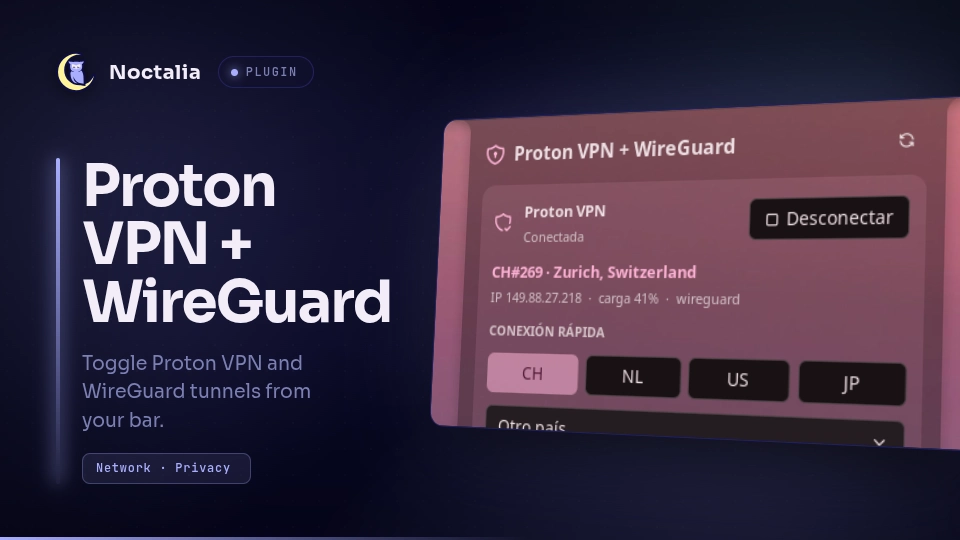
Control Proton VPN and your NetworkManager WireGuard tunnels from the bar, a panel and the control center: connect, switch country, toggle the kill switch and NetShield, and bring WireGuard tunnels up or down.
Control only. This plugin switches things on and off and shows their state. Setup stays in the CLI: WireGuard tunnels and peers are configured with
nmcli(ornm-connection-editor), and Proton VPN with the officialprotonvpnCLI.
Plugin
| Field | Value |
|---|---|
| ID | gitgxldf1sh/proton-wireguard |
| Entries | Bar widget: bar; panel: panel; service: service; shortcut: proton |
Requirements
You can use either half on its own. The panel only shows what is configured and tells you which half is missing.
- Proton VPN:
proton-vpn-cli1.0.5 or newer, withproton.VPN.servicerunning and a signed-in account. Tested with CLI 1.0.5. - WireGuard: NetworkManager's
nmcli. Only connections managed by NetworkManager are listed; tunnels started withwg-quickare not. getent(glibc) for the optional DNS check, andbashfor the sign-in helper. Both are present on virtually every system.
Setting things up happens outside the plugin:
# Proton VPN (Arch-based example)
sudo pacman -S proton-vpn-cli
protonvpn signin <user>

# WireGuard: import an existing .conf into NetworkManager
nmcli connection import type wireguard file wg0.conf
nmcli connection modify wg0 connection.autoconnect no   # optional
Usage
Add the Proton VPN + WireGuard widget to a bar from Settings → Bar. It shows a shield (highlighted while Proton is up) and a network glyph while any WireGuard tunnel is up.
- Left click opens the panel.
- Right click connects Proton to the fastest server, or disconnects it.
The panel can also be toggled with:
noctalia msg panel-toggle gitgxldf1sh/proton-wireguard:panel
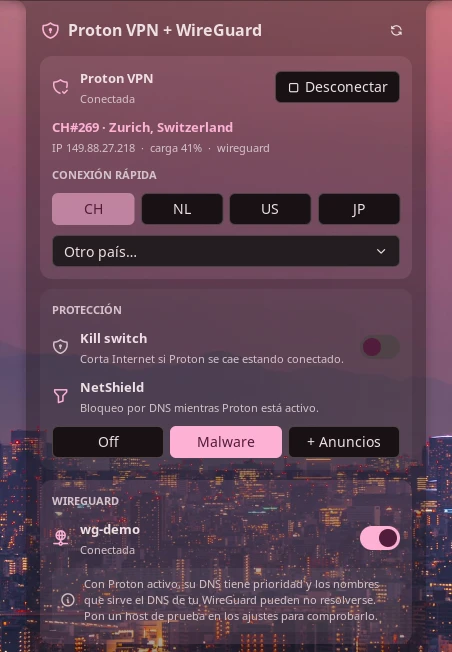
The panel shows, depending on what is configured:
- Proton VPN: connect/disconnect, server, location, IP, load and protocol, favourite-country buttons and a list of every other country.
- Protection: kill switch and NetShield (off, malware, malware + ads).
- WireGuard: one toggle per NetworkManager WireGuard connection, found automatically.
- A "not set up yet" notice for whichever half is missing, or a single "control only" note when neither is.
The proton shortcut connects Proton (fastest) or disconnects it. Add it
in Settings → Control Center → Shortcuts.
Settings
| Setting | Type | Default | Description |
|---|---|---|---|
favorite_countries |
string_list |
["CH", "NL", "US"] |
Two-letter country codes shown as quick-connect buttons. |
hidden_connections |
string_list |
[] |
NetworkManager connection names to leave out of the panel. |
dns_check_host |
string |
"" |
A name only your WireGuard DNS resolves (e.g. nas.lan). When Proton and a WireGuard tunnel are both up, Proton's DNS usually takes priority; the panel warns if this name stops resolving. Empty disables the check. |
show_server |
bool |
false |
Shows the Proton server (e.g. CH#120) next to the bar icon. |
notify |
bool |
true |
Notify on connect and when Proton drops without being asked to. |
IPC
noctalia msg plugin gitgxldf1sh/proton-wireguard:service all toggle-proton [CC]
noctalia msg plugin gitgxldf1sh/proton-wireguard:service all connect [CC]
noctalia msg plugin gitgxldf1sh/proton-wireguard:service all disconnect
noctalia msg plugin gitgxldf1sh/proton-wireguard:service all toggle-wg <name|uuid>
noctalia msg plugin gitgxldf1sh/proton-wireguard:service all wg-up <name|uuid>
noctalia msg plugin gitgxldf1sh/proton-wireguard:service all wg-down <name|uuid>
noctalia msg plugin gitgxldf1sh/proton-wireguard:service all refresh
CC is an optional two-letter country code (connect CH); without it Proton
connects to the fastest server. <name|uuid> is a NetworkManager connection
name or UUID.
Notes
- What it does not do: it never creates, edits or deletes WireGuard
connections, peers, keys, endpoints or
AllowedIPs, and it does not manage your Proton account. Sign in opensprotonvpn signinin a terminal, so your password and 2FA go straight to the official CLI. - Processes spawned, always with arguments passed directly (no shell):
protonvpn info | status | config list | countries list | connect | disconnect | config set kill-switch|netshieldnmcli -t -f NAME,UUID,TYPE,DEVICE,STATE connection showandnmcli connection up|down uuid <uuid>getent hosts <dns_check_host>, only when that setting is setbash signin.shin a terminal, only when you press Sign in
- Files: it reads
/sys/class/net/proton0to detect the tunnel. It writes no files and makes no network requests of its own. - Privileges: no
sudo/pkexec. Bringing a NetworkManager connection up uses NetworkManager's normal polkit rules for your session. - Detection: Proton counts as connected only while the
proton0interface exists. Proton's own NetworkManager profiles (ProtonVPN …) are excluded from the WireGuard list, so the two are never confused. - Polling: the tunnel interface every second, the WireGuard list every 3 s, Proton status every 15 s while connected, Proton settings every 60 s.
- The plugin parses the English output of the Proton CLI. A future CLI that changes its output format may need a plugin update.
License
Versions
| Version | Plugin API | Updated |
|---|---|---|
| v0.1.0 latest | 43 | Nov 8, 2026 |
Older versions stay installable on a Noctalia release whose plugin API is below the latest version's.