
About
Process Monitor
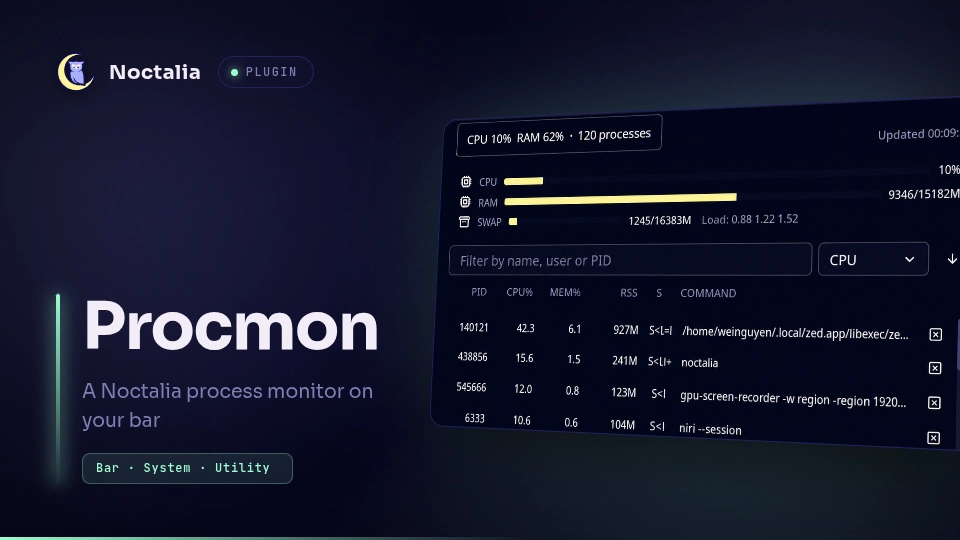
A bottom-style process monitor for Noctalia: live CPU/RAM/swap bars and a sortable, searchable process table with a per-process kill action, all in a panel. Great for spotting a runaway process or a zombie and killing it without opening a terminal.
Plugin
| Field | Value |
|---|---|
| ID | weinguyen/procmon |
| Entries | Bar widget: widget; panel: panel; service: service |
Requirements
Install ps, kill, head, grep and cat on PATH (all are present on
virtually every Linux distribution).
Usage
Add the Process Monitor widget to a bar. It shows the current CPU and RAM usage (plus the process count). Click the widget to toggle the process panel:
noctalia msg panel-toggle weinguyen/procmon:panel
The panel shows CPU, RAM and swap bars with the 1/5/15-minute load averages,
then a process table. Sort by the column dropdown (PID, CPU%, MEM%, RSS,
COMMAND) and flip asc/desc with the arrow button. Type in the filter box to
match a process by name, user or PID. Click the ✕ button on a row to run the
configured kill command against that PID (default kill -TERM). Zombie
processes are tinted with the error color so they stand out.
The table refreshes on the interval set in the refresh_interval setting. The
panel re-renders automatically as new samples arrive, so the view stays live
while it is open.
Settings
| Setting | Type | Default | Description |
|---|---|---|---|
refresh_interval |
int |
1000 |
Process resample interval in milliseconds. (default 1000) |
sort_by |
select |
cpu |
Initial sort column when the panel opens (cpu, mem, pid, cmd). |
kill_command |
string |
kill -TERM |
Command run against a selected PID; the PID is appended. Empty falls back to kill -TERM. |
show_count |
bool |
true |
Bar widget also shows the total process count. |
Notes
Spawns processes. A background service runs
psevery 2nd refresh interval (the process table changes slowly) and reads/procstats every interval;runAsyncruns the configuredkill_commandwhen a row's ✕ is clicked. There is no confirmation dialog, so check the PID before clicking.The bar widget only renders data the service publishes; it never runs commands. The panel runs the configured
kill_commandwhen a row's ✕ is clicked.Requires
plugin_api = 13. The panel renders a windowed slice of the process table and follows the keyboard cursor with edge-follow scrolling (window slides only when the cursor pushes past an edge, so scrolling up doesn't collapse the page until the top edge is reached). CPU%, RAM%, swap and the 1/5/15-minute load averages are sampled from/proc(/proc/stat,/proc/meminfo,/proc/loadavg) by the service, so they work with no separate system-monitor dependency.
Versions
| Version | Plugin API | Updated |
|---|---|---|
| v0.5.0 latest | 13 | Aug 12, 2026 |
| v0.3.0 | 12 | Aug 8, 2026 |
Older versions stay installable on a Noctalia release whose plugin API is below the latest version's.