 Noctalia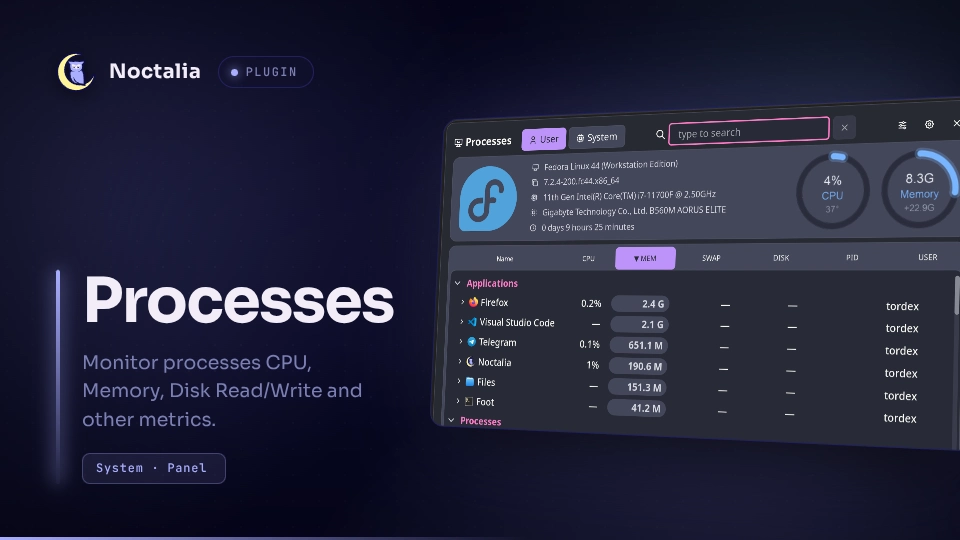
About
Processes
Monitor CPU, memory, disk read/write, and other process metrics.
Features
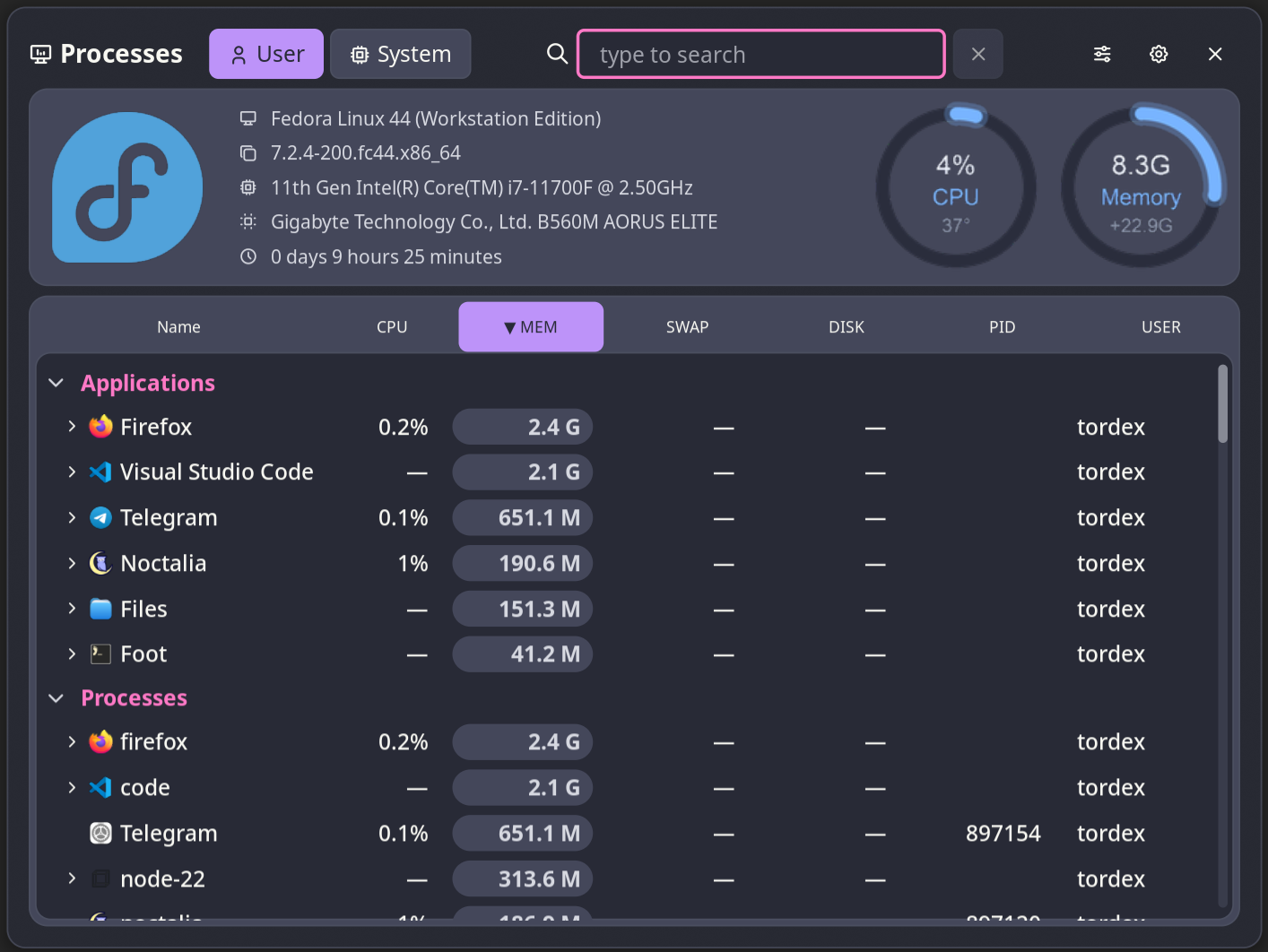
- Group processes by application. Supported compositors: Niri, Umbriel, Hyprland, Mango, Sway, and Scroll.
- Group processes by executable path.
- Show user and system processes.
- Process columns: Name, CPU Usage, Memory Usage, Swap Usage, Disk read/write bytes, PID, and Process user.
- Click a process to view extended process information and buttons for killing it. Click a value to copy it to the clipboard.
- Kill a process with SIGINT or terminate it with SIGKILL.
- Show system information: Distro name, Kernel version, CPU name, Motherboard name, and Uptime.
- Customizable polling interval.
- Customizable colors for the sorted column.
- Show graphical gauges for CPU and memory usage.
- The plugin starts statistics collection when the panel opens and stops it when the panel closes. This helps save resources.
Plugin
| Field | Value |
|---|---|
| ID | tordex/processes |
| Entries | Panel: panel; bar widget: widget |
Requirements
The plugin requires python to run the statistics collection script. You must install the psutil, Pillow, and PyGObject modules with pip:
pip install PyGObject psutil Pillow
The kill and pkill commands must also be installed and available in $PATH.
Other requirements depend on the compositor you use:
| Compositor | Dependencies |
|---|---|
| Niri | niri |
| Umbriel | umbriel |
| Hyprland | hyprctl |
| Sway | swaymsg, jq |
| Scroll | scrollmsg, jq |
| Mango | mmsg |
NixOS Configuration
If you see the No data available message, edit /etc/nixos/configuration.nix. Here is an example configuration:
fonts = {
    fontDir.enable = true;
    packages = with pkgs; [
    dejavu_fonts
    liberation_ttf
    ];
};

environment.systemPackages = with pkgs; [
    gtk3
    gobject-introspection
    adwaita-icon-theme
    hicolor-icon-theme
    (let
        myPython = python3.withPackages (ps: with ps; [
        pygobject3
        psutil
        pillow
        ]);
    in
    runCommand "python3-gtk-env" {
        nativeBuildInputs = [ makeWrapper ];
    } ''
    mkdir -p $out/bin
    makeWrapper ${myPython}/bin/python3 $out/bin/python3 \
        --prefix GI_TYPELIB_PATH : "${lib.makeSearchPath "lib/girepository-1.0" [
        gtk3
        gobject-introspection
        pango.out
        pango.dev
        gdk-pixbuf
        atk
        harfbuzz.out
        harfbuzz.dev
        glib.dev
        ]}" \
        --prefix XDG_DATA_DIRS : "${lib.makeSearchPath "share" [
            gtk3
            adwaita-icon-theme
            hicolor-icon-theme
            dejavu_fonts
            ]}"
    '')
];
Usage
Add the Processes bar widget in the shell's bar-widget picker and click it to open the process panel.
You can also open the panel by binding it in your compositor or by setting an action for sysmon widgets:

[widget.ram.actions]
left = "panel-toggle tordex/processes:panel mem"

[widget.cpu.actions]
left = "panel-toggle tordex/processes:panel cpu"
To open the panel from the command line, use:
noctalia msg panel-toggle tordex/processes:panel [order_by]
Possible values for order_by:
order_by value |
Effect |
|---|---|
pid |
Sort by Process ID (PID) |
name |
Sort by Process Name |
cpu |
Sort by CPU Usage |
mem |
Sort by Memory Usage |
swap |
Sort by Swap Usage |
io |
Sort by Disk read/write bytes |
username |
Sort by Process user |
Without order_by, the panel opens using the previous sort mode.
Add - before order_by to reverse the sort order. For example:
noctalia msg panel-toggle tordex/processes:panel -mem
Settings
| Setting | Type | Default | Description |
|---|---|---|---|
delay |
int |
1 |
Refresh rate in seconds. |
sort_column_background |
color |
surface_container |
Background color for the sorted column. |
sort_column_color |
color |
on_surface_variant |
Text color for the sorted column. |
process_hover_background |
color |
surface_container |
Background color for the hovered row. |
process_hover_color |
color |
on_surface_variant |
Text color for the hovered row. |
show_apps |
bool |
true |
Show applications section. |
show_processes |
bool |
true |
Show processes section. |
Notes
The panel writes some files to the ${XDG_RUNTIME_DIR} directory when it is opened:
| File name | Description |
|---|---|
noctalia_tordex_procs_params |
The information about processes filters and sorting. |
noctalia_tordex_procs.json |
The information about processes and system. |
noctalia_tordex_procs_cpu_usage.png |
Gauge for CPU usage |
noctalia_tordex_procs_mem_usage.png |
Gauge for memory usage |
PNG files are not deleted on panel close to prevent error messages in the noctalia log. Other files are deleted when the panel closes.
The Application section in the process list is available with the following supported compositors:
- Niri
- Umbriel
- Hyprland
- Sway
- Scroll
- Mango
Third-party notice
The scripts/stats.py script includes code from ps_mem, which is licensed under the LGPL-2.1 license.
Versions
| Version | Plugin API | Updated |
|---|---|---|
| v2.1.1 latest | 43 | Oct 25, 2026 |
| v2.1.0 | 24 | Sep 30, 2026 |
Older versions stay installable on a Noctalia release whose plugin API is below the latest version's.