 Noctalia
Back to plugins 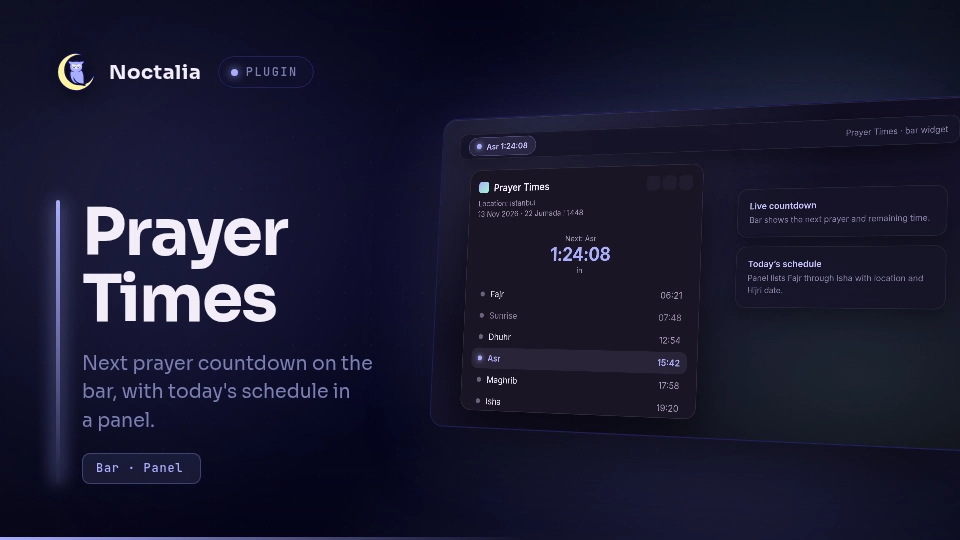
v1.0.0 bekiryildirimcode
About
Prayer Times
Shows Islamic prayer times for your location on the Noctalia bar, with a live countdown to the next prayer and a panel listing today's schedule.
Plugin
| Field | Value |
|---|---|
| ID | bekiryildirimcode/prayer-times |
| Entries | Bar widget: bar; panel: panel; service: fetcher |
Usage
Enable the plugin in Settings → Plugins, then add the Prayer Times widget to a bar section.
- Left click the bar widget → open today's prayer times panel.
Toggle the panel directly:
noctalia msg panel-toggle bekiryildirimcode/prayer-times:panel
The panel lists Fajr, Sunrise, Dhuhr (Jumu'ah on Friday), Asr, Maghrib, and Isha, with a countdown to the next prayer, the resolved location, and Gregorian / Hijri dates when available.
Settings
Plugin-level (Settings → Plugins → Prayer Times):
| Setting | Type | Default | Description |
|---|---|---|---|
location_mode |
select |
auto |
auto uses the shell location address when set, otherwise IP geolocation. city uses city/country. coords uses latitude/longitude. |
city |
string |
"" |
City name when location_mode is city. |
country |
string |
"" |
Country name or code when location_mode is city. |
latitude |
string |
"" |
Latitude when location_mode is coords. |
longitude |
string |
"" |
Longitude when location_mode is coords. |
method |
select |
13 |
Calculation method. Default is Diyanet (Turkey); also includes MWL, ISNA, Egypt, Makkah, Karachi, and Moonsighting. |
school |
select |
1 |
Asr school: 0 Shafi/Maliki/Hanbali, 1 Hanafi. |
notify |
bool |
true |
Show a notification when a prayer time begins. |
Bar widget settings:
| Setting | Type | Default | Description |
|---|---|---|---|
show_countdown |
bool |
true |
Show a live countdown to the next prayer. |
show_name |
bool |
true |
Show the next prayer name on the bar. |
glyph |
glyph |
building-mosque |
Bar icon. |
IPC
Force an immediate refetch:
noctalia msg plugin bekiryildirimcode/prayer-times:fetcher all refresh
Notes
- The background service fetches daily timings from
api.aladhan.com. - In
automode without a shell location address, it first queriesip-api.comfor approximate coordinates, then requests timings by latitude/longitude. - Today's timings are cached under the plugin data directory and reused after a restart while a fresh fetch runs in the background.
- No external commands are spawned; there are no manifest
dependencies. - This plugin focuses on countdown + schedule. It does not play azan audio.
Versions
| Version | Plugin API | Updated |
|---|---|---|
| v1.0.0 latest | 43 | Nov 13, 2026 |
Older versions stay installable on a Noctalia release whose plugin API is below the latest version's.