 Noctalia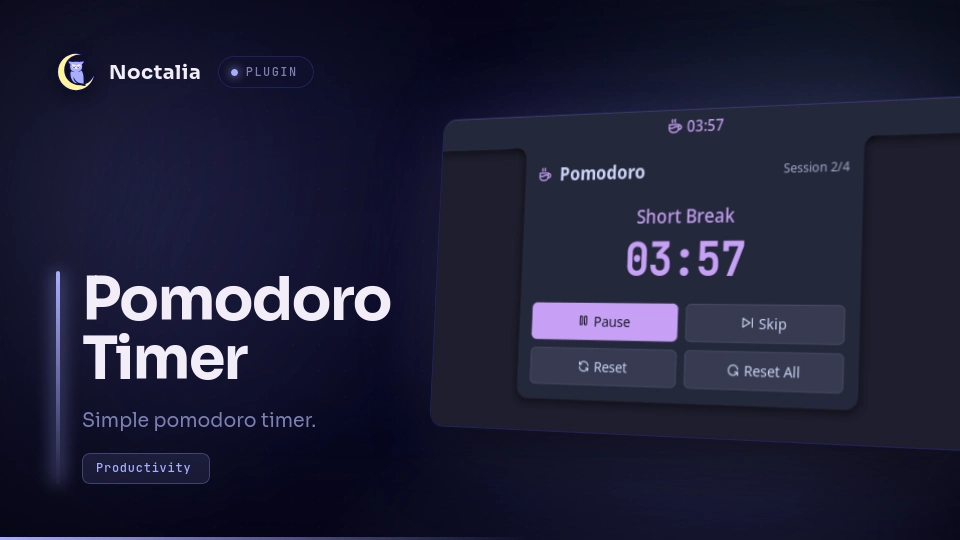
About
Pomodoro Timer
A Pomodoro timer plugin for Noctalia for productivity. Initially ported from the legacy v4 plugin Pomodoro Timer.
Features
- Sessions: Configurable sessions based on the standard format (work - short break - long break). Durations can be configured in the settings.
- Cycles: Configurable number of (work - short break) cycles before a long break.
- Auto-start: Optionally auto-start breaks and/or work sessions.
- Bar Widget: Shows status and remaining time on the bar widget when the panel is closed.
- Notifications: Toast notification + alarm sound when work/break finishes.
- Ticking Sound: Optional tick/tock sounds each second while a work session is running.
- IPC: Control the timer from scripts, keybinds and other automation.
Plugin
| Field | Value |
|---|---|
| ID | thepunkoff/pomodoro |
| Entries | Bar widget: widget; panel: panel; service: pomodoro |
Usage
- Enable plugin in settings
- Add bar widget
Pomodoro Timer - Widget appears on the bar, clicking it will toggle the panel.
Alarm Sound Configuration
When enable_sounds is set to true in Noctalia config (or enabled in the GUI with Services -> Audio -> Shell Sounds), the notification after completed session will pop up with Noctalia's default sound. If you want to use the bundled alarm sound, set this in Noctalia config:
[plugin_settings."thepunkoff/pomodoro"]
use-bundled-alarm-sound = true
or use Use Bundled Alarm Sound in the GUI plugin settings. Note that after enabling this the notification will play both the default sound and the bundled one at the same time. To silence the default sound use Noctalia's notification filtering:
[notification]
# ...
    [notification.filter.pomodoro]
    match = "noctalia"
    match_content = "Pomodoro Timer"
    play_sound = false
or use Notifications -> Filtering in the GUI.
To play the sound even when enable_sounds (Shell Sounds) is set to false (e.g. if you don't want to enable all the sounds, just pomodoro's), use:
[plugin_settings."thepunkoff/pomodoro"]
bypass-noctalia-sound-globals = true
or Bypass Noctalia Sound Globals in the GUI plugin settings. This will use the ffplay tool to play the sound directly, so make sure to have it installed.
Ticking Sound Configuration
To play a ticking (tick/tock) sound each second while a work session is running, enable it in Noctalia config:
[plugin_settings."thepunkoff/pomodoro"]
enable-work-timer-sound = true
or use Enable Work Timer Sound in the GUI plugin settings. Break timers stay silent.
The ticking sound obeys the same global sound rules as the alarm: it plays through Noctalia's sound system when enable_sounds (Shell Sounds) is true. To play it even when enable_sounds is false, combine it with bypass-noctalia-sound-globals (which requires ffplay):
[plugin_settings."thepunkoff/pomodoro"]
enable-work-timer-sound = true
use-bundled-alarm-sound = true
bypass-noctalia-sound-globals = true
To open the panel with a command:
noctalia msg panel-toggle thepunkoff/pomodoro:panel
IPC
All timer commands are available through the pomodoro service:
noctalia msg plugin thepunkoff/pomodoro:pomodoro all <event>
| Event | Description |
|---|---|
toggle |
Start the timer if paused, pause it if running (same as the panel's start/pause button). |
start |
Start the timer. Does nothing if it is already running. |
pause |
Pause the timer. Does nothing if it is already paused. |
skip |
Stop the timer and skip to the next stage. |
reset |
Stop the timer and reset the current stage. |
reset-all |
Stop the timer and reset to the first work session. |
For example, in niri:
binds {
    Mod+P { spawn "noctalia" "msg" "plugin" "thepunkoff/pomodoro:pomodoro" "all" "toggle"; }
}
Settings
| Setting | Type | Default | Description |
|---|---|---|---|
work-duration |
int |
25 |
Duration of each work session in minutes. |
short-break-duration |
int |
5 |
Duration of short breaks in minutes. |
long-break-duration |
int |
15 |
Duration of long breaks in minutes. |
sessions-before-long-break |
int |
4 |
Number of sessions before a long break (min=1). |
auto-start-work |
bool |
false |
Automatically start the work timer after a break. |
auto-start-breaks |
bool |
false |
Automatically start the break timer after a work session. |
enable-work-timer-sound |
bool |
false |
Play tick/tock sounds each second while a work session is running. Break timers stay silent. |
use-bundled-alarm-sound |
bool |
false |
Use the bundled alarm sound when work/break is over. |
bypass-noctalia-sound-globals |
bool |
false |
Ignore Noctalia's global sound settings and play bundled sounds directly via ffplay. |
IPC
noctalia msg panel-toggle thepunkoff/pomodoro:panel
More IPC commands to directly control the timer are coming soon.
Requirements
- (optional)
ffplayfor playing bundled sounds independently from Noctalia's global sound settings.
Licensing
This project is licensed under the MIT License.
Additional assets:
- JetBrains Mono font, which is licensed separately under the SIL Open Font License 1.1 (OFL-1.1). See
THIRD_PARTY_LICENCES/OFL.txtfor the full license text. - Alarm sound:
alarm.mp3- Sourced from Pixabay (Royalty-free, Pixabay Content License) - Tick/Tock sounds:
tick1-9.wav/tock1-9.wav- Sourced from Pixabay, manually cut into parts. (Royalty-free, Pixabay Content License)
Versions
| Version | Plugin API | Updated |
|---|---|---|
| v1.4.0 latest | 22 | Oct 19, 2026 |
| v1.2.1 | 20 | Aug 24, 2026 |
| v1.1.0 | 3 | Jul 28, 2026 |
Older versions stay installable on a Noctalia release whose plugin API is below the latest version's.