 Noctalia
Back to plugins 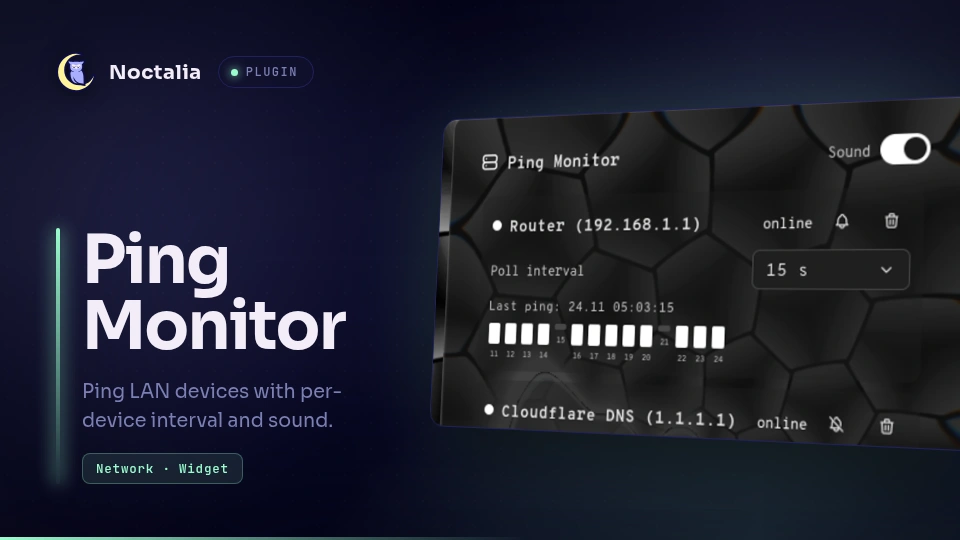
v1.0.0 NoFilterA1
About
Ping Monitor
Ping devices on your network and see at a glance which ones are reachable. Devices are shown as cards in a grid, can be put into groups and reordered by dragging, and each one has its own poll interval and sound. A notification (and an optional sound) appears when a device goes offline or comes back.
Plugin
| Field | Value |
|---|---|
| ID | nofiltera1/ping-monitor |
| Entries | Bar widget: bar; panels: panel, panel_tall; service: service |
Requirements
ping (iputils or equivalent) on PATH.
Usage
Add the widget to a bar section as nofiltera1/ping-monitor:bar (for example [widget.ping] with type = "nofiltera1/ping-monitor:bar").
- The bar icon is the primary color when every device is online, the error color when any is offline, and neutral while checking. Hovering shows every device and its state. Right click checks all devices now.
- Left click opens the panel. It opens the compact panel (
panel, height follows the content) while all cards fit, and the tall panel (panel_tall, fixed height, scrolling list) when they do not. - Each card shows the state, the latency in ms (green under 100 ms, yellow up to 300 ms, red above), the last successful ping and an activity graph of the last days. Controls on the card: poll interval, sound for this device, edit and remove (remove asks for a second press).
+in the header adds a device (a name, and an IP, host name or full link: scheme, port and path are dropped) or a group.- Groups: the header of a group folds it (the state is remembered), renames it with the pencil, or deletes it; the devices of a deleted group fall back to "No group".
- Dragging: drag a card by its handle onto a group header (or into an empty group) to move it there, or onto another card to put it in front of that one. Drag a group by its handle onto another group's header to put it in front.
- The Sound toggle in the header mutes every device at once; the bell on a card mutes one.
- The gear opens the plugin settings.
Open a panel directly with:
noctalia msg panel-toggle nofiltera1/ping-monitor:panel
noctalia msg panel-toggle nofiltera1/ping-monitor:panel_tall
Settings
| Setting | Type | Default | Description |
|---|---|---|---|
sound_enabled |
bool |
true |
Master switch for the "back online" sound. |
sound_file |
file |
/usr/share/sounds/Oxygen-Sys-App-Positive.ogg |
Sound played when a device comes back online. The default comes from the Oxygen sound theme and is not shipped with the plugin; without it pick any .ogg/.wav/.oga here, or turn sound_enabled off. A missing file is logged and the notification still appears. |
history_days |
int |
14 |
Number of days shown in each card's activity graph (3 to 30). |
timeout_seconds |
int |
2 |
How long each ping waits for a reply (1 to 10). |
fail_threshold |
int |
2 |
Failed checks in a row before a device is shown as offline (1 to 10). One check sends three pings; a failed check is repeated after 3 s. |
notify_on_down |
bool |
true |
Error notification when a device goes offline. |
notify_on_recovery |
bool |
true |
Notification (and sound) when an offline device answers again. |
colorize_latency |
bool |
true |
Color the latency by value; off shows it in a neutral color. |
columns |
select |
2 |
Cards per row: 1, 2 or 3. |
glyph (widget) |
glyph |
server |
Bar icon while every device is online. |
Notes
- Runs
ping -c 3 -i 0.3 -W <timeout> <host>for each device at its own interval. No other network access. - Stores the device list, the groups and the mute state (
config.json) and a per-device history of days with at least one successful ping (history.json) in the plugin data directory. - Failed checks are written to the shell log with the exit code and the error text, which helps to tell a real outage from a lost packet.
- A notification is shown only when a device changes state after its first check.
Versions
| Version | Plugin API | Updated |
|---|---|---|
| v1.0.0 latest | 43 | Nov 25, 2026 |
Older versions stay installable on a Noctalia release whose plugin API is below the latest version's.