
About
Phone Operate
Mirror and control your Android phone with scrcpy (wired or wireless), and run KDE Connect device actions (ring, ping, clipboard, SMS, media) — all from a unified Noctalia panel.
Plugin
| Field | Value |
|---|---|
| ID | icefish/phone-operate |
| Entries | Bar widget: status; panel: main (also main_floating, main_widget); service: core; control-center tile: tile; launcher provider: device |
| Launcher Prefix | /ph |
Requirements
Install these on PATH:
scrcpy— casting and controlandroid-tools(adb) — device discovery, pairing, connectionkdeconnect(kdeconnectd / kdeconnect-cli / gdbus) — KDE Connect device integrationsshfs— browsing device files (SFTP mount)
Usage
Panel
Open the panel from the bar widget (left-click) or the control-center tile. Copy-paste toggle:
noctalia msg panel-toggle icefish/phone-operate:main
The panel is also registered as main_floating (centered) and main_widget
(below the bar widget); toggle them the same way:
noctalia msg panel-toggle icefish/phone-operate:main_floating
noctalia msg panel-toggle icefish/phone-operate:main_widget
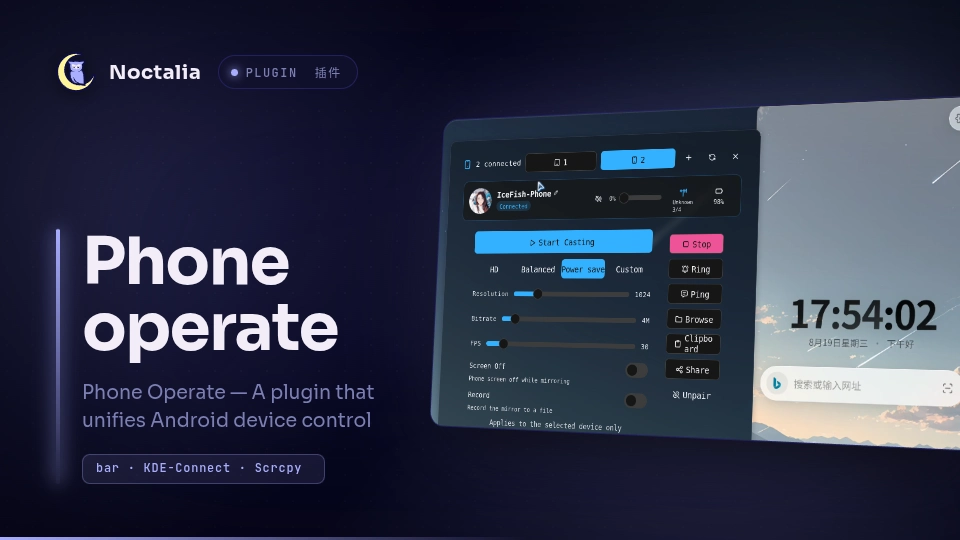
The panel provides a split workspace for managing KDE Connect and ADB devices:
- Sidebar: Lists paired and available devices with connection status and unpair / disconnect buttons. Quick action buttons trigger Ring, Ping, Browse, Clipboard, and Share.
- Dashboard: Shows selected device avatar, battery percentage, Wi-Fi / USB link info, and an editable device alias (pencil icon).
- Cast & Connect: Mirrors and controls the phone screen via
scrcpy. Pick a preset (HD, Bal, Save) or customize resolution, bitrate, and frame rate. Toggle Screen Off to mirror while keeping the phone display dark, or Record to save the session to a video file. Press Cast / Stop to manage the session. USB devices cast directly; wireless devices switch between Pair (one-time setup with pair port and 6-digit PIN) and Connect (reconnects to the phone's debug port). - Messages: Send SMS with phone number, clear button (
x), persistent favorite contacts with names, inline renaming, and live search while typing. - Media bar: Bottom playback bar showing album art, now playing title and artist, previous / play-pause / next transport buttons, and a seek slider.
Bar widget
Shows the selected device's icon and (optionally) name and battery. Left-click opens the panel; right-click opens Settings.
Launcher
Type /ph in the launcher, then the device name. Activating a result casts to
that device immediately.
Settings
| Setting | Type | Default | Description |
|---|---|---|---|
state_update_interval |
int |
30 |
Seconds between KDE Connect device refreshes. 0 disables auto-refresh. |
enable_charging_animation |
bool |
true |
Highlight the bar widget while a device is charging. |
show_device_name |
bool |
false |
Show the selected device's name or alias in the bar widget. |
battery_display |
select |
icon_and_percent |
What the bar widget shows: icon, percentage, both, or nothing. |
migrated_notice |
string |
`` | Informational: device image and name are edited in the panel. |
language |
select |
en |
Panel display language (en or zh-Hans). |
enable_clipboard_action |
bool |
true |
Show the send-clipboard quick action on device cards. |
panel_placement |
select |
attached |
How the panel opens: attached to the bar, floating, or below the widget. |
max_size |
int |
1920 |
Maximum video long edge in pixels (up to 3840). |
bit_rate |
int |
8 |
Video bitrate in Mbps (up to 30). |
max_fps |
int |
60 |
Video frame-rate cap (up to 240). |
turn_screen_off |
bool |
false |
Turn the phone screen off while casting. |
record |
bool |
false |
Record the cast to a file. |
record_max_files |
int |
10 |
Max recording files kept; oldest are deleted. |
poll_interval_ms |
int |
3000 |
Device scan interval in milliseconds. |
Per-device cast parameters are remembered independently; unset values fall back to these defaults.
IPC
The service accepts commands over the pc.cmd channel; UI entries send these
internally. A few are useful externally, for example:
noctalia msg plugin icefish/phone-operate:core all cast '{"device":"<serial>","seq":1}'
noctalia msg plugin icefish/phone-operate:core all stop_cast '{"device":"<serial>","seq":1}'
Notes
- Casting spawns
scrcpyper device; the plugin only starts and tracks the process, it does not touch the video stream.pkillmatches the command line (no exact PID handle). - Wireless debugging has two ports: the one-time pairing port (with the 6-digit code) and the long-lived debug port shown under "IP address & Port" on the phone. After pairing, the plugin connects to the debug port. Re-enabling wireless debugging may change the debug port.
- A device that connects but reports
offline(common after the phone locks) needs the screen on and a stable Wi-Fi link before casting. - niri users should add a window rule so scrcpy windows are floating and opaque; see the "niri window rule" snippet in the developer notes.
Versions
| Version | Plugin API | Updated |
|---|---|---|
| v1.0.1 latest | 22 | Sep 11, 2026 |
Older versions stay installable on a Noctalia release whose plugin API is below the latest version's.