 Noctalia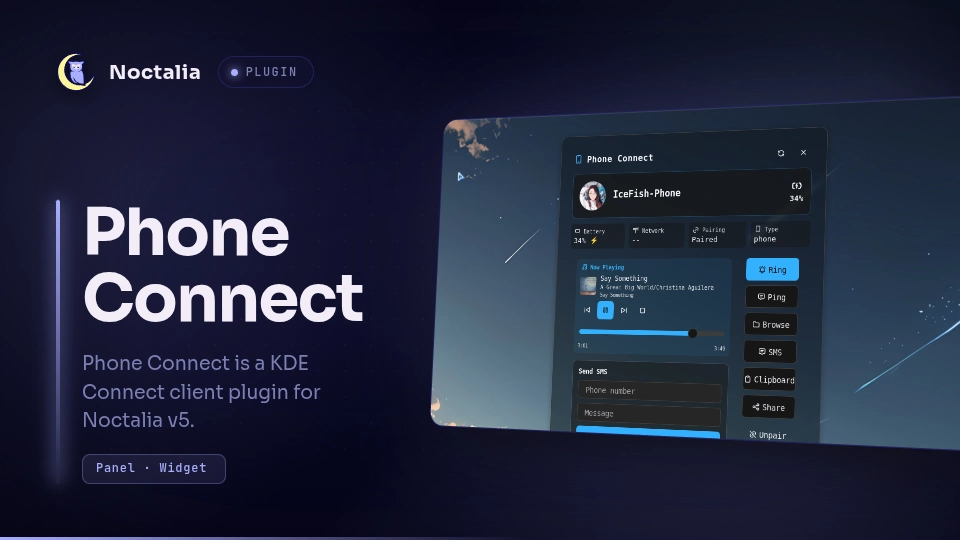
About
Phone Connect
Control your KDE Connect-paired phone from the Noctalia bar.
Plugin
| Entry | Type | Id |
|---|---|---|
icefish/phone-connect |
plugin | — |
bar |
widget | icefish/phone-connect:bar |
tile |
shortcut | icefish/phone-connect:tile |
details |
panel | icefish/phone-connect:details |
details_floating |
panel | icefish/phone-connect:details_floating |
details_widget |
panel | icefish/phone-connect:details_widget |
kde |
service | icefish/phone-connect:kde |
Usage
Add the bar widget and control-center tile from Settings, then click either to open the details panel.
Open panels from the shell:
noctalia msg panel-toggle icefish/phone-connect:details
noctalia msg panel-toggle icefish/phone-connect:details_floating
noctalia msg panel-toggle icefish/phone-connect:details_widget
Send IPC events to the service:
noctalia msg plugin icefish/phone-connect:kde all refresh
noctalia msg plugin icefish/phone-connect:kde all cmd '{"op":"ring","device":"<id>"}'
Features
- Device status — battery level, charging state, network type (5G/LTE), pairing
- Quick actions — ring, ping, send clipboard, share text/files/URLs, SMS, SFTP browser
- Media control — play/pause/skip/seek, album art, now-playing (MPRIS)
- Customization — configurable bar contents, per-device image and alias, three panel placements
- Language — English / Simplified Chinese
Requirements
kdeconnect— KDE Connect daemon and CLIgdbus— ships with glib2sshfs— optional, for phone file browsing
Settings
| Setting | Default | Description |
|---|---|---|
| State Update Interval | 30 | Seconds between device refreshes |
| Show Charging Fill | true | Highlight bar widget when charging |
| Show Device Name | false | Show the selected device's name or alias |
| Battery Display | icon_and_percent | Show the battery icon, percentage, both, or neither |
| Show Clipboard Action | true | Show clipboard button in panel |
| Device Image | — | Custom image for selected device |
| Device Alias | Your-Phone | Custom display name |
| Language | en | English / 简体中文 |
| Panel Placement | attached | Attached / Floating center / Below widget |
IPC
| Event | Payload | Description |
|---|---|---|
refresh |
— | Full device refresh |
cmd |
JSON {"op":"…","device":"…"} |
Execute an operation |
Supported ops: ring, ping, clipboard, share_text, share_url, share_file, pair, accept, reject, unpair, browse, sms_send, launch_sms_app, media, media_seek, select, refresh, set_image.
Notes
- Communicates with KDE Connect via DBus (
gdbus call) and CLI (kdeconnect-cli) - Persists user preferences to
pluginDataDir()/state.json - No external network requests; all logic runs locally
Development tests
The mocked regression checks run the plugin's Lua-compatible code with Lua 5.4, without Noctalia, a phone, filesystem writes, or spawned commands:
lua phone-connect/tests/regressions.lua phone-connect service
lua phone-connect/tests/regressions.lua phone-connect panel
They cover a connected phone without a cellular report and device cards with missing, present, and offline media volume.
Versions
| Version | Plugin API | Updated |
|---|---|---|
| v0.2.1 latest | 16 | Oct 15, 2026 |
Older versions stay installable on a Noctalia release whose plugin API is below the latest version's.