
About
Performance Plus
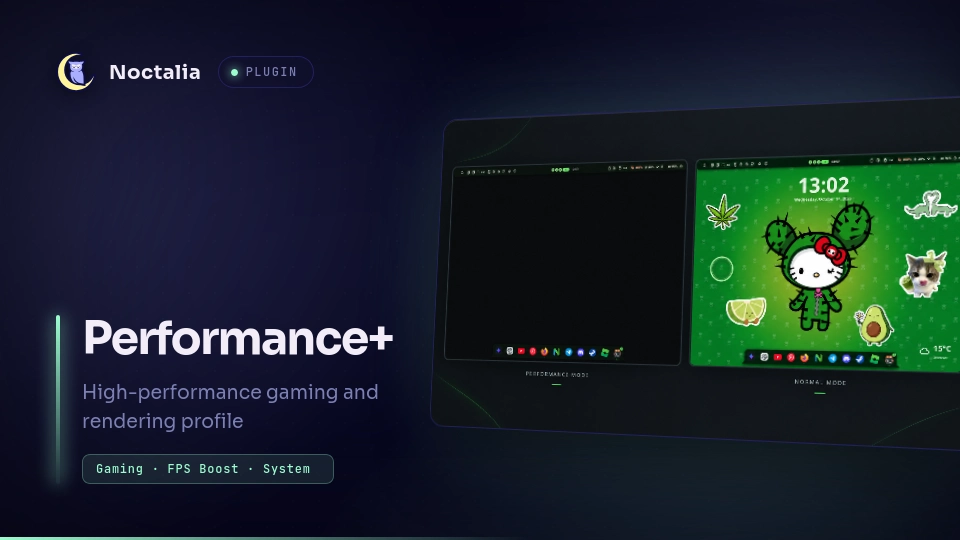
High-performance gaming, rendering, and immersion profile suite for Noctalia. Dynamically disables heavy compositor effects, unmaps wallpapers, suspends desktop widgets, enables Do Not Disturb, and sets system power profiles.
Plugin
| Field | Value |
|---|---|
| ID | detluck/performance-plus |
| Entries | Bar widget: indicator; shortcut: shortcut; service: service |
| Dependencies | Declared conditional on active compositor and enabled features (see Requirements) |
Requirements
No external daemons are required. External commands declared in plugin.toml are conditional on your active Wayland compositor or optional features:
Compositor Utilities (Conditional)
Only the utility corresponding to your active compositor is required:
- Hyprland:
hyprctlonPATH(supports both modern Hyprland Lua setups and legacy configurations). - Niri:
nirionPATH. - Mango:
mmsgonPATH. - Sway / SwayFX:
swaymsgonPATH. - KWin:
qdbus6,qdbus, orbusctlonPATH. - Umbriel:
umbrielonPATH.
System Utilities (Optional)
- Power Profile Management:
powerprofilesctlonPATH(whenset_power_profileis enabled). - Media Control:
playerctlonPATH(whenpause_mediais enabled).
[!NOTE] The plugin manifest declares these commands for catalog disclosure; Noctalia does not block enabling the plugin if a tool for an inactive compositor or unused feature is not installed.
Usage
Control Center Shortcut
Add the quick tile in Settings → Control Center → Shortcuts (detluck/performance-plus:shortcut). Clicking the tile toggles Performance Plus on or off.
Status Bar Widget
Add the indicator widget (detluck/performance-plus:indicator) in Settings → Bar → Widgets or under your bar definition in settings.toml. Left-clicking toggles Performance Plus.
Keybinding
Bind a keyboard shortcut in your compositor configuration:
Hyprland (hyprland.lua)
hl.bind("SUPER + F12", hl.dsp.exec_cmd("noctalia msg plugin 'detluck/performance-plus:service' all toggle"))
Niri (config.kdl)
binds {
    Mod+F12 { spawn-sh "noctalia msg plugin 'detluck/performance-plus:service' all toggle"; }
}
Sway / Mango / Generic
noctalia msg plugin "detluck/performance-plus:service" all toggle
Settings
Configure individual features in Settings → Plugins → Performance Plus:
| Setting | Type | Default | Description |
|---|---|---|---|
disable_wallpaper |
bool |
true |
Tear down background layer-shell surfaces to free GPU VRAM memory. |
disable_blur |
bool |
true |
Turn off compositor background blur. |
disable_animations |
bool |
true |
Turn off window and shell transition animations. |
disable_shadows |
bool |
true |
Turn off window drop shadows. |
hide_widgets |
bool |
true |
Pause and hide all active desktop widgets. |
enable_dnd |
bool |
true |
Silence all notification toasts while active. |
clear_notifications |
bool |
true |
Clear any currently visible notification toasts immediately upon activation. |
set_power_profile |
bool |
true |
Set CPU and system governor to Performance mode via UPower. |
hide_bar |
bool |
false |
Hide Noctalia status bar for full screen immersion. |
hide_dock |
bool |
false |
Hide Noctalia application dock while performance mode is active. |
disable_osd |
bool |
true |
Suppress volume and brightness popups to avoid game frame drops. |
pause_media |
bool |
false |
Pause active MPRIS media players when entering performance mode. |
hook_on_enter |
string |
"" |
Custom shell command or script executed when performance mode is enabled. |
hook_on_exit |
string |
"" |
Custom shell command or script executed when performance mode is disabled. |
IPC
Dispatch events directly to the background service:
# Toggle performance mode on/off
noctalia msg plugin "detluck/performance-plus:service" all toggle

# Explicitly enable performance mode
noctalia msg plugin "detluck/performance-plus:service" all enable

# Explicitly disable performance mode
noctalia msg plugin "detluck/performance-plus:service" all disable
Notes
- Rapid Toggles: Disabling cancels pending activation. A cancelled activation's callback cannot cancel a newer activation.
- Compositor Adaptation:
- Hyprland: Evaluates
hl.config()viahyprctl eval(with fallback tohyprctl keyword) to safely disable blur, shadows, and animations without breaking Lua configuration parsers. - Niri: Generates an overlay configuration and hot-loads it via
niri msg action load-config-file. Base config is restored upon exit. - Mango: Generates an overlay configuration sourcing
~/.config/mango/config.confand hot-swaps it viammsg dispatch load_config_file. Default config is restored upon exit. - Sway / SwayFX: Disables blur, shadows, corner radius, and dimming via
swaymsg. Config is reloaded on exit (swaymsg reload) to restore custom styles. - KWin: Dynamically unloads/loads effects via D-Bus (
/Effects) and triggers/KWin reconfigureto resynchronize settings. - Umbriel: Replaces configuration via
umbriel config-replaceand resets active screen shaders.
- Hyprland: Evaluates
- Clean Teardown: Exiting or uninstalling the plugin while Performance Plus is active automatically disengages the mode and restores all system and compositor settings.
Versions
| Version | Plugin API | Updated |
|---|---|---|
| v0.2.0 latest | 31 | Oct 16, 2026 |
Older versions stay installable on a Noctalia release whose plugin API is below the latest version's.