
Back to plugins 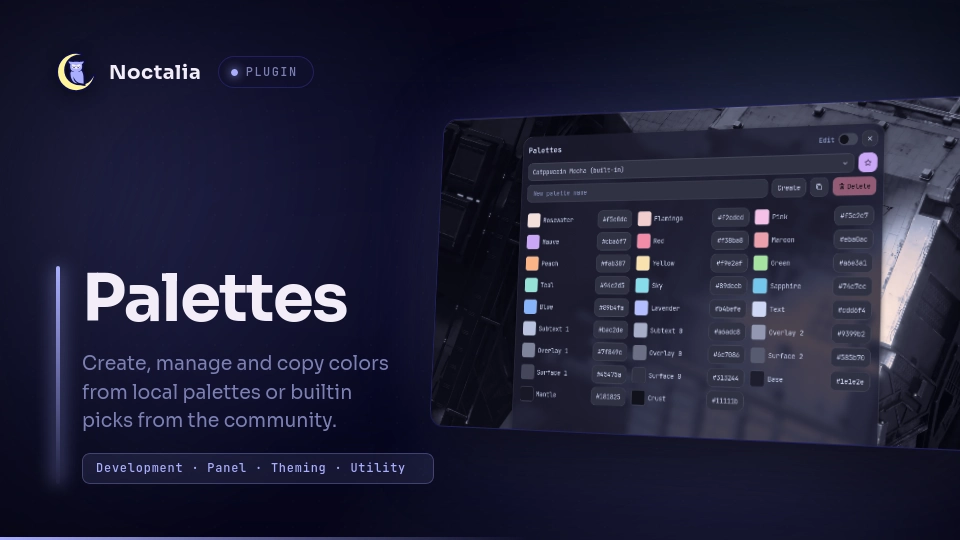
v1.0.0 soul
About
Palettes
Palettes is a panel plugin designed to help you work with colors across multiple apps and platforms. Add, Edit and Name your colors per file then copy hex codes with one click, all from the UI.
Create and store your own palettes locally, or reference builtin community palettes.
Current Builtin Palettes:
- Catppuccin (Latte, Frappé, Macchiato, Mocha)
- Dracula (Dracula, Alucard)
- Eldrictch (Abyss, Cthulhu, Dusk)
- Gruvbox (Dark, Light)
- Kanagawa (Wave, Lotus and Dragon are planned)
- Nord (All colors combined)
- Rosé Pine (Default, Moon, Dawn)
Plugin
| Field | Value |
|---|---|
| ID | soul/palettes |
| Entries | Bar widget: bar; panel: panel |
Usage
- Add the
Paletteswidget to your bar or. - Create a compositor keybind with the following IPC command:
noctalia msg panel-toggle soul/palettes:panel
Settings
| Setting | Type | Default | Description |
|---|---|---|---|
columns |
int |
3 |
Number of columns to display in panel. |
show_builtin |
bool |
true |
Include the bundled palettes (Catppuccin, Nord, and others) in the palette list. |
Notes
- This plugin was made with help from AI. And manually tested with every change.
- If you would like a palette to be included in the plugin open a PR for
builtin.json - Local palettes are written to the plugin data directory, Default:
~/.local/state/noctalia/plugins/
Common Errors:
Couldn't read your palettes. The old file was kept as "palettes.json.bak"If you see this message, your old file is saved aspalettes.json.bak; fix it manually in the plugin data folder~/.local/state/noctalia/plugins/data/soul/palettesand reload the plugin through your settings window.
Attribution:
Versions
| Version | Plugin API | Updated |
|---|---|---|
| v1.0.0 latest | 9 | Oct 15, 2026 |
Older versions stay installable on a Noctalia release whose plugin API is below the latest version's.