 Noctalia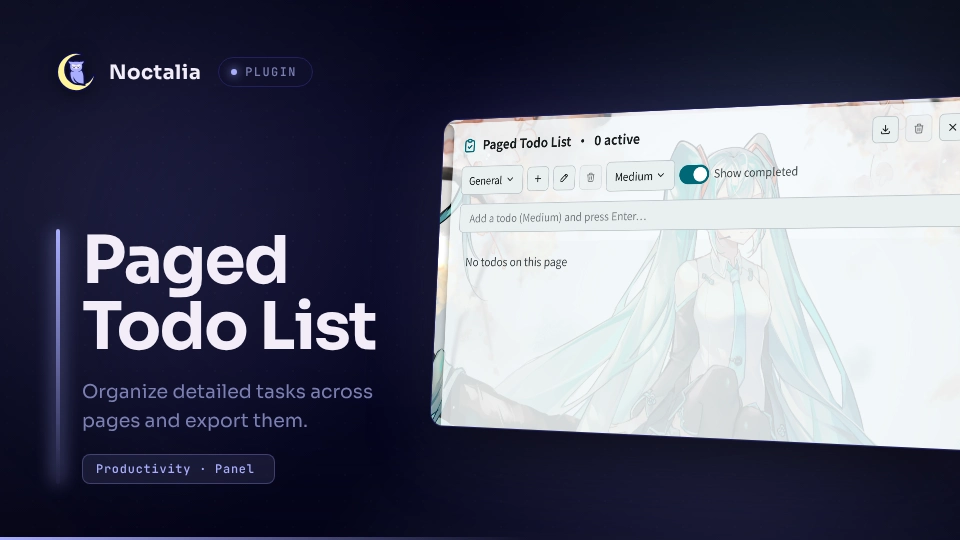
About
Paged Todo List
A multi-page task manager for Noctalia with task details, priorities, copying,
drag reordering, Markdown/JSON export, and migration from the legacy V4 Todo
List. Unlike the single-list nightwatch75/todo plugin, this plugin organizes
tasks into named pages and preserves the legacy page-oriented workflow.
Plugin
| Field | Value |
|---|---|
| ID | baizhu/paged-todo |
| Entries | Bar widget: bar; panel: panel; service: service |
Requirements
No external programs, accounts, network access, or compositor-specific features
are required. The plugin requires Noctalia plugin API 22 because its entries
share the relative module data.luau.
Usage
Add the bar widget from Noctalia's widget picker. Its label shows the number
of unfinished tasks across all pages.
- Left-click the bar widget to open or close the panel.
- Right-click the bar widget to open this plugin's settings.
- Choose, create, rename, or delete pages from the controls below the header. Deleting a non-default page moves its tasks to General.
- Select a priority, type a task, and press Enter to add it to the current page.
- Toggle completion, cycle priority, edit the title and optional details, copy the title, or delete a task with its row controls.
- Drag a row by its grip and drop it between rows to reorder tasks on that page.
- Use the header buttons to export or clear all completed tasks.
Open the panel directly or bind this exact command in a compositor shortcut:
noctalia msg panel-toggle baizhu/paged-todo:panel
The service entry loads the persistent data and keeps the shared state
available to the bar and panel; it has no separate user interface.
Settings
| Setting | Type | Default | Description |
|---|---|---|---|
show_completed |
bool |
true |
Sets whether completed tasks are shown when the panel starts; the panel toggle changes the live view. |
export_path |
folder |
~/Documents |
Folder where the Export button writes timestamped files. |
export_format |
select |
markdown |
Chooses markdown (.md) or json (.json) export. |
export_empty_sections |
bool |
false |
Includes task-free pages in Markdown exports. JSON always contains the complete data model. |
use_custom_colors |
bool |
false |
Uses the configured priority colors instead of theme colors. |
priority_low_color |
color |
#9E9E9E |
Low-priority marker color; visible when custom colors are enabled. |
priority_medium_color |
color |
#2196F3 |
Medium-priority marker color; visible when custom colors are enabled. |
priority_high_color |
color |
#F44336 |
High-priority marker color; visible when custom colors are enabled. |
Storage, migration, and side effects
- Normal task state is read from and written to
todos.jsoninside the per-plugin directory returned bynoctalia.pluginDataDir(). - On the first load without valid plugin data, the plugin reads the legacy V4
paths
~/.config/noctalia/plugins/todo/settings.jsonand, as an older fallback,~/.config/noctalia/settings.json. It migrates task completion, details, priorities and timestamps together with pages and the current page, then writes the converted data only to this plugin's data directory. Legacy files are never changed or deleted. - Export writes a timestamped
todo_YYYYMMDD_HHMMSS.mdor.jsonfile only inside the configuredexport_path. Markdown contains page sections and task details; JSON contains the complete page/task data model. - The plugin copies a task title to the clipboard only when its Copy button is pressed.
- It makes no network requests, starts no processes, and downloads or executes no remote code.
Attribution
This plugin is a Noctalia V5 port and modification of
legacy-v4 Todo List 1.10.0,
originally authored by lonerOrz <lonerOrz@qq.com>. The V5 implementation,
documentation, and community-plugin packaging are maintained by baizhu945. See
LICENSE for the MIT terms and copyright notices.
Versions
| Version | Plugin API | Updated |
|---|---|---|
| v1.0.1 latest | 43 | Oct 25, 2026 |
| v1.0.0 | 22 | Sep 18, 2026 |
Older versions stay installable on a Noctalia release whose plugin API is below the latest version's.