 Noctalia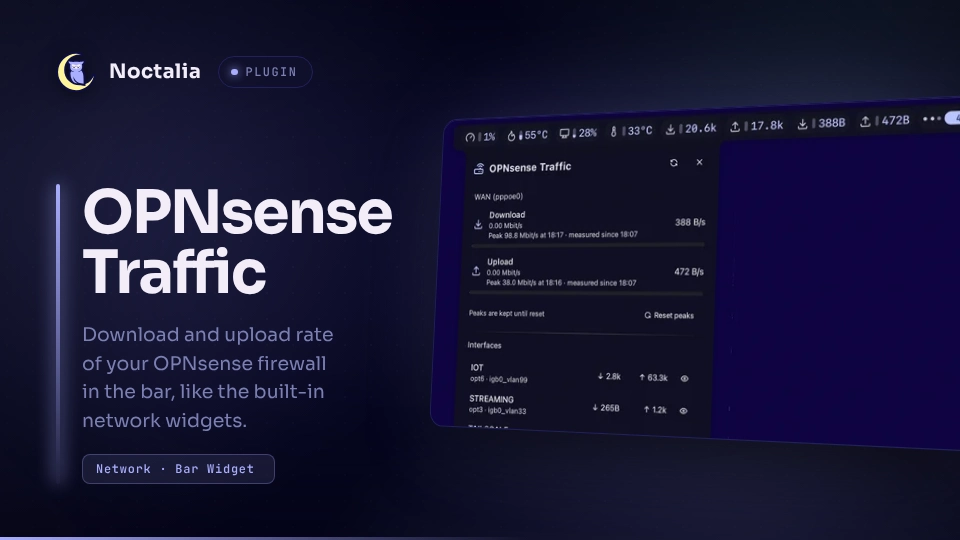
About
OPNsense Traffic
Shows the download and upload rate of one OPNsense interface in the bar, styled
like the built-in network_rx / network_tx widgets (glyph, gauge or graph,
value, same units and highlight gradient). Useful to see what the whole
network pulls through the firewall, not just the local machine.
Plugin
| Field | Value |
|---|---|
| ID | dmopp/opnsense-traffic |
| Entries | Bar widget: traffic; panel: panel; service: service |
Requirements
- An OPNsense firewall reachable over HTTPS from this machine.
curl,shandsedonPATHfor the reconnect fallback after a suspend (see Notes). Withoutcurlthe widget still works, it just shows--for up to ~15 minutes after waking up.- An API key for a user with the privilege Reporting: Traffic, plus Status: Interfaces (recommended: auto-detect and WAN recognition). Do not use an admin key.
Creating the API key
System → Access → Users → + (Add).
- Username: e.g.
noctalia-traffic - Password: tick Generate a scrambled password; the user never logs in to the web GUI.
- No group membership (not
admins).
- Username: e.g.
In the same dialog, field Privileges, select:
- Reporting: Traffic - required (
api/diagnostics/traffic/*) - Status: Interfaces - recommended (
api/interfaces/overview/*): needed for auto-detect and to recognise WAN interfaces by their default route
Save.
- Reporting: Traffic - required (
In the user list, create an API key for that user. OPNsense downloads
<hostname>_<user>_apikey.txtwith the lineskey=…andsecret=…. The secret is shown only this once.Store the file where the plugin looks for it:
mkdir -p ~/.config/noctalia-opnsense
mv ~/Downloads/*_noctalia-traffic_apikey.txt ~/.config/noctalia-opnsense/apikey.txt
chmod 600 ~/.config/noctalia-opnsense/apikey.txt
Check it. The first request must return
200, the second403:f=~/.config/noctalia-opnsense/apikey.txt u="$(sed -n 's/^key=//p' "$f"):$(sed -n 's/^secret=//p' "$f")" curl -s -o /dev/null -w '%{http_code}\n' -u "$u" https://opnsense.lan/api/diagnostics/traffic/interface curl -s -o /dev/null -w '%{http_code}\n' -u "$u" https://opnsense.lan/api/core/firmware/status
The same over the API, with an admin key in $ADMIN (key:secret):
curl -u "$ADMIN" -X POST -H 'Content-Type: application/json' \
  https://opnsense.lan/api/auth/user/add \
  -d '{"user":{"name":"noctalia-traffic","scrambled_password":"1","priv":"page-status-trafficgraph,page-status-interfaces"}}'
curl -u "$ADMIN" -X POST https://opnsense.lan/api/auth/user/add_api_key/noctalia-traffic
add_api_key takes the user name (not the UUID) and returns key and secret
as JSON.
Usage
Enable the plugin and open its settings (Settings → Plugins → gear). Set OPNsense URL and either Interface or Detect WAN automatically.
Add the bar widget
dmopp/opnsense-traffic:traffictwice, one with Direction Download and one with Upload, like the built-in pair:[widget.opnsense_rx] type = "dmopp/opnsense-traffic:traffic" direction = "download" [widget.opnsense_tx] type = "dmopp/opnsense-traffic:traffic" direction = "upload"Hover a widget for interface and both rates. Left-click opens the panel: both directions with current rate, line speed and peak, a Reset peaks button, and every interface on the firewall with its live rates. Click an interface to copy its identifier for the Interface setting, or its eye button to hide it. Hidden interfaces are listed collapsed at the bottom, where the eye button shows them again (interfaces hidden through the
hidden_interfacessetting can only be shown again there).
noctalia msg panel-toggle dmopp/opnsense-traffic:panel
Errors (no URL, key file missing, HTTP 401/403, unknown interface) show -- in
the bar and the reason in the tooltip and the panel.
Download and upload are always seen from the network behind an interface: on
WAN they are your internet download and upload, on a LAN or VLAN interface
download is what the clients in that network download. OPNsense counts from
the firewall's side, so the plugin flips the counters of every interface that
is not WAN-side (see wan_interfaces).
Settings
Plugin settings (shared by all widgets):
| Setting | Type | Default | Description |
|---|---|---|---|
url |
string |
"" |
Base URL of the OPNsense web GUI including the port, e.g. https://opnsense.lan:4443. A trailing /api is ignored. |
credentials_file |
file |
~/.config/noctalia-opnsense/apikey.txt |
File with key= and secret= lines, as OPNsense downloads it. |
interface |
string |
"" |
Identifier (opt1), description (WAN) or device (pppoe0), case-insensitive. |
wan_interfaces |
string_list |
[] |
Advanced. Interfaces whose counters are taken as they are (received = download). All others are flipped. Empty: interfaces with a default route plus any with wan in identifier or name, which covers OPNsense's default WAN and a PPPoE parent port named like it. Set it for other multi-WAN or transport interfaces. |
hidden_interfaces |
string_list |
[] |
Identifiers, names or devices to hide. Hidden interfaces get no panel row and their counters are not evaluated; the API still returns them, as OPNsense has no filter for this call. The interface shown in the bar is never hidden. |
auto_detect |
bool |
false |
Only while interface is empty: use the interface that carries the default route. Re-checked every 10 minutes. Needs Status: Interfaces. |
poll_interval |
int |
2 |
Seconds between two API requests (1-60). This is the only thing that sets the API load. |
line_down_mbit / line_up_mbit |
int |
0 |
Bandwidth of your line in Mbit/s. Scales gauge and graph and enables the highlight. 0 = adaptive: scale to the measured peak. |
peak_hold_hours |
int |
0 |
Adaptive scale only: how long a peak counts, in hours (up to 720). 0 keeps it until Reset peaks. |
highlight_from / highlight_full |
int |
50 / 90 |
Percent of the line speed where the value starts fading to the highlight color and where it reaches it. Needs a line speed. |
allow_insecure_tls |
bool |
false |
Advanced. Skip certificate checks, only for a self-signed GUI certificate. |
Widget settings (per bar widget, matching the built-in network widgets):
| Setting | Type | Default | Description |
|---|---|---|---|
direction |
select |
download |
download or upload |
speed_unit |
select |
auto |
auto, kb or mb (decimal, 1 kB = 1000 B) |
speed_compact |
bool |
false |
1.2M instead of 1.2 MB/s |
visualization |
select |
gauge |
gauge, graph (last 40 samples) or none; graph falls back to gauge on a vertical bar |
show_value / show_units |
bool |
true |
Show the value, with or without its unit |
label_min_width |
int |
0 |
Minimum width of the value, keeps the widget from jumping |
show_glyph |
bool |
true |
Show the glyph |
download_glyph / upload_glyph |
glyph |
download / upload |
Glyph for the widget's direction (only the matching one is shown in settings) |
glyph_position |
select |
before |
before or after the value |
highlight_color |
color |
error |
Color the value fades to near the line speed |
IPC
noctalia msg plugin dmopp/opnsense-traffic:service all refresh       # poll now, re-run auto-detect
noctalia msg plugin dmopp/opnsense-traffic:service all reset-peaks   # forget the peaks of the selected interface
noctalia msg plugin dmopp/opnsense-traffic:service all hide opt5      # hide an interface by identifier (like the eye button)
noctalia msg plugin dmopp/opnsense-traffic:service all unhide opt5    # show it again
Notes
- Network:
GET <url>/api/diagnostics/traffic/interfaceeverypoll_intervalseconds, andGET <url>/api/interfaces/overview/interfaces_infoevery 10 minutes to find the default route (auto-detect, WAN side). Without the Status: Interfaces privilege the second call fails quietly unless auto-detect needs it. HTTP basic auth with the API key, normally through Noctalia's HTTP client, for a while after a suspend throughcurl(see below). The key never shows up in a command line. Nothing else is contacted. - Files read:
credentials_file. The key is never stored in the Noctalia settings, so it does not end up insettings.tomlor in any export of it. - Files written:
peaks.jsonin the plugin data directory (noctalia.pluginDataDir()): per interface the highest rates since the last reset and the highest rate per 15-minute slot of the last 30 days. Written at most once a minute and on Reset peaks. - Files written:
hidden.jsonin the plugin data directory: the interface ids hidden with the eye button. Plugins cannot change their own settings, so the panel keeps its own list next tohidden_interfaces. - Rates are the difference of the interface byte counters between two
polls, so they are averages over
poll_interval. A counter that goes backwards (firewall reboot) is skipped for one sample. - Processes / reconnect fallback: Noctalia's HTTP client reuses one
HTTP/2 connection per host. After a suspend that connection is dead, and the
client keeps sending requests over it until the kernel drops the socket
(
tcp_retries2, about 15 minutes); plugins cannot request a fresh connection. So after a suspend (detected as a gap in the service tick) or a request timeout, the plugin polls for 20 minutes throughsh -c '… | curl -K - …'instead, then switches back. The shell reads key and secret fromcredentials_fileand passes them to curl on stdin, so they never appear in a command line. No other process is started.
Versions
| Version | Plugin API | Updated |
|---|---|---|
| v1.0.0 latest | 42 | Oct 27, 2026 |
Older versions stay installable on a Noctalia release whose plugin API is below the latest version's.