
Back to plugins 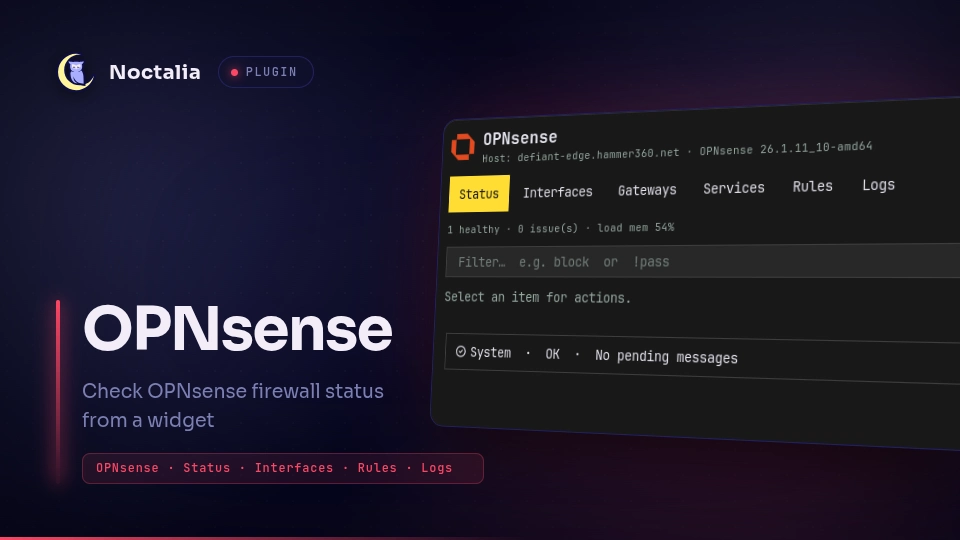
v1.1.7 davemhammer
About
OPNsense
Monitor OPNsense system health, interfaces, gateways, services, firewall rules, and recent firewall logs from Noctalia.
Plugin
| Field | Value |
|---|---|
| ID | davemhammer/opnsense |
| Entries | Bar widget: status; panel: manager; service: service; launcher: opn |
| Launcher Prefix | /opn |
Requirements
- Network access to your OPNsense REST API
- An API key + secret with permission to read status (and control services if you use restart/start/stop)
- On
PATH(declared inplugin.tomldependencies):curl— on-demand firewall log fetchjq— slim log JSON for the panelxdg-open— open the OPNsense web UI
Usage
Configure Base URL, API key, and API secret under plugin settings (key/secret are sensitive string fields).
Add the status bar widget (davemhammer/opnsense:status). Click to open the manager panel.
Panel tabs: Status, Interfaces, Gateways, Services, Rules, Logs. Logs load only when you open the Logs tab (last 100 events).
Launcher: /opn for categories and quick actions.
noctalia msg panel-toggle davemhammer/opnsense:manager
Settings
| Setting | Type | Default | Description |
|---|---|---|---|
base_url |
string |
https://192.168.1.1 |
OPNsense base URL (no trailing /api). |
api_key |
string |
(empty) | API key (basic auth username). |
api_secret |
string |
(empty) | API secret (basic auth password). |
allow_insecure_tls |
bool |
true |
Skip TLS certificate verification (default on for common LAN self-signed certs; set false when you have a trusted cert). |
refresh_interval |
int |
20 |
Core status poll interval in seconds. |
notify_on_issue |
bool |
true |
Notify when a new subsystem/gateway issue appears. |
web_ui_url |
string |
(empty) | Override URL for “Open Web UI”; empty uses base_url. |
show_label |
bool (widget) |
true |
Show OK / issue label on the bar. |
ok_color |
select (widget) |
tertiary |
Bar color when status is OK. |
warn_color |
select (widget) |
error |
Bar color when issues are present. |
IPC
noctalia msg panel-toggle davemhammer/opnsense:manager
noctalia msg plugin davemhammer/opnsense:service all refresh
noctalia msg plugin davemhammer/opnsense:service all logs
Notes
- Uses
noctalia.httpfor status/rules/services (Basic Auth). Log fetch usescurl+jqwith?limit=100so large log dumps do not stall Luau. Web UI opens viaxdg-open. - API credentials are stored in Noctalia settings (not in this repo). Prefer a restricted API key.
allow_insecure_tlsapplies to bothnoctalia.httpand the logcurlrequest. Default is true (verification skipped); turn it off when the firewall presents a certificate you trust.- Service control mutates the firewall only when you request start/stop/restart.
Versions
| Version | Plugin API | Updated |
|---|---|---|
| v1.1.7 latest | 10 | Aug 23, 2026 |
Older versions stay installable on a Noctalia release whose plugin API is below the latest version's.