
About
OpenVPN 3
Connect to VPNs with the OpenVPN 3 Linux client
from Noctalia. Noctalia's built-in VPN support covers NetworkManager protocols only, so it cannot drive openvpn3
sessions. This plugin imports your .ovpn profiles, connects and disconnects them, answers password, OTP and web-login
prompts, shows live status and traffic, and exposes the per-profile options of the client in a panel that works like the
desktop OpenVPN clients.
Plugin
| Field | Value |
|---|---|
| ID | vinioli/openvpn3 |
| Entries | Bar widget: bar; panel: panel; panel: picker; Control Center shortcut: toggle; service: service |
Requirements
openvpn3(the OpenVPN 3 Linux client and its D-Bus services) installed and running.busctl, which ships with systemd. The plugin talks to the client over the system D-Bus with it.- Optional:
curlfor importing a profile from a URL, andxdg-openfor web (SSO) sign-in. Both are only started when you use those features.
Tested against openvpn3 27.1 on Fedora with Niri.
Usage
Add the bar widget with type vinioli/openvpn3:bar under Settings → Bar → Widget List. Its icon shows the state, and
with the default display mode it also shows the active profile name. Left click opens the panel. Right click connects the
default profile or disconnects the active one, and cancels a connection that is still being made. Add the Control Center
shortcut vinioli/openvpn3:toggle in Settings for the same toggle.
Open the panel from a keybind or script:
noctalia msg panel-toggle vinioli/openvpn3:panel
The picker panel is the floating file chooser the + page opens; it can be opened the same way for testing:
noctalia msg panel-toggle vinioli/openvpn3:picker
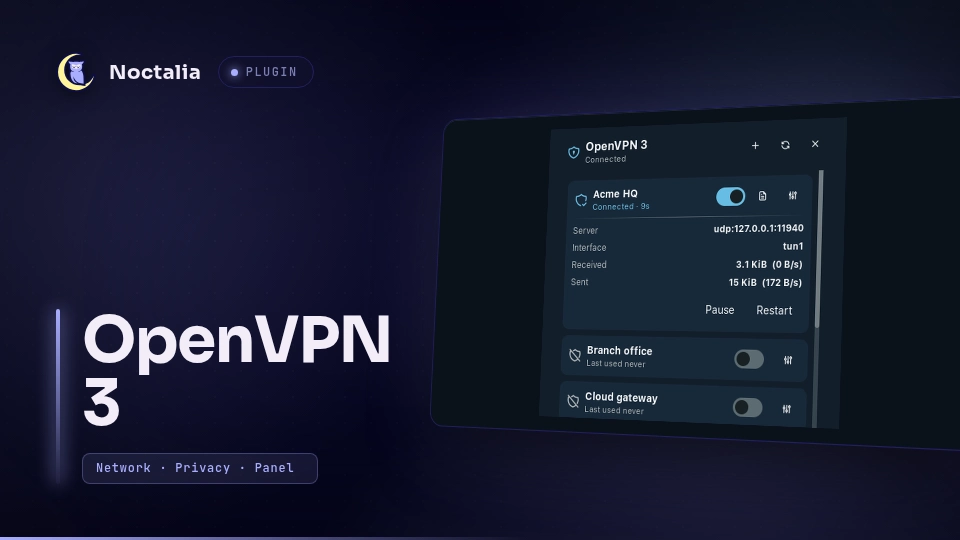
Profiles. Use the + button to add a profile from a file or from an https:// URL. The file button opens a small
floating file picker. Profiles are stored in the OpenVPN 3 configuration manager with --persistent, so they survive
reboots and nothing depends on where the original file lives. Each profile has a card with a connect switch, its status,
and a log button. A connected card shows the server, interface, bytes transferred and the current speed, with Pause and
Restart. Sessions you started from a terminal show up too.
Sign-in. If the profile needs input, the panel shows a form with exactly the fields the client asks for: username and password, a one-time code, a private-key passphrase, or a challenge response. Credentials go to OpenVPN 3 and are not stored by the plugin. Web (SSO) logins open your browser and the panel waits until you are connected. A notification tells you when input is needed while the panel is closed.
Options. The adjustments button on a card opens the profile options, stored on the profile by OpenVPN 3
(openvpn3 config-manage). Change what you need and press Apply.
| Section | Options |
|---|---|
| General | Rename, Data Channel Offload, persistent tunnel, connect at startup, retry after auth failure, automatic restart |
| Connection | Server and port override, IPv6, compression |
| Security | Minimum TLS version, TLS certificate profile, legacy algorithms |
| DNS | DNS scope, fall back to Google DNS, do not configure DNS, synchronous lookup |
| HTTP proxy | Host, port, username, password (write-only), cleartext authentication |
| Logging | Log level |
"Profile default" removes an override. Only one profile can have Connect at startup: it is stored as the
noctalia-autoconnect tag on the profile, and the plugin connects it once when Noctalia starts if nothing is connected
yet. A protocol (UDP/TCP) override is deliberately not offered: in openvpn3 27.1 the value is stored but has no effect
on the connection.
Log. The log button shows the connection log of a session, newest first, and can copy it. OpenVPN 3 delivers log events live, so the log starts when the plugin creates the session or when you first open it.
Notifications. Connected, resumed, paused, connection lost and reconnecting, disconnected, and failed, for sessions started anywhere.
Settings
Configured under Settings → Plugins, on the gear of this plugin.
| Setting | Type | Default | Description |
|---|---|---|---|
default_profile |
string |
empty | Profile name used by the right click and the Control Center shortcut. Empty uses the first valid profile. |
notifications |
bool |
true |
Notify about connections that are made, lost, paused or failed. |
single_session |
bool |
true |
Disconnect other sessions before connecting a profile. |
connect_timeout |
int |
45 |
Seconds to wait for a connection before giving up (10 to 300). It does not run while waiting for your input. |
poll_seconds |
int |
5 |
How often sessions and traffic are refreshed (2 to 60). While connecting it refreshes every second. |
display_mode |
select |
name |
icon shows only the icon, name also shows the active profile. |
IPC
noctalia msg plugin vinioli/openvpn3:service all <action> [payload]
| Action | Payload | Effect |
|---|---|---|
connect |
profile name | Connect the profile. Without a payload it uses default_profile. |
disconnect |
optional JSON {"path": "<session path>"} |
Disconnect that session, or every session. |
toggle |
none | Connect the default profile, or disconnect everything. |
cancel-auth |
none | Cancel the connection being made or the sign-in prompt. |
refresh |
none | Re-read profiles and sessions. |
pause, resume, restart |
JSON {"path": "<session path>"} |
Manage a session. |
import |
JSON {"file": "...", "name": "..."} or {"url": "https://...", "name": "..."} |
Import a profile. |
remove |
JSON {"path": "<profile path>"} |
Remove a profile. |
set-options |
JSON {"path": "...", "options": {"dco": true, "tls-version-min": "tls_1_3"}, "rename": "..."} |
Change profile options. An empty string removes an override. |
The panel and picker use the same commands, so every action can be scripted.
Notes
- Processes:
openvpn3andbusctlfor everything.curl(andmktemp/rm) for URL imports,xdg-openfor web sign-in,findto list folders in the file picker, andtimeoutaroundopenvpn3 log. Nothing runs with elevated privileges: the OpenVPN 3 services do the privileged work. - Network: only what you ask for. A URL import downloads the one address you enter, over
httporhttps. - Files: none are written by the plugin. A URL import uses a temporary file that is deleted right after the import.
- Credentials: they are passed to the OpenVPN 3 session manager through
busctlarguments, so another process running as the same user could read them from the process list for a few milliseconds. The proxy password is write-only and is never shown or logged. The plugin logs option names, never values. - Single user: profiles are owned by the user who imported them, as with the
openvpn3command line. - State mapping: session states follow the
StatusMinorcodes of the client. If a profile shows an unexpected state, checkopenvpn3 sessions-listandopenvpn3 session-manage --path <session> --show.
Versions
| Version | Plugin API | Updated |
|---|---|---|
| v1.0.0 latest | 24 | Oct 13, 2026 |
Older versions stay installable on a Noctalia release whose plugin API is below the latest version's.