
About
OpenCode Companion
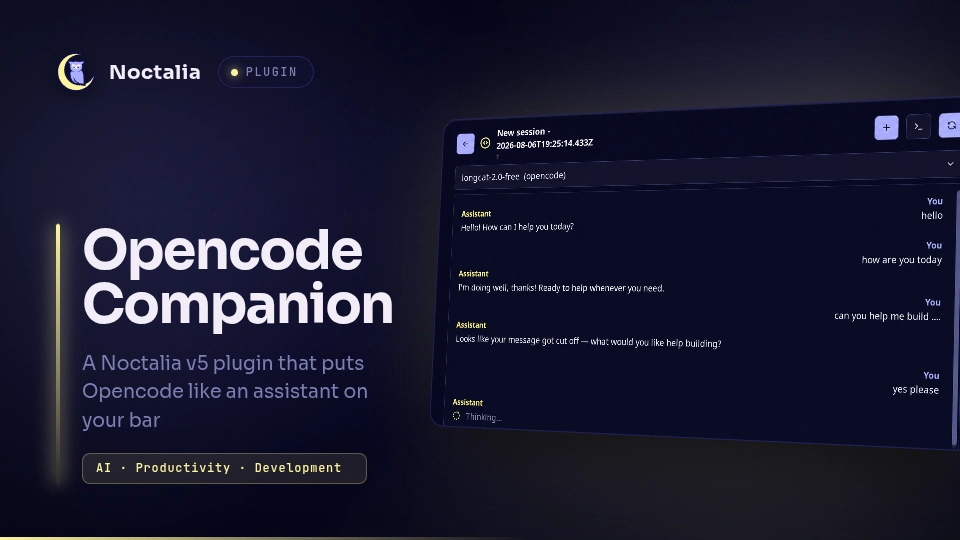
A Noctalia v5 plugin that puts OpenCode on your bar — a glanceable status dot, a native chat panel, session management, and MCP status — all driven by the OpenCode HTTP API. No embedded terminal, no key emulation.
Plugin
| Field | Value |
|---|---|
| ID | weinguyen/opencode-companion |
| Entries | Bar widget: widget; panels: panel-fill, panel; service: service |
| Plugin API | 3 |
Built and tested against:
- Noctalia v5.0.0 (97917d9ca07e)
- OpenCode v1.18.13
Requirements
- Noctalia v5 (beta or newer) with
plugin_api >= 3support - OpenCode installed and available on your
PATH(opencode --versionto verify) - A configured OpenCode provider (run
opencodeonce to set up auth)
Install
# Clone the community-plugins repo (if you haven't already)
git clone https://github.com/... community-plugins

# Symlink into Noctalia plugins directory
ln -s "$PWD/community-plugins/opencode-companion" ~/.local/share/noctalia/plugins/opencode-companion

# Enable the plugin
noctalia msg plugins enable weinguyen/opencode-companion
Usage
Adding the widget to your bar
- Open Noctalia Settings → Bar
- Click Add Widget
- Select OpenCode Companion (the code-circle icon)
- The widget appears on your bar
Opening the panel
- Left click the bar widget → opens/closes the panel
- Right click → quick-create a new session
- Middle click → open current session in terminal (
opencode attach)
Panel workflow
When you first open the panel (after a reboot), the session chooser appears. From there you can:
- Create a new session
- Pick an existing session (sorted by most recently updated)
- Filter sessions by workspace (visible in the subtitle)
Once a session is selected, the chat view shows:
- Message history (user + assistant)
- Tool call status cards (if enabled)
- Reasoning text (if enabled)
- Streaming responses as they arrive
Type a prompt in the composer and press Enter or click Send.
IPC
# Toggle the panel (full-height, right side)
noctalia msg panel-toggle weinguyen/opencode-companion:panel-fill

# Toggle the panel (compact, near click)
noctalia msg panel-toggle weinguyen/opencode-companion:panel

# Force refresh
noctalia msg plugin weinguyen/opencode-companion:service all refresh

# Reconnect to server
noctalia msg plugin weinguyen/opencode-companion:service all reconnect

# Create a new session
noctalia msg plugin weinguyen/opencode-companion:service all create_session
Settings
| Setting | Type | Default | Description |
|---|---|---|---|
server_mode |
string | "auto" |
"auto" manages a local server; "external" connects to a URL |
server_host |
string | "127.0.0.1" |
Hostname the managed server binds to (loopback only) |
server_port |
double | 4096 |
Port the managed server listens on |
server_url |
string | "" |
External server URL (used in "external" mode) |
default_workspace |
folder | "" |
Default working directory for new sessions |
default_model |
string | "" |
Default model in provider/model format |
default_agent |
string | "build" |
Default agent for new sessions |
auto_start |
bool | true |
Auto-start the managed server |
show_tool_calls |
bool | true |
Show tool call status cards |
show_reasoning |
bool | false |
Show reasoning/thinking text |
max_messages_load |
double | 50 |
Max messages to load per session |
debug_logging |
bool | false |
Print debug messages |
Session Lifecycle
Within the same boot
- Selecting a session, closing the panel, and reopening it preserves the active session
- Draft text is preserved when the panel closes
- Unread responses are tracked and shown as a badge on the bar widget
- The SSE connection stays alive while the panel is closed
After reboot
- The plugin detects reboot via
/proc/sys/kernel/random/boot_id - After reboot, the session chooser appears instead of auto-opening the last session
- Old sessions are still available to select
- The active session is persisted to
~/.local/state/noctalia/opencode-companion/opencode_state.json
Boot-ID behavior
| Condition | Behavior |
|---|---|
| Boot ID matches saved state | Restore active session on first open |
| Boot ID differs (reboot) | Show session chooser; keep session list |
| Saved session no longer exists | Show session chooser |
Security Notes
- Loopback only: The managed server binds to
127.0.0.1by default - No credential storage: The plugin does not store API keys or tokens
- Shell quoting: All paths and arguments are shell-escaped before command execution
- No auto-approve: Permission requests are never auto-approved
- No secret logging: Passwords and tokens are not written to logs
When running in auto mode without authentication, any local process can reach the managed server. For multi-user systems, consider:
- Setting
OPENCODE_SERVER_PASSWORDbefore starting the server - Using
externalmode with a password-protected server
MCP Status
The plugin reads MCP status from OpenCode's /mcp endpoint. To check Context7 and Firecrawl:
curl http://127.0.0.1:4096/mcp | jq
Example response:
{
  "context7": { "status": "connected" },
  "firecrawl": { "status": "connected" },
  "github": { "status": "connected" }
}
Status values: connected, failed, disabled.
The plugin does not add or configure MCP servers — it only reports their status. Configure OpenCode MCP servers through your opencode.json or the TUI.
Troubleshooting
Widget shows offline
# Verify opencode is on PATH
which opencode

# Start a server manually to test
opencode serve --hostname 127.0.0.1 --port 4096 &

# Check health
curl http://127.0.0.1:4096/global/health
Server fails to start
# Check for port conflicts
ss -tlnp | grep 4096

# Try a different port in plugin settings
Panel doesn't open
# Verify plugin is enabled
noctalia msg plugins list

# Try toggling manually
noctalia msg panel-toggle weinguyen/opencode-companion:panel
SSE events not arriving
OpenCode 1.14.42+ had SSE regressions. Upgrade to 1.18.13+ if events stop flowing. The plugin handles reconnection with exponential backoff.
Debug logging
Enable debug_logging in plugin settings, then check Noctalia logs:
journalctl --user -u noctalia -f
Logs
Debug output (when enabled) is prefixed with [opencode-companion]. Look for:
- Connection state changes
- SSE events received
- IPC messages handled
- HTTP request failures
Known Limitations
- No
ui.markdown: Responses are rendered as plainui.label. Code blocks lose syntax highlighting. - Single-line composer fallback: If
multilineinput is not fully supported, the composer falls back to single-line. - Panel layer: Panels render at
Layer::Top— notifications and polkit prompts may cover the panel. - No desktop orb: Initial release includes only the bar widget. A desktop presence orb is planned.
- Boot-ID edge case: If the boot ID file is unreadable, session restoration is skipped.
- SSE reconnection: After server restart, SSE reconnects with backoff (up to 30s delay).
- No model/agent switching mid-session: Model and agent are set at session creation.
Uninstall
# Disable the plugin
noctalia msg plugins disable weinguyen/opencode-companion

# Remove the symlink
rm ~/.local/share/noctalia/plugins/opencode-companion

# Optionally remove saved state
rm -rf ~/.local/state/noctalia/opencode-companion
Roadmap
- Desktop presence orb
- Model/agent switching from header
- Session rename/delete from panel
- MCP status panel
- Multi-workspace profiles
-
ui.markdownsupport when available - Attachment support (images, files)
License
Versions
| Version | Plugin API | Updated |
|---|---|---|
| v0.2.0 latest | 21 | Aug 12, 2026 |
| v0.1.0 | 3 | Aug 9, 2026 |
Older versions stay installable on a Noctalia release whose plugin API is below the latest version's.