
About
Noctes
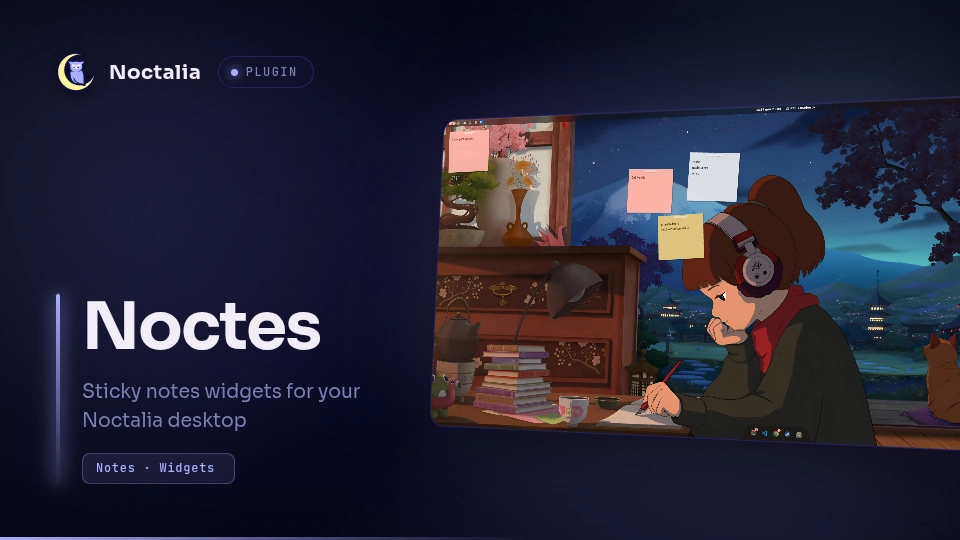
Sticky notes on your desktop rather than in a window. Each note is its own desktop widget - a sheet of paper at a small random angle, a strip of tape on top, in a colour drawn from your Noctalia palette - sitting above the wallpaper and below every window. Writing happens in a small panel that opens when you click a sheet.
Plugin
| Field | Value |
|---|---|
| ID | remo/noctes |
| Entries | Bar widget: bar; panel: panel; service: service; desktop widget: note |
Requirements
python3 on PATH. It runs tools/noctes-widget, the helper that adds,
removes and tilts sheets, because a widget's rotation, its background panel and
the widget entry itself are host state in settings.toml that no plugin call
can write. See Notes.
Usage
The first sheet
noctalia msg plugin remo/noctes:service all desk
That puts a sheet on the focused output, tilted, coloured and bound to a note of
its own. tools/noctes-widget is what writes it into settings.toml, since no
plugin call creates a desktop widget.
Noctalia's editor does it too, for anyone who would rather click: Settings -> Desktop -> Widgets -> Toggle Editor, add a Noctes widget, then Done. A widget added that way appears square, grey and framed. A moment later the service notices a sheet with no note behind it and adopts it: a key of its own, a small angle, no frame.
Everything after that
Click a sheet. The panel opens on that note, and it is the only view: title, body, colour chips, and a toolbar with
- + - a new sticker, note and sheet together
- arrows - hands the desk back to Noctalia's widget editor, for dragging, resizing and rotating
- gear - this plugin's settings
- bin - deletes the note and takes its sheet off the desktop
The bar widget shows the note count and opens the panel. To open the panel from a keybind:
noctalia msg panel-toggle remo/noctes:panel
Typing lives in the panel because desktop widgets are background layer-shell surfaces and never take keyboard focus.
Colours
A note with no colour of its own is dynamic: it derives one from its key, so
neighbouring sheets rarely match and each keeps its look across restarts. With
Paper follows the theme on, that draws from primary, secondary, tertiary
and error, each with its own on_* text role - so on a generated scheme the
whole wall recolours with your wallpaper. Off, it draws from eight classic
papers.
Picking a chip fixes a note's colour. Besides the eight papers there is glass, a translucent pane with a hairline edge, and black, the one sheet written in white ink. A caption under the chips always names the mode.
Settings
Plugin-wide:
| Setting | Type | Default | Description |
|---|---|---|---|
default_color |
select |
auto |
Colour new notes get. auto leaves it to the sheet's key. |
theme_colors |
bool |
true |
Dynamic notes draw from the palette instead of the classic papers. |
tilt |
bool |
true |
Sheets sit at a small random angle. Off squares every one of them; on gives each a new angle. Rewrites settings.toml. |
paper_opacity |
double |
0.96 |
How solid a sheet is. Text stays fully opaque. |
save_path |
string |
(empty) | Folder for notes.json. Empty uses the plugin's data directory. |
Per sheet, in the widget's own settings:
| Setting | Type | Default | Description |
|---|---|---|---|
key |
string |
(empty) | Which note this sheet shows. Generated; set it only to point a sheet at a particular note. |
color |
select |
auto |
Overrides the note's colour for this sheet. |
fold |
select |
none |
Dog-ears a bottom corner. Off by default: a diagonal can only be drawn as a staircase here, and it shows. |
tape |
select |
auto |
Whether a strip of tape is drawn, and where. auto decides from the key. |
paper_width |
int |
220 |
Paper width in px. |
paper_height |
int |
200 |
Paper height in px. |
font_size |
int |
16 |
Body size in pt; the title is three larger. A handwriting font needs more than a UI font. |
max_lines |
int |
14 |
Body lines before the text is elided. |
show_title |
bool |
true |
Draw the note title above the body. |
opacity_override |
double |
0.0 |
Opacity for this sheet alone; 0 follows the plugin-wide value. |
shadow |
bool |
true |
Draw the drop shadow. |
use_theme_colors |
select |
inherit |
Force theme colours on or off for this sheet. |
font_path |
string |
PatrickHand-Regular.ttf |
Font the note is drawn in. Plugin-relative, absolute or ~; empty uses the shell font. |
IPC
noctalia msg plugin remo/noctes:service all desk            # note and sheet together
noctalia msg plugin remo/noctes:service all new "buy milk"  # note only
noctalia msg plugin remo/noctes:service all open work       # select the note keyed "work",
                                                            # creating it if absent
noctalia msg plugin remo/noctes:service all move            # toggle the widget editor
noctalia msg plugin remo/noctes:service all reload          # re-read notes.json
desk, new and open all select what they touch, so pairing one with
noctalia msg panel-toggle remo/noctes:panel gives a single-keybind quick note.
Notes
Files written. notes.json in save_path, or in the plugin's data
directory when that is empty, plus a one-line tilt.state beside it. Writes are
debounced onto a two second tick.
Noctalia's settings.toml. A desktop widget's rotation, its background
panel and the widget entry itself are host state, and no plugin call reaches
them - so a plugin that creates its own sheets, tilts them or takes them down
has to edit that file. tools/noctes-widget does, and every write backs the
file up first, runs noctalia config validate, and restores the backup if
validation fails. It touches only desktop_widgets entries whose type is
remo/noctes:note, and the plugin's own plugin_settings block is read, never
written.
Process spawned. python3 tools/noctes-widget, for the above, and
noctalia msg desktop-widgets-toggle-edit for the toolbar's move button.
Nothing else.
No network access. Nothing is fetched or sent.
Font. PatrickHand-Regular.ttf ships with the plugin and is the default.
Patrick Hand by Patrick Wagesreiter, SIL Open Font License 1.1, in
PatrickHand-OFL.txt.
Debugging. Noctalia logs to stdout, which most ways of starting it discard.
pkill -x noctalia; nohup noctalia >/tmp/noctalia.log 2>&1 & makes plugin
errors visible.
Versions
| Version | Plugin API | Updated |
|---|---|---|
| v0.19.1 latest | 26 | Sep 23, 2026 |
Older versions stay installable on a Noctalia release whose plugin API is below the latest version's.