
About
Niri Workspace Stack
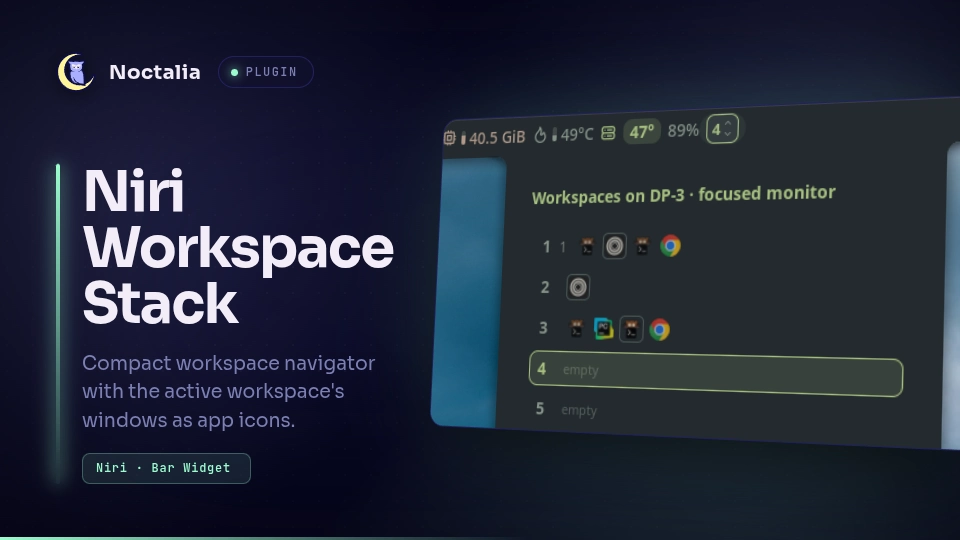
A compact view of your niri workspaces for a horizontal Noctalia bar: the workspaces of the bar's own monitor in niri's vertical order, with the windows of the active workspace as clickable app icons next to it. The default Navigator mode is a small badge that opens a list of the monitor's workspaces and windows; two alternative modes (Numbered rail, Mini map) draw the stack directly in the bar. Each bar can use a different mode.
Plugin
| Field | Value |
|---|---|
| ID | johnnyp0t/niri-workspace-stack |
| Entries | Bar widget: stack; panel: navigator (the workspace list, opened from the widget) |
Requirements
- niri 25.08 or newer (window positions in the scrolling layout), with
nirionPATHandNIRI_SOCKETset (both are standard in a niri session). Outside niri the widget hides itself. - Noctalia with plugin API 32 (v5.2.0+).
Usage
Enable the plugin, then add Niri Workspace Stack to a bar from Settings → Bar → Add widget. Put one on every bar whose monitor you want to see: each instance shows only its own output.
The navigator list opens from the widget; it can also be toggled by hand, optionally for a given monitor (without one it shows the monitor of the last hovered widget, or the focused one):
noctalia msg panel-toggle johnnyp0t/niri-workspace-stack:navigator
noctalia msg panel-toggle johnnyp0t/niri-workspace-stack:navigator DP-1
Switch the mode in the widget's settings (Display mode); the widget rebuilds immediately. New widgets start in Navigator; a mode you already saved is kept.
| Mode | In the bar | Interaction |
|---|---|---|
| Navigator (default) | A small badge with the active workspace's name (or number when it has none) and ▲▼ hints for workspaces above/below | Click the badge for a list of every workspace on this monitor with number, name and app icons; click a row to switch or an icon to focus |
| Numbered rail | Active workspace number (accent + underline on the focused monitor, muted elsewhere), a vertical rail: long accent pill = active, solid = occupied, outline = empty, red = urgent; dots above/below = more workspaces | Click a pill to switch |
| Mini map | Number + one row per workspace with a dot per window (bright dot = focused window, solid = the workspace's current window, outline ring = empty, bar = more than four) | Click a row to switch |
In every mode:
- the window icons of the active workspace sit on the right; the one with keyboard focus is highlighted (there is only ever one, on the focused monitor); on other monitors a thin outline marks the workspace's current window;
- scrolling over the widget moves one workspace up/down on that bar's monitor (the pointer may move, see Known limitations);
- clicking the capsule outside a workspace or icon opens the navigator list;
- hovering explains the element: workspace number and full name, whether it is active and on the focused monitor, the window count and apps; for a window its full title, app name and app id, floating and focus state.
Named workspaces
Workspaces named in the niri config (workspace "web" { … }) or at runtime (niri msg action set-workspace-name)
show their name instead of the number in the badge and next to the rail / mini map; unnamed ones show the number.
Names longer than 10 characters are shortened with … in the bar (the width is capped as well), the panel shows the
number and up to 16 characters of the name, and tooltips always show the full name. Renames arrive through niri's
event stream like any other change.
Settings
| Setting | Key | Type | Default | Description |
|---|---|---|---|---|
| Display mode | displayMode |
select | navigator |
navigator, numbered_rail or mini_map |
| Visible workspaces | visible_workspaces |
int, 1–4 | 3 |
Rail and mini map; centered on the active workspace, limited to what fits the bar height |
| Show numbers | show_numbers |
bool | true |
Active workspace number (or name) next to the rail / mini map |
| Show windows | show_windows |
bool | true |
Window icons of the active workspace |
| Show empty workspaces | show_empty |
bool | true |
false hides empty, inactive workspaces (including niri's trailing one) |
| Maximum window icons | max_windows |
int, 0–32 | 8 |
The rest collapse into +N; 0 shows all |
| Window icon size | icon_size |
double, 12–28 px | 18 |
|
| Indicator size | indicator_size |
double, 0.75–1.5 | 1.0 |
Scales indicators, numbers and spacing |
| Compact spacing | compact |
bool | false |
Tighter gaps |
Colors come from the active Noctalia theme (primary, on_surface, surface_variant, error).
The navigator panel uses the standard panel settings in Settings → Plugins (Attached / Floating, position, Open Near Click); the defaults are attached and opened near the clicked widget.
IPC
noctalia msg plugin johnnyp0t/niri-workspace-stack:stack all resync          # re-read the full state from niri
noctalia msg plugin johnnyp0t/niri-workspace-stack:stack all diag            # log one state dump per instance
noctalia msg plugin johnnyp0t/niri-workspace-stack:stack all debug on        # in-bar debug label + tooltip (off to hide)
noctalia msg plugin johnnyp0t/niri-workspace-stack:stack DP-1 mode mini_map  # try a mode without saving it
noctalia msg plugin johnnyp0t/niri-workspace-stack:stack DP-1 mode           # back to the configured mode
diag writes a few lines per widget to the Noctalia log (~/.cache/noctalia/noctalia.log): the widget's output and
mode, the focused output and window, every workspace as idx=id(window count) per output, the last processed event
and an invariant check. Nothing is logged continuously.
Notes
How it works
Every widget instance runs one long-lived niri msg --json event-stream and keeps a model of niri's workspaces and
windows that mirrors niri's own reducer (niri-ipc/src/state.rs). There is no polling: niri sends the full state on
connect, then incremental events; the stream reconnects with backoff if niri restarts.
Workspaces and windows are tracked by niri's stable ids. An action looks the target up by id in the current state and only then turns it into a niri command:
| Target | Command |
|---|---|
| Named workspace | niri msg action focus-workspace <name> (niri resolves the output) |
| Workspace on the focused output | niri msg action focus-workspace <idx> |
| Workspace on another output | niri msg action focus-monitor <output>, then focus-workspace <idx> |
| Window | niri msg action focus-window --id <id> |
(niri msg cannot address a workspace by id, and an index always refers to the focused output, hence the
focus-monitor step.)
Processes started
- One
/bin/sh -creconnect loop aroundniri msg --json event-streamper widget instance, ended when the widget is removed, reloaded or its settings change (Noctalia kills the whole process group). - One more for the navigator panel, from its first opening until the plugin is reloaded or disabled.
niri msg action …once per click or wheel step.niri msg --json workspaces/windowsonly if a stream line could not be decoded (Noctalia drops lines over 64 KiB), or on theresyncIPC event.
No network access, no file writes. The widget stores its output name in the plugin's in-memory shared state so the navigator panel knows which monitor's list to show.
Known limitations — Mouse cursor warping
Switching a workspace or a window through the plugin (wheel, workspace click, Navigator list, window icon) can move the mouse cursor to the center of the newly focused window.
- The plugin switches through niri IPC (
niri msg action focus-workspace …,focus-window --id …). Withwarp-mouse-to-focusenabled in niri'sinputsection, niri moves the pointer after these actions; a focus change to another monitor moves it there regardless of the setting. - Noctalia's built-in workspaces widget switches through the ext-workspace Wayland protocol, which niri handles without moving the pointer.
- Binding the wheel to Noctalia's
workspace-switchthrough the widget's gesture mapping ([widget.actions]) was tried and did not work in the tested Noctalia build: even after the bar was rebuilt, the bindings did not show up. The reason has not been established yet. - Noctalia's public plugin API gives no direct access to ext-workspace or foreign-toplevel activation.
The plugin does not change your niri config and does not move the pointer back. If this matters more than warping,
warp-mouse-to-focus can be turned off in niri.
Future improvements
Window previews in the Navigator list. Not implemented: there is no safe way to do it today.
- Noctalia's plugin API has no capture call:
ui.imageonly shows image files, and the core's window thumbnails (used by its own window switcher) are not exposed to plugins. - niri 26.04 implements
wlr-screencopy(whole outputs only), but notext-image-copy-capturewithext-foreign-toplevel-image-capture-source, the Wayland protocols for capturing a single window. niri msg action screenshot-window --id N --path …works, but it also replaces the clipboard on every capture, writes full-size PNGs to disk and runs one process per window on every hover, so it is not suitable for hover previews.
A realistic path: a plugin API for one-shot, size-bounded window thumbnails (Noctalia's core already has
ToplevelThumbnailCapture) once niri supports per-window capture. Until then the window tooltips show the full title and app. A schematic preview (window rectangles drawn from niri's layout data, no pixels) would work without capture.- Noctalia's plugin API has no capture call:
Switching without moving the cursor (see Known limitations). Possible directions to look into: why the widget gesture mapping did not apply, a public plugin API for switching a workspace by id, and window activation without a pointer warp. No solution is planned yet.
Panel output without the hover handoff, if Noctalia passes the opening bar's output to plugin panels.
Versions
| Version | Plugin API | Updated |
|---|---|---|
| v0.3.1 latest | 32 | Oct 21, 2026 |
Older versions stay installable on a Noctalia release whose plugin API is below the latest version's.