
About
Niri Workspace Preview
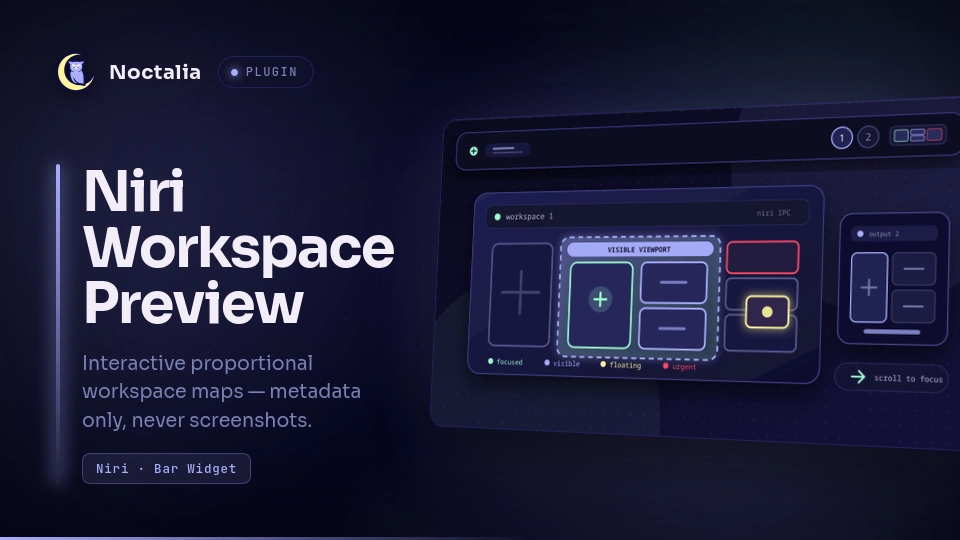
Niri Workspace Preview draws a tiny, proportional map of the windows in every currently active Niri workspace. It shows layout and optional application icons without capturing or displaying any window content.
Plugin
| Field | Value |
|---|---|
| ID | teagar/niri-workspace-preview |
| Entries | Bar widget: preview; service: workspace-state |
Requirements
nirionPATH, running as the current Wayland compositor. The plugin reads workspace and window layout metadata fromniri msg --json event-stream.- A Noctalia build with plugin API 17 or newer.
Usage
Enable the plugin, then open Settings → Bar, choose a bar section and add Niri Workspace Preview. Its background service starts with the plugin and feeds every placed widget instance.
Each outlined map represents the active workspace on one connected output, ordered by the output's physical position. Its outer shape follows the whole scrolling workspace rather than the monitor. Tiled windows follow Niri's columns and stacks. A single scale is used on both axes, so every miniature keeps the aspect ratio of Niri's reported tile and every open tiled window is shown.
The default Automatic size mode lets that complete layout determine the map's shape. Fixed mode instead uses an explicit frame width and height; the same complete layout is uniformly scaled and centered inside it, so fixing the frame never stretches individual windows.
The Visible viewport settings form one logical block in the widget editor. They can highlight visible windows inside the complete map, add a second monitor-shaped map, or do both. Color and border thickness are shared by both presentations. The reconstruction preserves its current column range and scrolls only when focus leaves that range, matching Niri's minimal-scroll behavior instead of always rebuilding from the left or right. Its anchor is kept across widget setting reloads, so changing visual options does not move the reconstructed viewport. Floating windows can appear either in a compact strip or in a separate viewport that preserves their exact Niri position and size. Exact-position windows use a distinct configurable color and, when icons are enabled, show their locally resolved application icon in the center. If Niri omits coordinates for a floating window, only that window falls back to the compact strip. Window-state colors are configurable. The output frame continues to use the theme's primary color when focused.
Click a window miniature to focus that Niri window. In exact floating mode, a single floating window is focused directly; when several overlap in the shared viewport, repeated clicks cycle from newer to older windows. Click empty widget space to toggle Niri's overview. Because Noctalia's bar renderer gives the last child of a tiny stacked column the whole column hitbox, repeated clicks on a stack cycle through its windows from top to bottom. Hover for the active workspace and window count on each output. Window miniatures under the pointer receive a configurable hover outline. Because the bar host exposes a stacked column as one pointer region, hovering a stack highlights all windows in that column rather than guessing a row. Scroll down over the widget to focus the column on the right and scroll up to focus the column on the left. Invert scroll direction reverses this mapping; Noctalia's standard Enable Scroll setting can disable it entirely.
Settings
| Setting | Type | Default | Description |
|---|---|---|---|
size_mode |
select |
auto |
Use content-driven automatic sizing or an explicitly sized fixed frame. |
preview_size |
int |
24 |
Cross-axis size of each output preview in logical pixels. |
max_output_length |
int |
160 |
Maximum length of one workspace map along the bar; reaching it shrinks both axes together. |
fixed_width |
int |
96 |
Width of each frame in fixed mode, in logical pixels. |
fixed_height |
int |
24 |
Height of each frame in fixed mode, in logical pixels. |
output_gap |
int |
3 |
Space between output previews in logical pixels. |
window_gap |
int |
1 |
Space between miniature windows in logical pixels. |
viewport_mode |
select |
off |
Disable the feature, highlight visible windows in the full map, add a separate map, or use both. |
viewport_color |
color |
tertiary |
Border color for visible windows; window-state and hover colors take priority. |
viewport_border_width |
int |
2 |
Thickness of the viewport border in logical pixels. |
show_icons |
bool |
true |
Resolve and show local application icons when a miniature is large enough. |
normal_color |
color |
outline |
Fallback color for inactive tiled windows. |
active_color |
color |
secondary |
Color for each workspace's active window (is-active=true). |
urgent_color |
color |
error |
Color for windows requesting attention (is-urgent=true). |
show_floating |
bool |
true |
Show floating windows using the selected floating mode. |
floating_mode |
select |
strip |
Use a compact strip or a proportional viewport with exact positions. |
floating_color |
color |
#ffb74d |
Color for floating windows in compact and exact-position modes. |
highlight_focused |
bool |
true |
Highlight the window holding keyboard focus. |
focused_color |
color |
primary |
Color used by the focused-window highlight (is-focused=true). |
invert_scroll |
bool |
false |
Reverse left/right column navigation while scrolling over the widget. |
highlight_hovered |
bool |
true |
Outline the window miniature or stacked column under the pointer. |
hover_color |
color |
secondary |
Border color used for the hover highlight. |
IPC
Force the widget to republish or redraw its current in-memory state:
noctalia msg plugin teagar/niri-workspace-preview:workspace-state all refresh
noctalia msg plugin teagar/niri-workspace-preview:preview all refresh
Notes
No screenshots. The plugin only reads Niri's window IDs, app IDs, workspace assignments, focus state, floating state, tile positions and tile sizes. It cannot display window contents or titles in the map. Titles, process IDs and focus timestamps received from Niri are discarded before state is published to the widget.
Window-state colors. Niri 26.04 publishes is_focused, is_floating and
is_urgent; the plugin derives is-active from each workspace's
active_window_id. Color priority is focused, urgent, hover, active, floating,
viewport, then normal. The rule matchers is-active-in-column,
is-window-cast-target and at-startup are not exposed by Niri's window IPC,
so the plugin deliberately does not offer misleading colors for them.
Processes. One long-lived niri msg --json event-stream subscription feeds
the service. A small static POSIX-shell loop reconnects it with increasing
delays if Niri restarts. Widget state changes use a 120 ms trailing debounce so
pointer-frequency move/resize events keep the last valid preview visible and
coalesce into one redraw. Normal operation performs no compositor polling.
Clicking the widget runs niri msg action toggle-overview.
Icons. Icons are resolved locally through Noctalia's desktop-entry and icon theme lookup, cached by app ID in each widget runtime and omitted when no icon matches or the miniature is too small.
No network or persistent data. The plugin makes no network requests. Exact
floating mode writes tiny generated SVGs under XDG_RUNTIME_DIR so the bar can
render overlapping coordinates; they are removed when the widget exits.
Scrolling and floating layouts. Niri exposes every tiled window's column, row and tile size, but optional viewport coordinates are not guaranteed. The widget lays out every column in order and scales the complete workspace as one unit. If the configured maximum length is reached, both axes shrink by the same factor, so window proportions remain unchanged. Floating coordinates are relative to Niri's current workspace viewport, so exact mode intentionally shows them in their own monitor-shaped viewport rather than mixing that coordinate system with the complete scrolling layout.
Visible viewport reconstruction. Niri documents tiled viewport positions
as optional and leaves them unset on some releases, including 26.04 in normal
scrolling layouts. In that case the plugin keeps a stateful viewport from the
focused column, output width and reported column widths. It follows the same
minimal-scrolling behavior as center-focused-column "never", but cannot
reproduce manual view-offset actions, partially clipped columns or custom gaps
pixel-for-pixel.
Versions
| Version | Plugin API | Updated |
|---|---|---|
| v1.0.0 latest | 17 | Sep 25, 2026 |
Older versions stay installable on a Noctalia release whose plugin API is below the latest version's.