 Noctalia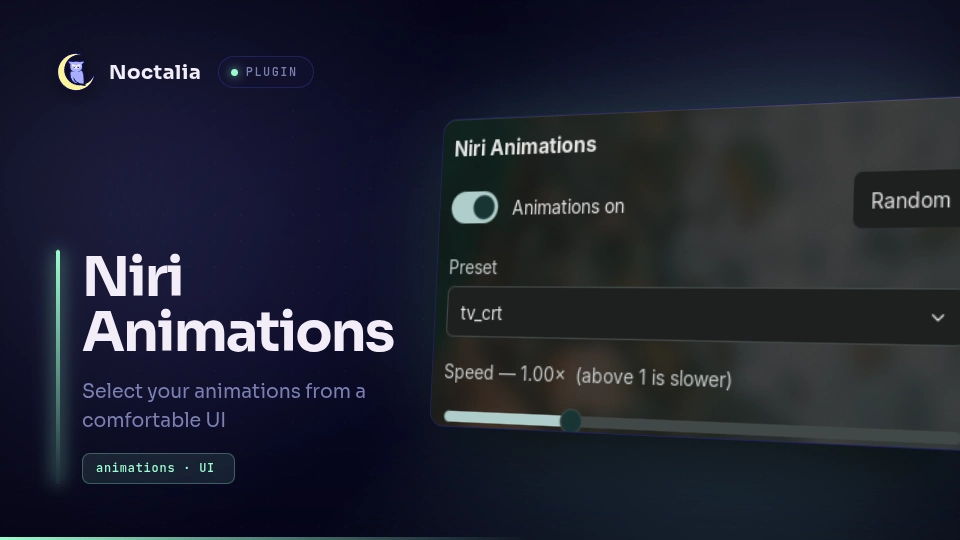
About
Niri Animations
Pick a niri animation preset, tune the global animation speed, or switch animations off — from a Noctalia panel, instead of editing config by hand and reloading the compositor yourself.
Plugin
| Field | Value |
|---|---|
| ID | imjustdoingmypart/niri-animations |
| Entries | Panels: picker (floating), docked (attached to the bar); shortcut: toggle |
Requirements
The
niricommand onPATH— used to reload the compositor config after a change.A niri config that
includes the plugin's target file after your base animations. The plugin owns that file; point it at one dedicated to this, not at yourconfig.kdl:include "./cfg/animation.kdl" // your base / fallback animations // ... include "./animations.kdl" // managed by this plugin, included lastA folder of
.kdlanimation presets. Any file niri canincludeworks; collections such as nirimation drop straight in.
Usage
Open the picker floating, or attached to the bar:
noctalia msg panel-toggle imjustdoingmypart/niri-animations:picker   # floating, centered
noctalia msg panel-toggle imjustdoingmypart/niri-animations:docked   # attached to the bar
Bind one of those to a key in your compositor. The Animations tile, added from Settings → Control Center → Shortcuts, opens the attached variant and stays highlighted while animations are enabled.
Both panel ids run the same script. They exist as separate entries because placement and
position are host-owned — the host reads them from the manifest at load time, so a plugin
cannot change its own placement at runtime and there is no user-facing key to override a
plugin panel's placement. Shipping both variants is the only way to offer the choice.
In the panel:
- Preset — a dropdown of every
.kdlin the presets directory, plus No preset (base pack), which drops theincludeand falls back to your base animations. - Animations toggle — writes
animations { off }. - Speed — the global
slowdownfactor, 0.25×–3.00×. Above 1 is slower. - Random — picks a random preset.
Every change is written and applied immediately; there is no Apply button.
Presets are listed by filename, deliberately. Preset headers carry a Desc: field, but
it is free-form text written by each preset author — often just "imported from https://…" —
and it gets worse with presets a user imported themselves. Surfacing it makes the plugin
look broken when the problem is somebody else's metadata.
Settings
| Setting | Type | Default | Description |
|---|---|---|---|
presets_dir |
string |
~/.config/niri/animations |
Folder scanned for .kdl presets. Non-.kdl files are ignored. |
target_file |
string |
~/.config/niri/animations.kdl |
File rewritten with the selection. Rewritten whole — treat it as owned by the plugin. |
include_prefix |
string |
./animations |
Path prefix written in the include line, relative to target_file. |
reload_command |
string |
niri msg action load-config-file |
Run after each write so the compositor picks up the change. |
Notes
What the plugin writes. target_file gets an include line for the chosen preset and an
animations block carrying the speed:
include "./animations/prism_fold.kdl"

animations {
    slowdown 1.50
}
off and slowdown are direct fields of animations, not subsections, which is why the
speed applies on top of a preset that sets its own slowdown. niri's includes are positional
and merge field by field, so a target file included last wins over the base animations.
See Configuration: Animations
and Configuration: Include.
Side effects.
| Network | None. |
| Files read | presets_dir (directory listing) and target_file (to restore panel state on open). |
| Files written | target_file only. Nothing else on disk is modified. |
| Processes spawned | reload_command after each write, and noctalia msg panel-toggle … when the control-center tile is clicked. |
Other compositors. The logic is compositor-agnostic — it writes an include line and runs
a reload command — but the generated animations { } block is niri syntax, so only niri is
supported today.
License
MIT
Versions
| Version | Plugin API | Updated |
|---|---|---|
| v0.2.0 latest | 9 | Aug 2, 2026 |
Older versions stay installable on a Noctalia release whose plugin API is below the latest version's.