
About
Neuralwatt
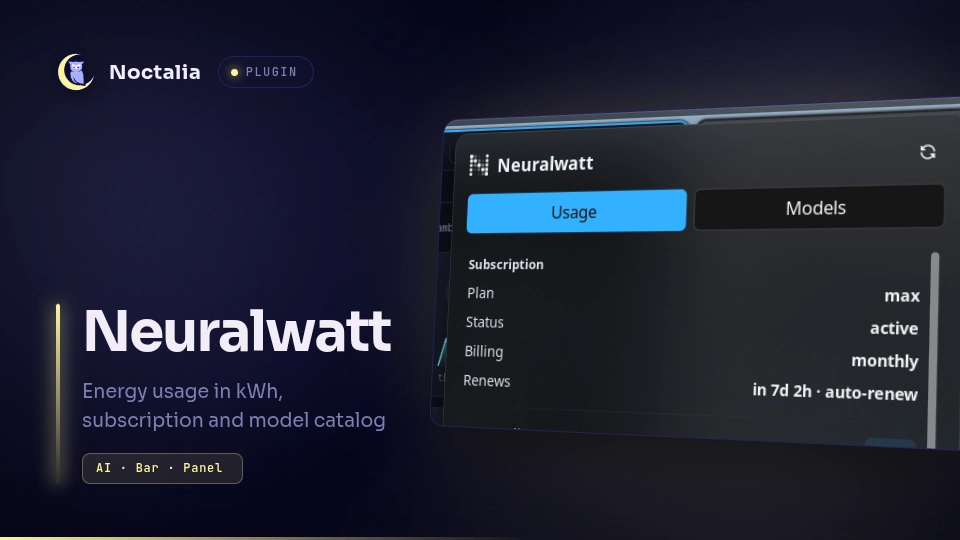
Your Neuralwatt energy usage in the bar, in kWh: how much of the billing period's allowance the account has drawn, when it renews, this month's cost, requests, tokens and physical energy, the CO₂e that came with it, and the account balance. The same panel carries a second tab that browses the model catalog with pricing, context limits and capability flags.
Neuralwatt bills inference by measured energy rather than by tokens, so the numbers this plugin shows are the ones the account actually pays for.
Plugin
| Field | Value |
|---|---|
| ID | omertahaoztop/neuralwatt |
| Entries | Bar widget: bar; panel: usage; service: poller |
| Panel | usage (420×480), floating, opening near the click, with Usage and Models tabs |
Requirements
| Requirement | What it means |
|---|---|
| Neuralwatt account | Sign up at https://portal.neuralwatt.com. |
API key (sk-...) |
Create one in the portal and paste it into API key (see Usage). The plugin cannot show anything without it. |
| Network access | The plugin calls api.neuralwatt.com over HTTPS, and nothing else. |
| External commands | None. dependencies in plugin.toml is empty: the plugin uses Noctalia's built-in HTTP client, so there is no curl, no helper binary and nothing to install on PATH. |
| Compositor | None in particular — only Noctalia's bar, panel and service entries are used, so it works on every compositor Noctalia supports. |
Usage
Quick start:
- Install the plugin — from the plugin store, or with
noctalia msg plugins enable omertahaoztop/neuralwatt. - Open Settings → Plugins, find Neuralwatt and paste your
sk-...key into API key. The first poll runs immediately, so the capsule fills in within a couple of seconds. - Open Settings → Bar and add the Neuralwatt widget (
omertahaoztop/neuralwatt:bar) to a bar. Right-click it any time to refresh; left-click opens the panel. - The panel has two tabs, Usage and Models; the Refresh button in its header refetches whichever tab is open.
Bar capsule
Add the Neuralwatt capsule (omertahaoztop/neuralwatt:bar) to a bar from the widget picker.
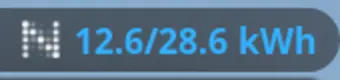
- It prints Neuralwatt's logomark and the reading chosen under Show in bar — used / allowance
(
12.5/28.6 kWh, the default), remaining kWh, percent of allowance, or the icon alone. - The colour tracks how much of the allowance is gone: Healthy colour (primary by default), Warning colour (amber by default) past Warn at, red past Critical at.
- Hovering lists the allowance, what is left, when the period renews, the plan, this month's cost and the credit balance as key/value rows.
- Left click opens the panel; right click asks the service for a fresh reading immediately.
- With no subscription on the account the capsule falls back to the remaining credit balance.
Panel
noctalia msg panel-toggle omertahaoztop/neuralwatt:usage
Two tabs share one surface, so switching between them never moves the window:
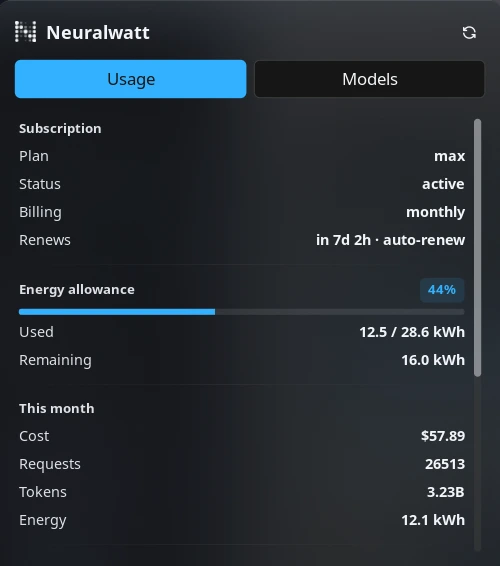
Usage
- Subscription — plan, status, billing interval and the renewal countdown (
in 7d 3h, markedauto-renewwhen it will renew itself). - Energy allowance — the meter, the charged kWh drawn this period (
subscription.kwh_usedofkwh_included), what is left, and an In overage badge once the allowance is spent. - This month — cost, requests, tokens and the physical energy the requests consumed.
- Carbon — the CO₂e for the billing period, its energy total and the exact window it covers. Shown only when carbon tracking is enabled on the account.
- Account — remaining and total credits, the accounting method, the rate-limit tier and the lifetime cost and energy totals.
Models
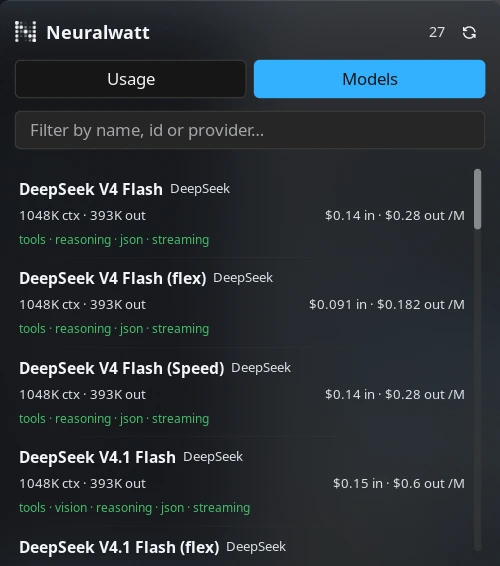
Every model the account can call, sorted by name, with the provider, the context window, the maximum
output, per-million-token pricing (input and output), the capability flags (tools, vision, reasoning,
JSON mode, streaming) and a deprecated badge where the model is on its way out. The filter box
matches on name, id or provider. Models with pricing still to be announced show pricing TBD
instead of numbers.
The header shows the model count on the Models tab and a Refresh button that refetches whichever tab is open.
Panel placement
The panel ships floating with position = "auto" and open near click, so a capsule on the
right of the bar opens it on the right, and one on the left opens it on the left. Placement, screen
position, layer and open-near-click are panel settings in Settings → Plugins, the same controls
built-in panels use.
Settings
Plugin-level settings live in Settings → Plugins; bar_mode is per bar-widget instance.
| Setting | Type | Default | Description |
|---|---|---|---|
api_key |
string |
"" |
Your Neuralwatt API key (sk-...). Required; without it the capsule stays empty and the panel explains how to add it. |
refresh_interval_sec |
int |
600 |
Seconds between polls, clamped to 60–86400. A shorter interval means more requests against the account. |
warn_percent |
int |
70 |
Allowance usage at or above this percentage switches the capsule and the meter to Warning colour. |
critical_percent |
int |
90 |
Allowance usage at or above this percentage turns them red. |
ok_color |
select |
primary |
Colour while the allowance is healthy: primary, secondary, tertiary or on_surface. |
warn_color |
select |
secondary |
Colour past the warning threshold: secondary, tertiary, error or primary. |
bar_mode |
select |
used |
Which reading the capsule prints: used (used / allowance kWh), remaining, percent, or none for the logomark alone. |
The panel also gets the host's standard per-panel settings (usage_placement, usage_position,
usage_open_near_click, usage_layer) in the same place, because Noctalia injects them for every
panel entry.
IPC
Open the panel from a keybinding or a script:
noctalia msg panel-toggle omertahaoztop/neuralwatt:usage
Ask the service for fresh data without waiting out the interval:
noctalia msg plugin omertahaoztop/neuralwatt:poller all refresh   # account usage + carbon
noctalia msg plugin omertahaoztop/neuralwatt:poller all models    # model catalog
The panel accepts the same events; models and usage also switch to that tab:
noctalia msg plugin omertahaoztop/neuralwatt:usage all refresh
noctalia msg plugin omertahaoztop/neuralwatt:usage all models
noctalia msg plugin omertahaoztop/neuralwatt:usage all usage
Notes
Network calls. One headless service is the only thing that touches the network.
- Every
refresh_interval_sec, oneGET /v1/quota(account balance, usage, limits and subscription). - Alongside it, one
GET /v1/usage/energyfor the current billing period, which is where the carbon row's CO₂e comes from. This call is best-effort: a failure leaves the previous reading in place. GET /v1/modelsis fetched only when the Models tab is opened without a cached list, or when you press Refresh on it. The catalog is cached for the session.
Extra capsules on extra monitors cost no extra requests: they read the state the service publishes.
Credentials. The API key is stored by Noctalia in its own plugin settings and sent only to
api.neuralwatt.com, in an Authorization: Bearer header. The plugin never logs it, writes it to
disk or sends it anywhere else. Like every other plugin setting it is stored as plain text in
Noctalia's settings file.
Units. The capsule and the allowance meter use charged kWh — subscription.kwh_used, the
amount that draws the allowance. The This month and Carbon energy rows are the physical
energy the requests consumed (energy_kwh). The two differ when flex-tier requests apply their
discount, so the numbers are not expected to match.
Nothing else runs. The plugin spawns no processes, writes no files and reads no environment
variables. It uses Noctalia's built-in HTTP client rather than shelling out to curl, which is why
dependencies is empty.
Assets. assets/logomark-light.png and assets/logomark-dark.png are Neuralwatt's own logomark
(from neuralwatt.com), kept in both a light and a dark cut so it reads on either palette.
Versions
| Version | Plugin API | Updated |
|---|---|---|
| v1.0.0 latest | 22 | Oct 12, 2026 |
Older versions stay installable on a Noctalia release whose plugin API is below the latest version's.