
Back to plugins 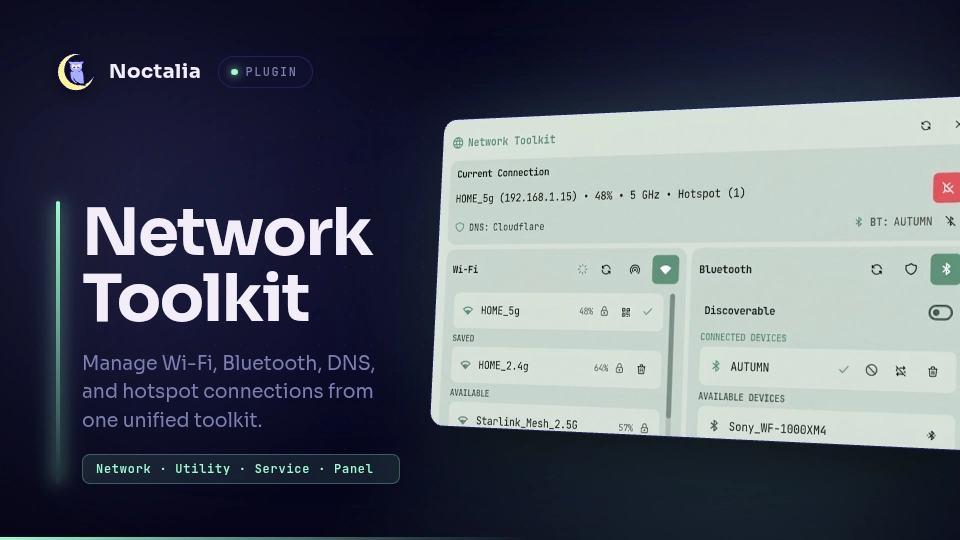
v0.1.0 Autumn
About
Network Toolkit
A unified network management hub for Noctalia providing real-time Wi-Fi, Ethernet, Hotspot, Bluetooth, and persistent DNS control from a single interface.
Plugin
| Field | Value |
|---|---|
| ID | autumn/network-toolkit |
| Entries | Bar widget: widget; shortcut: toggle; panel: panel; service: service |
Requirements
Install the following tools on PATH:
networkmanager(nmcli) — Wi-Fi scanning, connection management, hotspot orchestration, and DNS routing.bluez-utils(bluetoothctl) — Bluetooth adapter power, scanning, device pairing, and trust settings.ip— Interface address resolution and neighbor discovery.iw— Virtual AP interface provisioning (__ap) and wireless client enumeration.qrencode(optional) — Generates shareable Wi-Fi QR codes in the panel.
Features
- Wi-Fi & Ethernet: Live access point scanning with signal metrics and security badges; inline password authentication prompt; saved network quick-connect; QR code generator for connected Wi-Fi credentials; network forget capability.
- Concurrent Wi-Fi Hotspot: Dynamically provisions a virtual access point (
<interface>-ap, such aswlp3s0-aporwlan0-ap) alongside active Wi-Fi station mode on supported hardware viascripts/hotspot_helper.sh, allowing you to host a hotspot while remaining connected to your existing Wi-Fi network; live connected client list with hostnames, IP, and MAC addresses. - Bluetooth Device Manager: Built-in native C BlueZ D-Bus agent (
scripts/bluetooth_helper) delivering instant desktop pairing authorization popups with PIN/passkey validation; one-click connect, disconnect, device removal, and auto-reconnect (trust) configuration; adapter discoverability toggle. - Persistent DNS Switcher: Instant switching between curated providers (Cloudflare, Google, Quad9, AdGuard) and custom DNS servers; automatically re-applies chosen DNS across network switches and system reboots.
- Bar Widget & Shortcut: Highly configurable top bar widget supporting single or multi-domain indicator modes; quick-toggle control center shortcut for one-click hotspot activation. The widget also displays a red dot if the hotspot is active and a green dot if a custom DNS is being used.
Usage
- Add the
Network Toolkitwidget to your bar in Settings → Bar Widgets. - Add the
Hotspotshortcut tile in Settings → Control Center → Shortcuts. - Left-click the bar widget to open the main network panel.
- Right-click the bar widget to trigger the configured quick action (toggle Wi-Fi, Hotspot, or Bluetooth).
- Right-click any section header icon in the panel (Wi-Fi, Hotspot, Bluetooth, DNS) to quickly toggle its power state on or off.
Open the main panel via IPC:
noctalia msg panel-toggle autumn/network-toolkit:panel
Or bind it to a keybinding in your configuration:
binds {
    Mod+N { spawn-sh "noctalia msg panel-toggle autumn/network-toolkit:panel"; }
}
(Niri configuration example)
Settings
All settings can be configured under Settings → Plugins → Network Toolkit:
| Setting | Type | Default | Description |
|---|---|---|---|
refreshinterval |
int |
5 |
Background state refresh interval in seconds (2–60). |
color |
string |
on_surface_variant |
Theme color token for widget glyphs. |
text_color |
string |
on_surface_variant |
Theme color token for widget labels. |
hotspot_ssid |
string |
Noctalia-Hotspot |
Default broadcast SSID for the hotspot. |
hotspot_password |
string |
noctaliapass |
WPA2 passphrase for the hotspot (minimum 8 characters). |
hotspot_max_connections |
int |
8 |
Maximum client connections allowed on the hotspot (1–32). |
custom_dns_1 |
string |
"" |
Custom DNS slot 1 (Name=IP, e.g. NextDNS=45.90.28.0 45.90.30.0). |
custom_dns_2 |
string |
"" |
Custom DNS slot 2. |
custom_dns_3 |
string |
"" |
Custom DNS slot 3. |
widget_display_mode |
select |
network |
Display mode: network, bluetooth, dns, network_hotspot, network_bluetooth, network_dns, bluetooth_dns, network_bluetooth_dns, network_hotspot_bluetooth_dns. |
widget_indicator_dots |
select |
hotspot_dns |
Status dots shown on widget: hotspot_dns (Hotspot + DNS), hotspot (Hotspot only), dns (DNS only), none (Disabled). |
widget_right_click |
select |
toggle_wifi |
Quick action on right-click: toggle_wifi, toggle_hs, or toggle_bt. |
IPC
The background service synchronizes state across all entries via network_command and network_state. You can also trigger panel actions directly:
# Toggle panel
noctalia msg panel-toggle autumn/network-toolkit:panel

# Open panel
noctalia msg panel-open autumn/network-toolkit:panel

# Close panel
noctalia msg panel-close autumn/network-toolkit:panel
Notes
- Bluetooth Pairing Agent: Uses a built-in D-Bus agent (
scripts/bluetooth_helper) registered under/org/noctalia/bluetooth_helperto handle authorization and passkey requests directly with BlueZ. - Concurrent Hotspot: Simultaneous Wi-Fi client and AP mode dynamically creates a virtual interface (
<interface>-ap) viascripts/hotspot_helper.sh. If the wireless driver does not support multi-VIF concurrency, starting the hotspot will fall back to standard access point mode. - DNS Configuration: DNS preferences are managed through NetworkManager device connections and persist across network switches.
- Files Written: Runtime pairing and DNS states are stored in
/tmpduring the active session.
License
MIT
Versions
| Version | Plugin API | Updated |
|---|---|---|
| v0.1.0 latest | 10 | Aug 31, 2026 |
Older versions stay installable on a Noctalia release whose plugin API is below the latest version's.