
About
Network Monitor
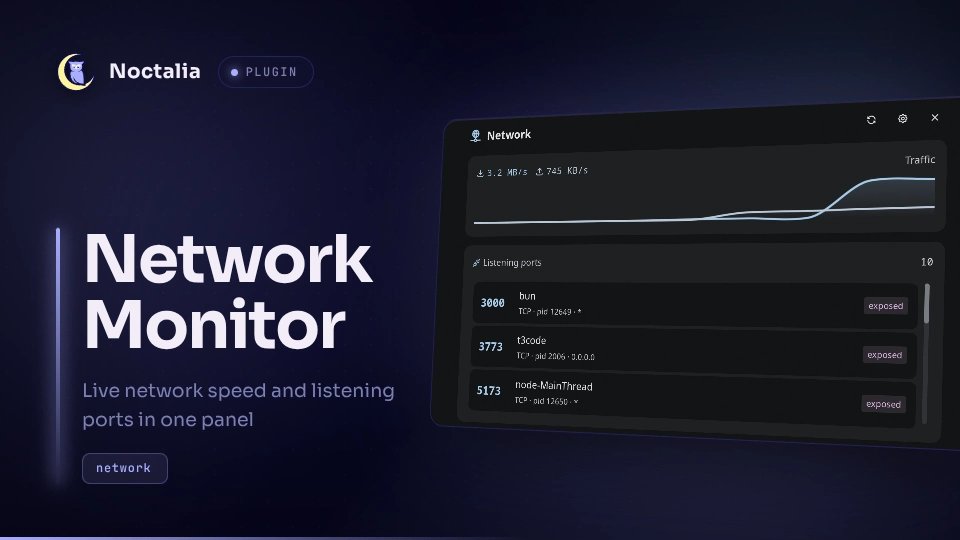
Shows download and upload speed alongside the number of listening ports in one bar capsule. Open the panel for traffic history and quick actions on each listener.
Plugin
| Field | Value |
|---|---|
| ID | mahmoudomiesh/network-monitor |
| Entries | Bar widget: indicator; panels: panel, menu; service: scanner |
Requirements
Noctalia v5 with plugin API 26 or newer. Tested with v5.2.1 on Linux.
Install these commands on PATH:
| Command | When it runs |
|---|---|
ss |
At startup, every refresh interval, and when you request a refresh. Runs ss -tulnpH. |
kill |
When you select Stop for a listener with a known PID. Sends SIGTERM. |
fuser |
When you select Stop for a listener whose PID is hidden. Runs through pkexec with -k -TERM <port>/<proto>. |
pkexec |
Elevates the fuser action. Requires a polkit agent and may ask for authentication. |
xdg-open |
When you select Open in browser for a TCP listener. Opens http://localhost:<port>. |
fuser sends SIGTERM to every process using that port and protocol.
Usage
Enable the plugin in Settings → Plugins. Add the mahmoudomiesh/network-monitor:indicator widget to your bar.
The bar shows compact rates such as ↓120K ↑34K and a plug with the listener count. A direction's arrow uses the primary theme color above 1024 B/s. Rates use decimal units. The port count hides when zero. Disabling both display options leaves a clickable plug.
Left-click toggles the network panel. Middle-click refreshes listeners. Right-click opens the menu panel with Refresh and Settings. Hover the widget for full rates and up to eight listener rows.
Open the main panel from IPC:
noctalia msg panel-toggle mahmoudomiesh/network-monitor:panel
The panel shows download/upload history and a scrollable listener list. Hover a row for Open in browser and Stop. Opening a port closes the panel. Stop acts immediately, keeps the panel open, and refreshes the list about 600 ms after the command finishes. UDP rows only offer Stop. When Stop needs authentication, Noctalia's password prompt replaces the panel.
The menu can also be opened from IPC:
noctalia msg panel-toggle mahmoudomiesh/network-monitor:menu
Settings in the header or menu opens this plugin's settings. The scanner starts automatically when the plugin is enabled.
Settings
| Setting | Type | Default | Description |
|---|---|---|---|
show_speed |
bool |
true |
Show download and upload speed in the bar. |
show_ports |
bool |
true |
Show the listener count when greater than zero. |
refresh_interval |
int |
5 |
Seconds between listener scans, from 1 to 30. Traffic follows the shell's network poll interval. |
hide_system_ports |
bool |
true |
Hide ports below 1024. |
only_own_processes |
bool |
false |
Only show listeners with a visible PID. Visibility depends on ss permissions. |
include_udp |
bool |
false |
Include UDP sockets. |
IPC
Refresh listeners:
noctalia msg plugin mahmoudomiesh/network-monitor:scanner all refresh
Run the bundled tests inside the shell. Each case logs ok or not ok to the shell log:
noctalia msg plugin mahmoudomiesh/network-monitor:scanner all selftest
Notes
Traffic comes from Noctalia's system monitor ([system.monitor]), so it uses the same interface aggregation as the built-in sysmon widget. If that monitor or its network polling is disabled, the rates stop updating. The graph keeps up to 60 samples while the service runs.
IPv4 and IPv6 binds with the same protocol, port and PID merge into one row. A socket that several processes share, such as a server's forked workers, shows one row per process, so Stop ends only the process its row names. Known PIDs sort before unknown ones, then by port. The local chip means every bind address is loopback. An exposed bind can still be protected by a firewall.
The plugin sends no network requests itself. Open in browser launches your browser, which can make requests to the selected local service. It writes no files.
The right-click menu uses an attached panel because v5.2.1 exposes native context menus only to panel callbacks.
Versions
| Version | Plugin API | Updated |
|---|---|---|
| v2.0.0 latest | 26 | Oct 10, 2026 |
Older versions stay installable on a Noctalia release whose plugin API is below the latest version's.