
About
Mihomo Control
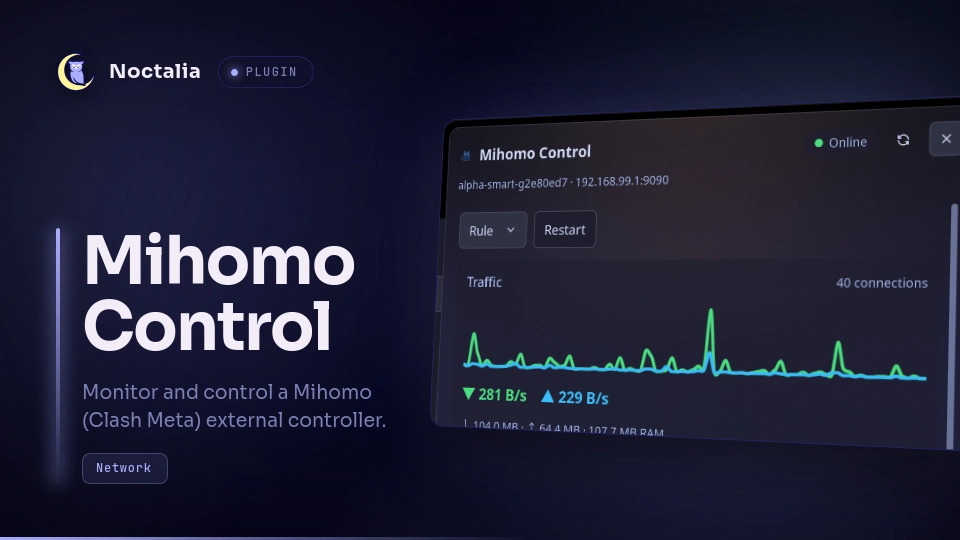
Monitor and control a Mihomo (Clash Meta) instance right from the Noctalia
bar: live traffic, proxy mode, proxy-group selection, latency tests and active
connections. It talks to the Mihomo external controller, which can run on this
machine (127.0.0.1) or on a remote host — just configure the IP, port and
secret.
Plugin
| Field | Value |
|---|---|
| ID | mdj2812/mihomo-control |
| Entries | Bar widget: widget; panels: panel, panel-attached; service: service; shortcut: mode |
Requirements
- Network access to the Mihomo external controller (local or remote)
- On
PATH(declared inplugin.tomldependencies):jq— project oversized/connectionsand/proxiesAPI responses during polling
Usage
Add the Mihomo Control widget from the Add-widget picker. By default it shows the current proxy mode (rule / global / direct). Widget label can instead show nothing, download speed, upload speed, both rates, or the active connection count. It can also show the first visible proxy group's current selection or its selected latency, falling back to that group's best known member latency. Its size and color presentation are also configurable. Hover it for the connection status, live download and upload rates, connection count and each proxy group's current selection. Left-click the widget to toggle the control panel using the configured Panel placement. Both variants can also be opened directly:
noctalia msg panel-toggle mdj2812/mihomo-control:panel
noctalia msg panel-toggle mdj2812/mihomo-control:panel-attached
The first command opens the centered floating panel; the second opens the variant attached to the bar.
The panel lets you switch the proxy mode (rule / global / direct), restart the core, refresh the status, and manage every proxy group. Use the Server dropdown to switch between saved controller profiles (host, port, secret, TLS). Manage edits the active profile; profiles and per-server proxy-group order are stored in the plugin data directory. Right-click the refresh button to reload the whole plugin; left-click only re-polls the controller. Each group card lists all of its members with their latency — sourced from mihomo's health checks and refreshed by the group's Test latency button. Each card also shows an overall latency (the selected member's, or the best tested one) right in its subtitle, visible without expanding. Member lists are collapsed by default; click a group header to expand it. Click a member to select it; the current selection is marked with a dot. Use Test all next to the Proxy groups heading to run a latency test on every group at once. Drag a card by its ☰ grip over another card to reorder the groups. The nearest insertion gap opens to preview the resulting layout before drop. The custom display order survives controller polling and plugin restarts.
Add the Mihomo: Rule shortcut from Settings → Control Center shortcuts to quickly toggle between rule and global mode.
Before the widget shows anything, enable the plugin's service entry — it owns
all communication with the external controller and streams the traffic data.
Settings
| Setting | Type | Default | Description |
|---|---|---|---|
| Host | string | 127.0.0.1 |
Hostname or IP of the Mihomo external controller. |
| Port | string | 9090 |
Port of the Mihomo external controller. |
| Secret | string | (empty) | secret from your Mihomo config; empty when authentication is disabled. |
| HTTPS | bool | off | Use https:// (external-controller-tls or a TLS reverse proxy). |
| Allow insecure TLS | bool | off | Skip certificate verification for self-signed TLS controllers. |
| Test URL | string | https://www.gstatic.com/generate_204 |
URL used for latency tests; empty uses each group's configured test URL. |
| Refresh interval | int | 2 |
Seconds between status polls (1–60); traffic rates stream in real time. |
| Panel placement | select | floating |
Open the control panel centered on screen or attached to the bar widget. |
| Widget label | select | mode |
Show nothing, mode, traffic, connections, or first-group proxy/latency. |
| Icon size | int | 16 |
Bar icon size in pixels (10–32). |
| Icon color mode | select | status |
Color the Mihomo glyph by connection status or use a custom color. |
| Icon color | color | primary |
Color used by the tintable Mihomo glyph. |
IPC
The service exposes two IPC events for scripting and debugging:
noctalia msg plugin mdj2812/mihomo-control:service all refresh
noctalia msg plugin mdj2812/mihomo-control:service all cmd '{"op":"mode","mode":"global"}'
refresh re-polls version, config, connections and proxy groups. cmd accepts
the same command tables the panel sends (mode, select, delay_test,
delay_test_all, reorder_group, restart, close_connections, refresh,
select_server, save_server, delete_server).
self-test runs in-process checks for group ordering, traffic dedup helpers,
and watchdog interval setup; results are published to mihomo.self_test.
Testing
Offline unit tests (plain Lua, no running shell required):
cd mihomo-control
lua5.4 tests/group_order_test.lua
noctalia plugins lint .
Full smoke test (adds live IPC when Noctalia is running):
./mihomo-control/tests/smoke.sh
Runtime self-test against the loaded service:
noctalia msg plugin mdj2812/mihomo-control:service all self-test
Notes
- The plugin talks HTTP to the configured external controller and shells out to
jqto project oversized/connectionsand/proxiesresponses so polling stays within Noctalia's Luau CPU budget. It also runsnoctalia msg plugins disable/enablewhen the panel refresh button is right-clicked. It writes server profiles and per-server proxy-group display order (group names, never the secret) to its Noctalia plugin data directory. Reordering does not modify the Mihomo configuration. - The bar widget uses a tintable glyph traced from the Clash cat silhouette. By default it is green online, amber while connecting and red offline; Icon color mode can instead apply one custom color. The panel keeps the official neutral logo next to its own status indicator.
- The traffic rate uses mihomo's streaming
GET /trafficendpoint; status, connections and proxy groups are polled every refresh interval. - The secret is stored in your Noctalia config and sent as the standard
Authorization: Bearer <secret>header. It is sent in plain text unless HTTPS is enabled — use HTTPS for remote controllers. - Restart posts to
/restart, which re-executes the core; the plugin reconnects automatically once it is back. There is no API endpoint that stops the core — switching the mode todirectis the closest equivalent. - A latency test where every node fails is reported as all nodes timed out: mihomo answers the delay endpoint with HTTP 504 in that case. If that keeps happening, set Test URL to an endpoint your network can reach.
Development
service.luau— headless API backend, publishesmihomo.*state.group_logic.luau— pure helpers for group ordering and traffic dedup (unit-tested).widget.luau— bar widget (rates + tooltip).panel.luau— control panel.shortcut.luau— rule/global mode toggle.fonts/— reviewable vector source and generated tintable Mihomo glyph font.translations/— user-facing strings.
Versions
| Version | Plugin API | Updated |
|---|---|---|
| v0.2.0 latest | 9 | Aug 31, 2026 |
Older versions stay installable on a Noctalia release whose plugin API is below the latest version's.