 Noctalia
About
Mic Denoise
Real-time RNNoise noise suppression for your microphone on PipeWire, toggled from the Noctalia control center, the bar, or a keybind.
Plugin
| Field | Value |
|---|---|
| ID | goldesquemoon/mic-denoise |
| Entries | Service: state; shortcut: denoise; bar widget: mic-denoise |
RNNoise microphone noise suppression for PipeWire: the default source follows a virtual filter-chain source while denoising is on, and switches back to the raw microphone when it is off, which leaves the chain without a consumer so PipeWire suspends it.
Requirements
| Requirement | Why |
|---|---|
pipewire |
Carries the filter-chain that does the denoising. |
noise-suppression-for-voice |
Provides the librnnoise_ladspa.so plugin the chain loads. |
libpulse |
pactl switches the default source and moves capture streams. |
Usage
Add the tile under Settings -> Control center -> Shortcuts -> Mic Denoise, or toggle it with
noctalia msg plugin goldesquemoon/mic-denoise:state all toggle. The optional mic-denoise bar
widget shows the same state. Pick the physical microphone in the settings; leave it empty for
automatic detection.
Settings
| Setting | Type | Default | Description |
|---|---|---|---|
hardware_source |
string |
empty | Microphone to fall back to when denoising is off. Empty reuses the last one or picks the first input. |
source |
string |
rnnoise_source |
Virtual source created by the bundled filter-chain config. |
poll_interval |
int |
5000 |
State refresh interval in milliseconds (minimum 500). Toggles refresh immediately; the tick only catches changes made elsewhere. |
中文说明
Noctalia 插件:一键开关 RNNoise 实时麦克风降噪(PipeWire filter-chain)。
- 控制中心磁贴:Home 页一键切换;蓝色高亮 = 降噪开启;右键跳到音频页
- 可选栏挂件:麦克风图标随状态切换,悬停显示当前输入源
- 关闭即零 DSP:关闭时默认输入源切回物理麦克风,并把所有录音流搬回去, 降噪链路因此没有消费者,PipeWire 直接挂起整条 graph,不做任何运算
- 不写死设备:首次运行自动探测物理麦克风并生成 filter-chain 配置
最小依赖树
运行时只需要三样东西,其余都是这三者的传递依赖:
mic-denoise (Noctalia 插件, 纯 Luau + 20 行 POSIX sh)
├── pipewire                     # libpipewire-module-filter-chain
│   ├── libpipewire
│   ├── dbus            (libdbus-1)
│   ├── glibc / libgcc
│   └── ncurses  readline
├── noise-suppression-for-voice  # /usr/lib/ladspa/librnnoise_ladspa.so
│   ├── freetype2
│   ├── libatomic
│   └── libgcc / libstdc++
└── libpulse                     # 提供 pactl(切换默认源、搬移录音流)
    ├── dbus  glib2  glibc
    ├── libasyncns  libsndfile
    ├── libxcb
    └── systemd-libs
安装体积约 31 MiB(noise-suppression-for-voice 占 28 MiB,其余 ~3 MiB)。
| 发行版 | 命令 |
|---|---|
| Arch / CachyOS | sudo pacman -S pipewire noise-suppression-for-voice libpulse |
| Fedora | sudo dnf install pipewire noise-suppression-for-voice pulseaudio-libs |
| Debian / Ubuntu | sudo apt install pipewire noise-suppression-for-voice libpulse0 (noise-suppression-for-voice 需第三方源或自编) |
Noctalia 侧:noctalia >= 5,plugin_api = 17。
安装
git clone https://github.com/Goldppx/noctalia-mic-denoise.git
cd noctalia-mic-denoise
./install.sh            # 注册 path 源 + 启用插件,不需要 root
./install.sh --restart  # 顺便重启一次 PipeWire(若虚拟源还没加载)
install.sh 做的事(全部幂等):
- 校验
noctalia/pactl/pw-cli,缺librnnoise_ladspa.so时给出警告 noctalia msg plugins source add <name> path <repo>noctalia msg plugins enable goldesquemoon/mic-denoise- 等插件写出
~/.config/pipewire/pipewire.conf.d/50-mic-denoise.conf - 检查虚拟源是否已加载,未加载时提示(或
--restart代跑)重启命令
手动安装:
noctalia msg plugins source add my-plugins path /path/to/repo
noctalia msg plugins enable goldesquemoon/mic-denoise

# 控制中心磁贴(或走 设置 → 控制中心 → 快捷方式)
[[control_center.shortcuts]]
type = "goldesquemoon/mic-denoise:denoise"
生成配置后需重启一次 PipeWire:
systemctl --user restart pipewire.service pipewire-pulse.service wireplumber.service
键位
// niri
binds {
    Mod+Shift+M { spawn "noctalia" "msg" "plugin" "goldesquemoon/mic-denoise:state" "all" "toggle"; }
    Mod+Shift+D { spawn "alacritty" "-e" "sh" "-c" "pactl list short sources; read -r _"; }
}
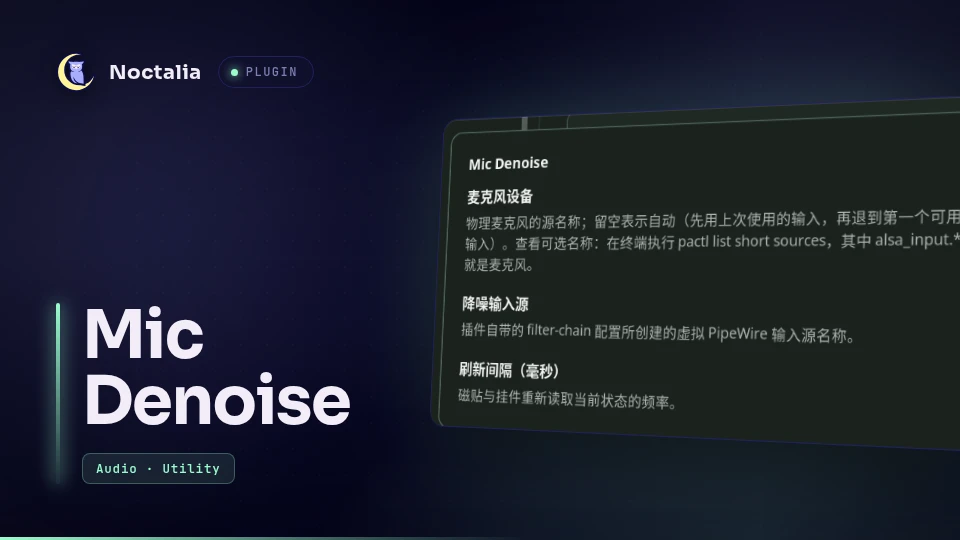
麦克风设备
麦克风在插件设置里填一个源名称,留空即自动(上次使用的输入 → 第一个可用输入):
设置 → 插件 → Mic Denoise → 麦克风设备
不知道设备名? 在终端执行:
pactl list short sources # 麦克风就是 alsa_input.* 那一行
固定用某个设备(多麦克风/插拔场景):
pactl list short sources | awk '$2 !~ /[.]monitor$/ {print $2}'
如果插件装在这台机器的 ~/dev/noctalia-plugins,也可以直接用自带脚本列出:
sh ~/dev/noctalia-plugins/mic-denoise/assets/mic-denoise.sh list
Available inputs (put one of these names into the plugin setting "Microphone"):

  alsa_input.pci-0000_05_00.6.analog-stereo   [current default]
      Ryzen HD Audio Controller 模拟立体声

The denoised source "rnnoise_source" is not listed: it is the output, not a microphone.
改了设置并保存后,onConfigChanged 会把新设备写进 filter-chain 的采集目标
(node.target)并重载一次 PipeWire(约 1 秒静音),然后恢复原来的开/关状态;
如果填的正是当前已在用的设备,则跳过重载。磁贴/挂件右键可直接跳到插件设置。
设置
插件级设置(设置 → 插件 → Mic Denoise):
| 键 | 类型 | 默认 | 说明 |
|---|---|---|---|
hardware_source |
string | 空 | 物理麦克风的源名称;留空自动(上次使用输入)。pactl list short sources 可列出候选 |
source |
string | rnnoise_source |
虚拟降噪源名称,须与配置里的 node.name 一致 |
poll_interval |
int | 5000 |
状态刷新间隔(毫秒,下限 500)。点击/键位会立即刷新,轮询只用来发现别处做的改动 |
调降噪力度:改 ~/.config/pipewire/pipewire.conf.d/50-mic-denoise.conf 里的
VAD Threshold (%)(默认 87;调低更灵敏、调高更安静),然后重启 PipeWire。
架构
                     ┌──────────── [[service]] state ────────────┐
                     │  轮询 pactl · 生成配置 · 切换设备 · backend │
                     └───────┬───────────────────────▲──────────┘
      noctalia.state "status"│                       │"command"
                             ▼                       │
              [[shortcut]] denoise            [[widget]] mic-denoise
                   (开/关)                    (开/关 + 状态)
- 单一事实来源:
[[service]]拥有全部逻辑;磁贴与挂件只渲染状态、写入命令 - 命令通道用「最新覆盖」队列:轮询进行中点击不会被丢弃
- 所有子进程带 8s 超时,
pactl挂死不会把服务卡在 busy 状态 - 切源后必然补一次 status,UI 不会停在乐观状态
- 插件被禁用/卸载时(
onExit)自动把默认源交还物理麦克风,不留悬空状态
兼容性
| 项 | 值 |
|---|---|
plugin_api |
17(与官方 noctalia/screen_recorder 同级) |
| 入口类型 | [[service]] [[shortcut]] [[widget]] |
| 文案 | translations/en.json + zh-Hans.json,全部走 noctalia.tr() |
| 校验 | noctalia plugins lint mic-denoise → 0 errors / 0 warnings |
| 自检 | sh tests/smoke.sh |
排障
| 现象 | 处理 |
|---|---|
| 有个「操作失败」通知 | 通知正文即原因;常见是 /usr/lib/ladspa/librnnoise_ladspa.so 缺失(装 noise-suppression-for-voice) |
| 虚拟源不存在 | 配置写了但没重启 PipeWire:systemctl --user restart pipewire;仍不行看 journalctl --user -u pipewire -b |
| 关闭后 CPU 仍在跑 | 有程序仍钉在虚拟源上:pactl list short source-outputs;脚本会自动搬移,但程序可能自己切回去 |
| 换了麦克风后降噪无声 | 在设置里填新的麦克风名并保存(自动重写 node.target 并重载一次 PipeWire) |
| 磁贴显示英文 | 当前 locale 无对应翻译文件;zh-Hans.json 覆盖简体中文 |
卸载
./uninstall.sh           # 禁用插件并把麦克风交还
./uninstall.sh --purge   # 同时删除生成的 PipeWire 配置
systemctl --user restart pipewire.service pipewire-pulse.service wireplumber.service
许可
MIT
Versions
| Version | Plugin API | Updated |
|---|---|---|
| v1.3.1 latest | 24 | Nov 3, 2026 |
Older versions stay installable on a Noctalia release whose plugin API is below the latest version's.