
About
Mango Displays
Per-output resolution, refresh rate and scale for MangoWC, applied from the bar,
plus mirroring one output onto another. Every control applies as you pick it:
the plugin writes mango monitorrule= lines and reloads the compositor, so the
change lands and survives a reboot in one step.
Plugin
| Field | Value |
|---|---|
| ID | prponkshe/mango-displays |
| Entries | Bar widget: bar; panels: panel, advanced; services: watcher, mirror |
Requirements
mmsg, MangoWC's IPC client. Everything that changes state goes through it, and the watcher readsmmsg watch all-monitors. The plugin is MangoWC-only.wlr-randr, read once per panel open for the mode list and the make/model/serial the rules match on. It never sets anything.wdisplays. Arrangement is out of scope, so right-clicking the bar tile hands off to it.wl-mirror, needed only for the Mirror card. See Mirroring.
Usage
Add the Mango Displays widget to a bar in Settings → Bar, or by hand:
[widget.display]
type = "prponkshe/mango-displays:bar"
Left-click the tile to open the panel, right-click to open wdisplays. The
panels also open over IPC:
noctalia msg panel-toggle prponkshe/mango-displays:panel
noctalia msg panel-toggle prponkshe/mango-displays:advanced
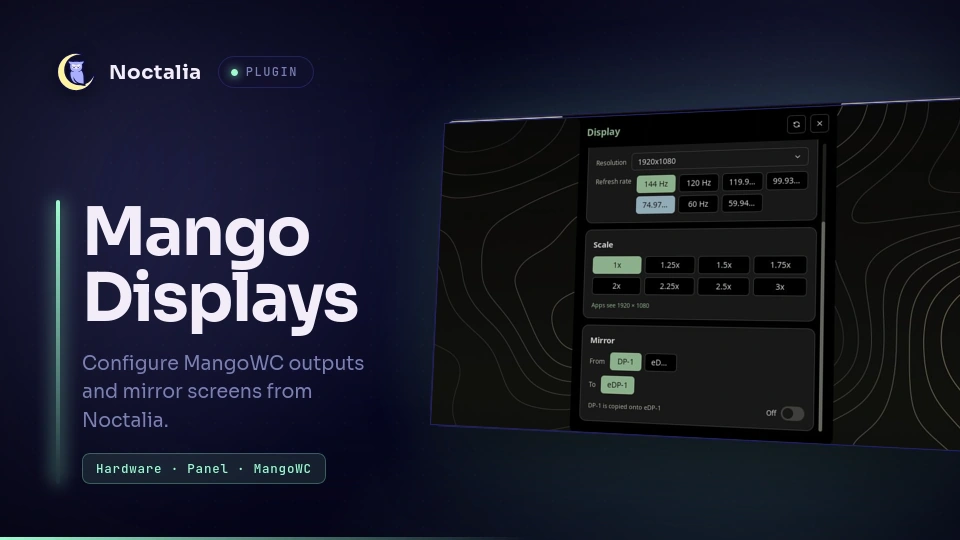
The panel carries three cards for the selected output - Monitor (picker plus
an on/off toggle), Mode (resolution and refresh rate) and Scale - and a
Mirror card for the layout as a whole. The settings button opens advanced
monitorrule fields: rotation, VRR, custom modes, HDR metadata and ICC profile.
There is no Apply button on the main cards: picking a value writes the rules and
reloads mango straight away, and the last thing that happened is reported along
the bottom of the panel. With auto_save on, a change made anywhere else (a
drag in wdisplays, a monitor unplugged) is written by the watcher without the
panel being open.
Settings
| Setting | Type | Default | Description |
|---|---|---|---|
auto_save |
bool |
true |
Let the watcher write monitorrule= lines when the layout changes on its own, such as a drag in wdisplays. With this off, only the panel writes. |
monitor_rules_path |
string |
~/.config/mango/monitors.conf |
The mango config the rules are written into. It has to be a file mango sources. If it contains other config, the panels ask before overwriting it with generated monitorrule= lines only. |
glyph |
glyph |
device-desktop |
Bar tile icon. |
IPC
The mirror service takes start, stop and toggle, so a compositor keybind
can raise a mirror without opening the panel. start and toggle accept an
optional "<source> <destination>" payload; without one they copy the built-in
panel onto the first other lit output, which is the right guess on a laptop and
the only guess available on a desktop.
noctalia msg plugin prponkshe/mango-displays:mirror all toggle
noctalia msg plugin prponkshe/mango-displays:mirror all start "DP-1 eDP-1"
noctalia msg plugin prponkshe/mango-displays:mirror all stop
Notes
Why wlr-randr is still a dependency
Everything that changes state goes through mango: mmsg dispatch to apply,
enable and disable, mmsg watch all-monitors for events. Two things mango
cannot answer:
- Which modes a display supports.
mmsg get all-monitorsreports no refresh rate at all, not even the current one, and/sys/class/drm/*/modeslists resolutions without them - the eight identical1920x1080lines on a 144 Hz panel are its eight refresh rates, indistinguishable. make,modelandserial, which the rules match on so a monitor keeps its settings across a reboot or a different port. Mango's own docs say to use wlr-randr for these.
So wlr-randr --json is read once per panel open, purely to describe the
hardware. It is never used to set anything.
Turning monitors off
The Monitor card carries an on/off toggle that runs mmsg dispatch enable_monitor / disable_monitor straight away. The last enabled monitor
cannot be switched off - its toggle locks and the label reads "Last output" - so
there is always somewhere to draw.
Disabled monitors stay in the picker (otherwise there would be no way back on)
and are drawn with the device-desktop-off glyph; the mode and scale controls
go inert while a monitor is off.
Mirroring
Mango cannot clone an output through monitorrule or an IPC dispatch, so the
Mirror card starts wl-mirror. The card picks both ends: From lists every
lit output and To lists the rest, so a desktop with no eDP-1 can mirror
whichever way round it likes. The pair defaults to the built-in panel copied
onto the first other output, and goes inert while a mirror is running, because
that pair is what wl-mirror was launched with.
Mango honours a fullscreen request but ignores the output the client asks for,
so --fullscreen-output alone leaves the mirror on whichever monitor had focus
- pointed at the laptop that is a feedback tunnel, not a mirror. The service
finds the client by its unique window title and moves it with
mmsg dispatch tagmon, then returns focus withfocusmonso the mirror does not swallow the keyboard.
Scaling is fit, so a 16:10 panel on a 16:9 projector is letterboxed rather
than cropped. The mirror service owns the process and stops it when either
output disconnects, the plugin reloads, or Noctalia exits. A private marker in
the plugin data directory controls normal shutdown; process errors stay in
memory and are shown through Noctalia.
A keybind can drive the mirror without the panel; see IPC.
Never a dark session
save() refuses to write a config in which every monitor is disabled, because
that state cannot be undone from the machine itself.
If the service ever sees nothing lit - the last enabled monitor unplugged while
the others were off - it turns one back on. It picks whichever monitor was lit
most recently, falling back to the first connected one. Nothing here is keyed to
a connector name: a desktop has no eDP-1 to fall back to.
The watcher
The compositor is the event source: mmsg watch all-monitors emits a line
whenever anything about a monitor changes, and service.luau holds that stream
open with noctalia.runStream. It also fires on focus and tag changes, so a
line means "look again", not "the layout moved" - an in-process
noctalia.outputs() signature decides that, and a change has to hold for
1.2 seconds before anything is written.
A 30 second tick stays armed behind the stream as a backstop, and becomes the
only trigger if mmsg is missing. runStream reports that the process spawned
rather than that it works, so mmsg is probed once before the tick goes quiet.
Writing is skipped when the rendered rules already match the file, which stops
the reload_config it triggers from coming back round as another change. Set
auto_save to false to leave writing to the panel alone.
Known limitation
Mango matches rules per monitor, not per combination, so position is a property of the display rather than of the set that is plugged in. Two setups that want the same monitor in different places cannot both be expressed: the most recent one wins. Resolution, refresh, scale and enabled state do not have this problem.
Layout
Panel size is manifest-declared and cannot change at runtime, so the header and
the status line are pinned and the card stack sits in a ui.scroll, whatever
the monitor count and mode count do to its height. Every size in the tree is
logical px that the host scales with the surface, so a 4K output at 2x renders
the panel at the same apparent size as a 1080p one.
Caveats
plugin_api = 22forrequire, so it needs Noctalia 5.0.0-beta.8 or newer.- Right-click is wired in
widget.luaurather than a manifest[widget.actions]block, which 5.0.0-beta.8 parses but does not apply. - Scale here is the Wayland output scale, so it drives every client on that
monitor including the Noctalia bar. Noctalia's own
[accessibility] ui_scaleand[bar.*] scaleare separate multipliers on top and are left alone.
Versions
| Version | Plugin API | Updated |
|---|---|---|
| v1.3.0 latest | 22 | Sep 14, 2026 |
Older versions stay installable on a Noctalia release whose plugin API is below the latest version's.