 Noctalia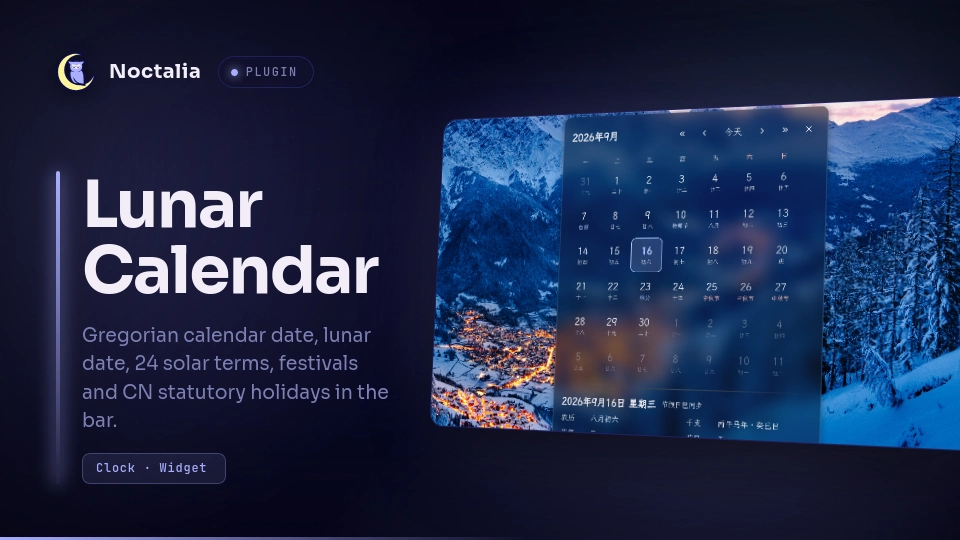
About
Lunar Calendar
A Chinese lunisolar calendar for the Noctalia bar. It puts the lunar date next to the Gregorian one, marks the 24 solar terms and traditional festivals, and overlays the statutory holiday and make-up work day data published by China's State Council.
Plugin
| Field | Value |
|---|---|
| ID | cwhirly/lunar-calendar |
| Entries | Bar widget: calendar; panel: panel; service: holiday-sync |
| Launcher Prefix | none |
Requirements
No external commands or packages - everything is shipped Luau. The plugin does
use the network when it can: the holiday-sync service downloads the Chinese
statutory holiday data from holiday-cn
(MIT) over HTTPS and caches it in noctalia.pluginDataDir(). The lunar calendar,
solar terms and festivals never need the network; set holiday_source to off
to keep the plugin fully offline.
What it shows
| Layer | Source | Example |
|---|---|---|
| Gregorian date + weekday | the system clock | 9月16日 周三 |
| Lunar date | baked-in astronomical tables, 1900-2100 | 八月初六, 闰六月初一 |
| 24 solar terms | the same tables, one per day of the year | 白露, 冬至 |
| Lunar festivals | lunar calendar rules | 春节 元宵节 龙抬头 端午节 七夕 中元节 中秋节 重阳节 腊八节 小年 除夕 |
| Solar festivals | fixed dates, 清明节 from the term, and nth-weekday rules |
元旦 情人节 妇女节 植树节 劳动节 青年节 儿童节 建党节 建军节 教师节 国庆节 万圣节 平安夜 圣诞节 清明节 母亲节 父亲节 感恩节 |
| CN statutory holidays | holiday-sync, cached on disk |
国庆节 休, 班 |
| 干支 / zodiac | sexagenary cycle anchored on a known 甲子 day | 丙午年 癸巳日 · 马年 |
Usage
Add the bar widget Lunar Calendar from the bar's widget picker, or hand-write
it as cwhirly/lunar-calendar:calendar:
[bar.<your-bar>]
end = ["cwhirly/lunar-calendar:calendar"]
| Gesture on the widget | Action |
|---|---|
| Left click | open the month panel |
| Right click | copy the full date description to the clipboard |
| Middle click | open this plugin's settings (the host's default binding) |
| Scroll | free for the bar unless you bind it in the widget's actions |
Hovering shows a tooltip with the Gregorian date, the lunar date, 干支, the next solar term and the next day off with a countdown.
Month panel
Left-click the widget, or run:
noctalia msg panel-toggle cwhirly/lunar-calendar:panel
Every cell carries its lunar day, and solar terms, festivals and holidays are
drawn on top: 节气 in the accent colour, festivals in the tertiary colour, days
off in red with the holiday name, and make-up work days as 班. The footer shows
the selected day in full (lunar date, 干支, zodiac, term, the month's holiday
ranges, the next day off) and the state of the holiday data. « ‹ 今天 › »
move by year, by month, or back to today; ✕ closes the panel.
Settings
Plugin settings live under Settings → Plugins → the gear on this plugin's row; widget settings are edited with the bar widget itself.
| Setting | Scope | Type | Default | Description |
|---|---|---|---|---|
week_start |
plugin | select |
monday |
First day of the week in the month panel: monday, sunday or saturday. |
holiday_source |
plugin | select |
auto |
Where the holiday data comes from: auto (jsDelivr CDN, then GitHub raw), jsdelivr, github, or off to stay offline. |
primary |
widget | select |
solar |
First label: solar (9月16日), lunar (八月初六) or both. |
secondary |
widget | select |
lunar_plus |
Second label: lunar_plus (lunar date, plus the event when there is one), auto (the event replaces the lunar date), lunar, or none. |
show_weekday |
widget | bool |
true |
Append the weekday to the Gregorian date. |
show_glyph |
widget | bool |
true |
Show the leading glyph. |
glyph |
widget | glyph |
calendar-event |
Glyph name, e.g. calendar-event or calendar-month. |
IPC
noctalia msg panel-toggle cwhirly/lunar-calendar:panel
noctalia msg plugin cwhirly/lunar-calendar:calendar focused refresh
noctalia msg plugin cwhirly/lunar-calendar:calendar focused settings
noctalia msg plugin cwhirly/lunar-calendar:calendar focused copy
noctalia msg plugin cwhirly/lunar-calendar:panel all today
noctalia msg plugin cwhirly/lunar-calendar:holiday-sync all refresh
noctalia msg plugin cwhirly/lunar-calendar:holiday-sync all clear-cache
refresh on the widget reaches the service through the plugin state channel.
copy copies today's description, settings opens this plugin's settings page,
and today on the panel jumps back to the current month.
Notes
Languages. The plugin's own date formats - weekday names, Sep 16 / 9月16日,
countdowns, the month title and the panel's weekday header - follow the shell's
language (its general.language setting, falling back to LC_ALL/LC_TIME/LANG).
The calendar's vocabulary is Chinese by nature and stays that way: lunar day names,
the 24 solar terms, 干支, and the statutory holiday names that come from holiday-cn.
Network. Only holiday-sync talks to the network: one HTTPS GET per tracked
year (the current one and the next) to cdn.jsdelivr.net or
raw.githubusercontent.com, both serving
NateScarlet/holiday-cn. There is no
telemetry and no other endpoint. A healthy dataset is re-checked every 6 hours, a
failed one every 10 minutes, and a year whose schedule the State Council has not
announced yet reports status.nodata instead of an error.
Files written. The downloaded JSON is cached as holiday-<year>.json in
noctalia.pluginDataDir() (under the shell's state directory), so the widget keeps
working offline after one successful sync. clear-cache deletes those files.
Nothing is written anywhere else.
Processes. None. The plugin never spawns a command.
Where the numbers come from. lib/data.luau is generated, not hand-typed: 201
rows of plain day numbers and month lengths, produced by tools/generate_data.py
(shipped in this plugin's tools/ directory) from
lunar_python, which implements the ShouXing
寿星天文历 algorithms. The generator round-trips every one of the 73,384 days from
1900-01-31 to 2100-12-31 back through that library before it writes the file, so
re-running it must leave lib/data.luau unchanged. Lunar dates, solar terms and
干支 are supported for 1900-2100, and the panel's month navigation is clamped to
that range.
Declarative UI gotchas (both hit while building this plugin, both worked around
in the code): the host applies only the props a render contains, so a dropped prop
keeps its old value on the retained native control - cells therefore always send an
explicit fill and border, with #00000000 meaning "draw nothing"; and
ui.label ignores width, so the weekday header wraps each label in a fixed-width
ui.column to line up with the grid below it.
Versions
| Version | Plugin API | Updated |
|---|---|---|
| v1.0.0 latest | 22 | Sep 16, 2026 |
Older versions stay installable on a Noctalia release whose plugin API is below the latest version's.