 Noctalia
About
LogonBox VPN
Show the LogonBox VPN client's status in the Noctalia bar, and connect or
disconnect your saved connections from a panel. The plugin drives the
logonbox-vpn-cli command line and watches the client's D-Bus service; it makes
no network calls of its own.
Plugin
| Field | Value |
|---|---|
| ID | 3dprogramin/logonbox |
| Entries | Bar widget: status; panel: panel; service: service |
Requirements
Install the LogonBox VPN client (version 3.0.7 was used to build this) and start
its service. Every manifest dependency must be on PATH:
logonbox-vpn-cli: the client's command line (also found in/opt/logonbox-vpn-client/when it isn't onPATH, as islogonbox-vpn-gui). The plugin reads connections with it and connects and disconnects through it.logonbox-vpn-gui: the LogonBox app. Open LogonBox starts it. Signing in happens there (see Notes).gdbus(from glib2): asks whether the LogonBox service is running and streams its signals, so the tile follows changes at once.xdg-open: opens the page on how to get the client, from the panel's How to get the client button.noctalia: the shell itself.
The client's service must be running:
sudo systemctl enable --now logonbox-vpn-service
You also need a LogonBox connection you have already signed in to once, in the LogonBox app. The plugin never asks for credentials.
Usage
Add the status widget to the bar. It shows a lock icon and a short label. Colours:
connected is a filled green lock (#22c55e, label in the normal text colour), in-between
is the primary theme colour, off is muted, and a problem is the error colour.
Click it to open the panel, or run:
noctalia msg panel-toggle 3dprogramin/logonbox:panel
The tile means:
| Icon | Label | Meaning |
|---|---|---|
| filled lock (green) | On |
At least one connection is connected. Hover for the host, or the count when there are several. |
| lock (primary colour) | … |
A connection is connecting, disconnecting, waiting for sign-in, or temporarily offline (the client lost the network and is retrying). |
| lock (muted) | Off |
Connections exist and none is connected. |
| lock with an exclamation mark (error colour) | ! |
Something needs you: the client isn't installed, its service isn't running, a kernel update needs a reboot, a connect just failed, there are no connections, or every connection needs sign-in. Hover for the reason. |
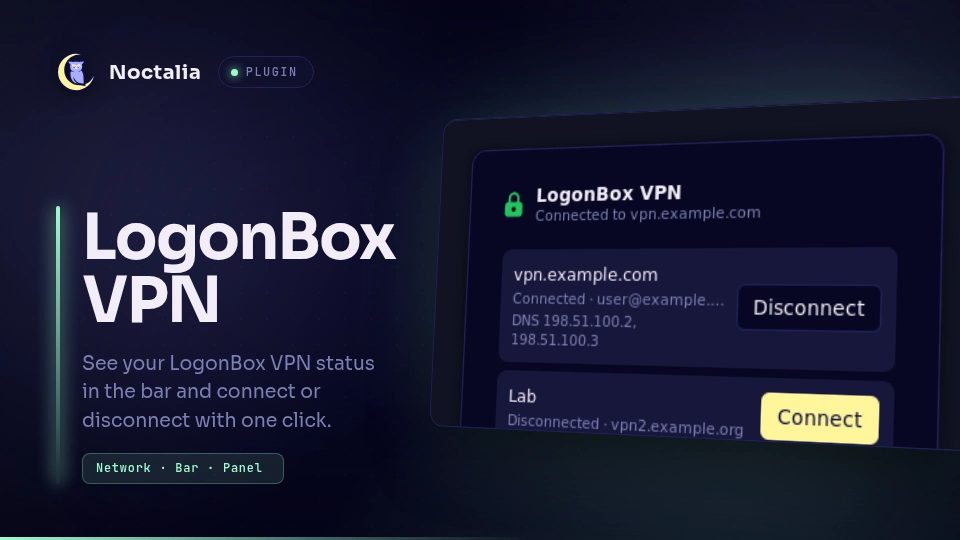
The panel lists every saved connection with its host, account and status, and the DNS servers of one that is connected. Each row has Connect or Disconnect. Only one action runs at a time (a second one is answered with "Wait for the current action to finish."). A footer button, Open LogonBox, starts the LogonBox app.
The panel also explains each problem in plain words:
| State | What you see | What to do |
|---|---|---|
| Client not installed | "This plugin needs the LogonBox VPN client." and How to get the client (opens LogonBox's own install article). | Install the client. |
| Service not running | "The LogonBox VPN service is not running." with the systemctl command and a Copy button. |
Run the command in a terminal. |
| No connections | "Sign in to your VPN in the LogonBox app." and Open LogonBox. | Sign in in the app. |
| Not signed in | The row says "Sign-in needed" and has no Connect button. | Sign in again in the app. |
| Connect failed | A short, one-line reason under the row, and a notification. | Try again, or open the app for details. |
| Reboot needed | "Your kernel was updated. Reboot before connecting." | Reboot. |
Reboot rule. After a connect fails, the plugin says "reboot needed" only
when WireGuard isn't loaded and no WireGuard module file for the running kernel is
left in /usr/lib/modules (a kernel update removed them); it clears by itself once
the check passes, which a reboot does.
Settings
| Setting | Type | Default | Description |
|---|---|---|---|
show_label |
bool |
true |
Bar widget only: show the On / Off / … / ! text next to the lock. |
IPC
The service is the only entry that runs a process or reads a file. The bar and
the panel send it requests, and you can too (all is required for a service
entry):
ID=3dprogramin/logonbox:service

noctalia msg plugin $ID all request '{"action":"refresh"}'
noctalia msg plugin $ID all request '{"action":"connect","id":0}'
noctalia msg plugin $ID all request '{"action":"disconnect","id":0}'
noctalia msg plugin $ID all request '{"action":"open_gui"}'
| Action | Arguments | Does |
|---|---|---|
refresh |
Re-reads the state now (the panel does this when it opens). | |
connect |
id: a connection id in the published state (digits, string or number) |
Runs logonbox-vpn-cli connect <id>, limited to 60 seconds. Refused for a connection that isn't signed in. |
disconnect |
id: as above |
Runs logonbox-vpn-cli disconnect <id>, limited to 30 seconds. |
open_gui |
Starts logonbox-vpn-gui. |
|
open_download |
Opens the page on how to get the client, with xdg-open. |
|
dismiss_error |
optional key of the error shown |
Clears it (with no key, whatever is shown). |
An id that isn't a plain number from the current list is refused ("That
connection no longer exists."); request data never reaches a command line
otherwise.
Notes
Processes it starts. Nothing else, and never through a shell except the one
constant gdbus monitor line:
logonbox-vpn-cli show '.*': reads every connection (at start, after each action, on each signal and every 60 seconds).logonbox-vpn-cli connect <id>andlogonbox-vpn-cli disconnect <id>: only when you press Connect or Disconnect.gdbus call --system --dest org.freedesktop.DBus --object-path /org/freedesktop/DBus --method org.freedesktop.DBus.NameHasOwner com.logonbox.vpn: is the service running.gdbus monitor --system --dest com.logonbox.vpn: a long-running stream of the client's signals.logonbox-vpn-gui: only on Open LogonBox.xdg-open https://docs.logonbox.com/app/logonbox-documentation/en/article/7680932: only on How to get the client.
The plugin never runs delete, create, edit, config, update or
shutdown, and never runs the CLI without a command (that opens an interactive
shell).
Files it reads. /proc/sys/kernel/osrelease, /sys/module/wireguard and
/usr/lib/modules/<release>/kernel/drivers/net/wireguard/ (only the kernel
check above), plus the simulate and debug marker files in the plugin's data
directory.
Files it writes. Only state.json in the data directory
(~/.local/state/noctalia/plugins/data/3dprogramin/logonbox/), and only while a
file named debug exists there. It is a copy of the published state without
host, account or DNS (it does keep connection names, so it is for debugging only).
Otherwise it writes nothing.
Network and privacy. It makes no network calls of its own. Hosts, accounts, DNS servers and raw CLI output are never written to the Noctalia log or to notifications; a connect error's reason has URLs, e-mail addresses, hosts and IP addresses removed first.
Sign-in happens in the LogonBox app. The plugin refuses to connect a connection that isn't signed in, because the CLI would then start a device sign-in that waits for input. It sends you to the app instead.
Simulate mode
To see every state without a real account (for a screenshot, say), write a mode
name into the data directory's simulate file:
D=~/.local/state/noctalia/plugins/data/3dprogramin/logonbox
echo needs_signin > $D/simulate    # remove the file to go back to real data
Modes: not_installed, service_down, no_connections, needs_signin,
reboot_needed, multi. The data is fake (user@example.com,
vpn.example.com), the panel says "Test mode: showing sample data", and Connect
and Disconnect are turned off.
Testing
The pure modules are unit-tested under plain Lua, against scrubbed captures from the real client (fake e-mail, hosts and IPs only):
lua logonbox/tests/run.lua
python3 logonbox/tests/check-translations.py
python3 -I logonbox/tests/capture-fixtures.py --check-only   # fixtures hold no real value
python3 -I logonbox/tests/privacy-check.py logonbox          # needs the real client: learns what to look for
tests/e2e-live.py drives a running plugin over IPC with the real client, and
tests/e2e-live.py --service is a manual check of the service-down handling
(it asks you to stop the LogonBox service yourself).
Versions
| Version | Plugin API | Updated |
|---|---|---|
| v0.1.0 latest | 43 | Nov 11, 2026 |
Older versions stay installable on a Noctalia release whose plugin API is below the latest version's.