 Noctalia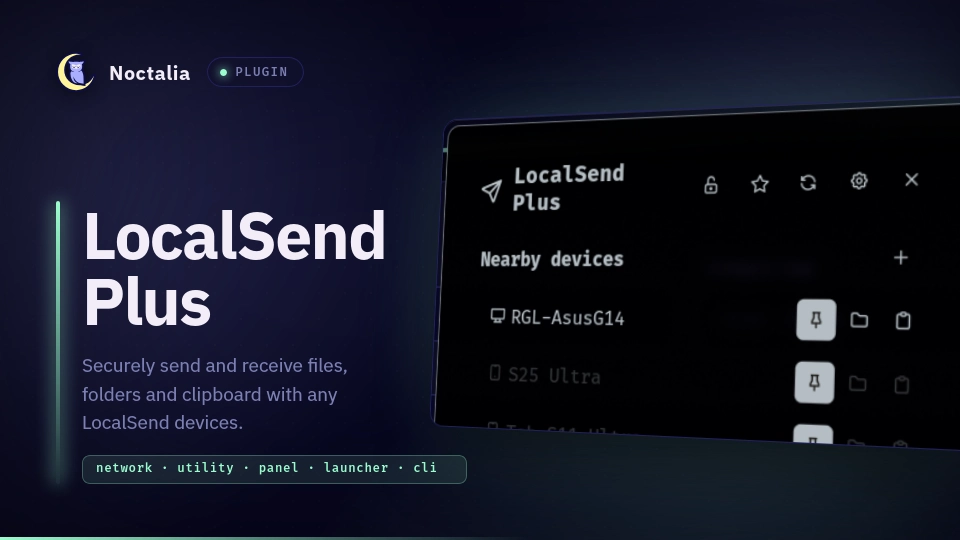
About
LocalSend Plus
A Noctalia plugin that sends and receives files, folders and clipboard text with LocalSend devices on your network. It speaks the official LocalSend protocol and adds receive and send PINs, favorites, visibility modes and auto-accept. Transfers always use HTTPS with the other device's certificate pinned.
Plugin
| Field | Value |
|---|---|
| ID | 0rgl/localsend-plus |
| Entries | Bar widget: widget; panel: panel; service: service; launcher provider: launcher |
| Launcher Prefix | /ls |
Requirements
- Noctalia 5.4.0 or newer (plugin API 43).
localsend-controller, the helper that speaks the LocalSend protocol. Its Rust sources ship with this plugin incontroller/; build it once as shown below.zenityfor the file and folder pickers.wl-pasteandwl-copyfromwl-clipboard, for clipboard sends and received messages.xdg-openandxdg-mime(both fromxdg-utils) to open the save folder in your default file manager. When that is Dolphin, the plugin opens a new Dolphin window directly.
Only one program can hold the LocalSend port, so close the LocalSend app while the plugin runs, or pick another port in the settings.
Building the controller
You need Rust 1.97 or newer with cargo and a C compiler (gcc). The panel shows the exact command for your
install, with a button to copy it. It looks like this:
cargo install --locked --path ~/.local/state/noctalia/plugins/materialized/<source>/localsend-plus/controller \
  --target-dir ~/.cache/localsend-plus/target
That puts localsend-controller in ~/.cargo/bin. The plugin looks there even when the session's PATH does not
include that folder. Press Retry in the panel afterwards. When a plugin update brings newer controller sources, the
panel asks you to run the same command again.
The build downloads the Rust crates and the LocalSend core library. The plugin itself never downloads or runs remote code.
Usage
Add 0rgl/localsend-plus:widget to a bar section. The number next to its icon counts the pending request and the
active transfers. A click opens the panel and a right click opens the settings.
noctalia msg panel-toggle 0rgl/localsend-plus:panel
In the panel, each nearby device has buttons to send files, a folder or the clipboard. If you copied files in a file
manager (Ctrl+C), the clipboard button sends those files. Otherwise it shows the text first and sends it after you
confirm. The pin button keeps a device in the list as a favorite. With the default auto-accept setting, files from
favorites arrive without asking, and the pin's tooltip says so. The plus button next to "Nearby devices" adds a
device by address when discovery cannot reach it (192.168.1.20 or phone.lan:53317).
An incoming request opens the panel with Accept and Decline. Accepting a text message copies it to the clipboard. A favorite shows up under the name it had when you pinned it. Any other device can call itself anything, so its name comes with the start of its fingerprint, and the panel warns when it uses the name of one of your favorites. Requests from devices that are not favorites open the panel and notify at most three times a minute; any beyond that still wait in the panel.
The header has three status buttons. The lock sets or removes the receive PIN; senders then have to enter it before
their request reaches you. The PIN card also has the switch "Accept files without asking when the PIN is right",
which is the same as auto_accept = everyone. Text messages still ask. The eye switches visibility (see below).
The robot shows up while files from anyone with the right PIN are accepted unasked, and opens the settings.
When a receiver asks for a PIN, the failed transfer gets a PIN field, and sending again uses the same files. The plugin does not store the PIN you type for a receiver.
In the launcher, type /ls (or search for "localsend") to send files, a folder or the clipboard to an online device,
or to switch visibility.
Visibility
| Mode | Announces | Answers announcements | Answers active scans | Receiver | Accepts requests from |
|---|---|---|---|---|---|
| Everyone | yes | yes | yes | on | anyone |
| Favorites only | no | no | yes | on | pinned devices |
| Hidden | no | no | no | off | nobody |
"Everyone for 10 min" is temporary and falls back to the previous mode. In favorites and hidden mode the plugin never announces itself and never scans the subnet. Refresh then only contacts the pinned devices at their last known addresses, and the connection fails unless the device there has the pinned certificate. A device that scans the subnet still sees your name in favorites mode; hidden mode keeps you invisible.
File manager integration
Every file manager can send through the panel: copy files or folders (Ctrl+C), open the panel and press the clipboard button of a device. For a context menu entry, the plugin can install one for Dolphin, Nautilus and Nemo, each behind its own setting, all off by default. Thunar and Yazi keep custom actions in their own configuration files, which the plugin never edits, so for them you add one entry by hand (see below). Every entry opens the panel with the selected files, where you pick a device. Files outside the plugin folder explains how the plugin handles the files it writes.
| Setting | File manager | Files the plugin writes | Where the entry shows up |
|---|---|---|---|
dolphin_menu |
Dolphin | ~/.local/share/kio/servicemenus/localsend-plus.desktop |
right-click on files or folders, sometimes in the Actions submenu |
nautilus_menu |
Nautilus (Files) | ~/.local/share/nautilus/scripts/Send with LocalSend Plus |
right-click, Scripts submenu |
nemo_menu |
Nemo | localsend-plus.nemo_action and localsend-plus-send.sh in ~/.local/share/nemo/actions/ |
right-click on files or folders |
Reopen Dolphin after turning dolphin_menu on. KDE only reads service menus in your home folder that are
executable, so the plugin marks the file executable. Nautilus and Nemo pick up their entries by themselves.
To install one of these entries by hand instead, copy its file from extras/ (extras/localsend-plus.desktop, or
extras/file-managers/ for Nautilus and Nemo) to the path in the table and make scripts and the Dolphin entry
executable. For example, for Dolphin:
mkdir -p ~/.local/share/kio/servicemenus
cp ~/.local/share/noctalia/plugins/localsend-plus/extras/localsend-plus.desktop ~/.local/share/kio/servicemenus/
chmod +x ~/.local/share/kio/servicemenus/localsend-plus.desktop
The path to extras/ depends on where Noctalia keeps the plugin; plugins from a catalog live under
~/.local/state/noctalia/plugins/materialized/<source>/localsend-plus/. Remove the copied file to take the entry
away.
Thunar
Open Edit, then Configure custom actions, add an action, and set:
- Name:
Send with LocalSend Plus - Command:
noctalia msg plugin 0rgl/localsend-plus:service all send "$(printf '%%s\n' %F)" - Icon:
document-send - Appearance conditions: file pattern
*, with every file type and directories checked
Thunar puts each selected path in quotes for %F and turns %% into %, so this command sends paths with spaces
correctly.
Yazi
With terminal_command on, add this to ~/.config/yazi/keymap.toml. Then c followed by l sends the selected
files, or the hovered one, and asks in the terminal which device gets them. Yazi comes back as soon as the command
ends, so when sending fails the message stays on screen until you press Enter:
[[mgr.prepend_keymap]]
on   = [ "c", "l" ]
run  = 'shell --block -- localsend %s || { printf "Press Enter to return to Yazi "; read -r _; }'
desc = "Send with LocalSend Plus"
Yazi's own copy (y) stays inside Yazi. A Yazi plugin that copies files to the system clipboard as text/uri-list
works with the clipboard button in the panel.
Terminal
localsend-controller send sends files and folders from a terminal through the plugin's running daemon:
localsend-controller send report.pdf phone          # to the device whose name starts with "phone"
localsend-controller send photos/ notes.txt "Swift Mango"
localsend-controller send report.pdf                # asks which device
The last argument names the device, unless it is an existing file or folder. The name is matched without regard to case: an exact match first, then the start of a name, then any part of it, and finally the start of the fingerprint. Favorites are matched first, and other devices only when no favorite matches. If exactly one favorite matches, the send starts at once. Otherwise, or with no device given, the command lists the matching devices, or all online ones, with favorites first and marked with ★, and asks for a number; Enter cancels. A device that is not a favorite is therefore always picked from the list, so another device using a favorite's name cannot get the files by accident.
The command then waits until the transfer ends. It shows when the receiver still has to accept, then a progress bar, and finally whether the files went through. Ctrl+C cancels the transfer and a second Ctrl+C stops waiting. When the receiver asks for a PIN, the command asks for it without echoing it and sends again. Messages are in Polish when the locale is Polish, English otherwise. The exit code is 0 when the files were sent, 1 on failure or decline, 2 for wrong arguments and 130 when cancelled.
For a shorter localsend command, turn on terminal_command (localsend command in the terminal) in the plugin
settings. The plugin then writes a two-line script to ~/.local/bin/localsend that runs localsend-controller send, plus Tab completion for three shells:
| Shell | Completion file | Loaded |
|---|---|---|
| fish | ~/.local/share/fish/vendor_completions.d/localsend.fish |
automatically |
| bash | ~/.local/share/bash-completion/completions/localsend |
automatically, with bash-completion installed |
| zsh | ~/.local/share/zsh/site-functions/_localsend |
after one line in ~/.zshrc |
For zsh, put this in ~/.zshrc before compinit runs (or before your framework, such as oh-my-zsh, loads):
fpath=(~/.local/share/zsh/site-functions $fpath)
The plugin changes no shell configuration itself. ~/.local/bin has to be on your PATH, as it is by default on
Fedora and most other distributions. Open a new terminal afterwards; then localsend report.pdf phone works, and
Tab after the file names offers the online devices. The same files are in extras/terminal/ if you prefer to
install them yourself.
Settings
| Setting | Type | Default | Description |
|---|---|---|---|
alias |
string |
random | Name other devices see. When empty, the controller picks a name like "Swift Mango" once and keeps it, so your hostname stays off the network. |
visibility |
select |
everyone |
Who can find you and send to you. The panel and launcher can change it too. |
auto_accept |
select |
favorites |
Accept incoming files without asking: from pinned devices (favorites), from anyone who gives the receive PIN (everyone), or never (off). Text messages always ask. everyone needs a receive PIN of at least 8 characters; until you set one it acts as favorites. The PIN card's switch changes this too, and a later change here wins. |
save_dir |
folder |
~/Downloads/LocalSend |
Where received files go. |
dolphin_menu |
bool |
false |
Adds "Send with LocalSend Plus" to Dolphin's context menu (see above). |
nautilus_menu |
bool |
false |
Adds "Send with LocalSend Plus" to the Scripts submenu of Nautilus (see above). |
nemo_menu |
bool |
false |
Adds "Send with LocalSend Plus" to Nemo's context menu (see above). |
terminal_command |
bool |
false |
Adds the localsend command with Tab completion for fish, bash and zsh (see above). |
port |
int |
53317 |
LocalSend port (advanced). |
device_model |
string |
distribution name | Model shown under your name. When empty it comes from /etc/os-release (advanced). |
controller_path |
file |
empty | A specific localsend-controller to run. When empty the plugin looks in PATH, ~/.cargo/bin and ~/.local/bin (advanced). |
You set the receive PIN in the panel, not here, because Noctalia stores settings in plain text.
IPC
noctalia msg plugin 0rgl/localsend-plus:widget focused toggle
noctalia msg plugin 0rgl/localsend-plus:service all refresh
noctalia msg plugin 0rgl/localsend-plus:service all restart
noctalia msg plugin 0rgl/localsend-plus:service all send "$(printf '%s\n' /path/to/a.jpg /path/to/folder)"
send takes absolute paths, one per line, and opens the panel so you can choose the device. The panel lists the
file names and the folders they come from. Noctalia joins IPC arguments with spaces, so pass the paths as one
argument with a newline between them, as above. The file manager entries above use the same command and put the
number of paths on the first line (printf '%s\n' "$#" "$@"). When the lines do not add up to that number, a file
name contained a line break, and the plugin refuses the send instead of reading the name as two paths.
Notes
Files outside the plugin folder
The plugin writes outside its own folders only for the file manager entries and the localsend command, and only
while their setting is on. A setting installs all of its files or none: when one of them already exists with other
content, the plugin writes nothing for that setting and names the file in the way. It remembers what it wrote to
each file and replaces or removes a file only while it still holds exactly that, so a file you added or edited
stays. Turning the setting off removes the files the plugin wrote and names any it left in place. A copy you
installed by hand stays untouched while the setting is off; once you turn it on, an identical copy becomes the
plugin's to manage.
Security and privacy
The controller listens on the LocalSend port (53317 by default) over TCP, with HTTPS and mutual TLS, and on UDP
multicast 224.0.0.167 and ff12::fd3a:e420. It contacts devices on the local network over HTTPS and opens no other
port. The plugin talks to it over a Unix socket in $XDG_RUNTIME_DIR (mode 0600, same user only).
The plugin data directory has mode 0700. It holds the device certificate and key (controller/identity.pem), the
chosen name (controller/alias), favorites.json, visibility.json, auto_accept.json and the receive PIN
(pin). The plugin refuses to save a PIN if it cannot make that directory private. PINs passed to the controller go
through one-shot files in $XDG_RUNTIME_DIR; the controller deletes each one as soon as it has read it, and the
plugin removes any that are left over. Received files are readable by you only (0600).
The plugin runs localsend-controller (a long-running daemon plus one short call per action), zenity,
wl-paste, wl-copy (run by the controller), xdg-mime, xdg-open or dolphin, chmod and sh. PINs never
appear on a command line, in the settings or in the controller's output, and neither do your favorites' addresses.
After three wrong PINs from one address, the receiver refuses that address until it restarts. A sender who keeps changing addresses can go on guessing, which is why accepting files from anyone requires a PIN of 8 characters or more.
The clipboard button never reads or shows text that a password manager marked as a secret, and the controller sends nothing if the clipboard changed after the preview. A received text message lands on the clipboard, so a clipboard history tool will keep it like anything else you copy.
After a declined, withdrawn or expired request, the controller declines further requests from the same certificate or the same address silently for 60 s. It declines a request nobody answers after 5 min, cancels an accepted transfer that receives nothing for 2 min, and accepts a transfer only if the save folder has its size plus 64 MiB free.
See controller/README.md for the controller's commands.
License
MIT, see LICENSE. The controller is based on omarchy-localsend by cryptobredda (MIT); its notice is in
controller/LICENSE.
Versions
| Version | Plugin API | Updated |
|---|---|---|
| v1.2.0 latest | 43 | Oct 26, 2026 |
Older versions stay installable on a Noctalia release whose plugin API is below the latest version's.