
About
Launcher pass
Browse a GNU Pass password store from the Noctalia launcher and copy or auto-type passwords, OTP codes, usernames, and any other field — without opening a terminal.
Plugin
| Field | Value |
|---|---|
| ID | mellotanica/launcher-pass |
| Entries | Launcher provider: pass; service: quick-actions (IPC) |
| Launcher Prefix | /pass |
The prefix is pass preceded by your launcher's provider prefix
(shell.launcher.provider_prefix, / by default). Every example below assumes
the default, so adjust /pass if you changed it.
Requirements
Install pass, find, and grep on PATH. pass also needs gpg and a
Wayland clipboard helper (wl-clipboard) for its -c copy mode.
The standard sleep, head and env (generally shipped by
coreutils package by most linux distributions) are expected to be
available as well.
Optional:
pass-otp— enables the Copy OTP / Type OTP rows. They appear only for entries whose decrypted body contains anotpauth://line.wtype— enables every Type row. If it is not onPATHthe Type rows are hidden and only the Copy rows are shown.
A working password store is expected where pass looks for it:
$PASSWORD_STORE_DIR when set, otherwise ~/.password-store. Override it with
the Password store path setting.
Usage
Open the Noctalia launcher and type /pass.
| Input | Result |
|---|---|
/pass |
list the store root |
/pass <query> |
fuzzy-search the whole store (see below) |
/pass work/ |
browse inside the work folder |
/pass work/aws pr |
fuzzy-search inside work/aws |
Activating a folder drills into it; a "Go back" row returns to the
parent. Every folder view also has a "New entry" row — see Creating
entries below. In search results, password entries are listed before folders
unless you type a folder's full path (e.g. work/aws), which floats that
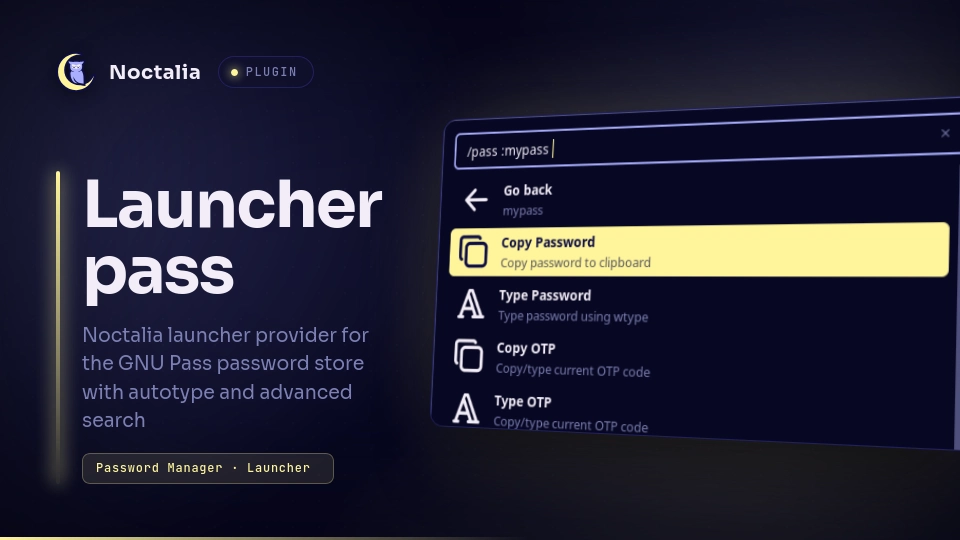
folder to the top so you can drill in. Activating an entry decrypts it with pass show and opens
its detail view, which lists, in order:
- Copy Password / Type Password
- Copy OTP / Type OTP — only when the entry has an
otpauth://line - Copy Username / Type Username — the value of the first
login,user, orusernamefield (case-insensitive), or the entry's own name when there is none - Autotype login — type the whole login in one go (only when enabled and
wtypeis present; see below) - Copy
<field>/ Type<field>for every remainingkey: valueline, in file order - Edit — open
pass edit <entry>in a terminal (only when a terminal resolves; see below) - Generate — regenerate the password in place, behind a confirm prompt
- Go back to the entry's folder
In the detail view, keep typing to filter these rows: /pass work/aws/root otp
shows only the two OTP rows. The filter uses the same match rule as search
(spaces are wildcards).
Copy puts the value on the clipboard. Password and OTP go through pass -c /
pass otp -c, so the clipboard is cleared automatically after the timeout;
usernames and other fields are copied directly and are not auto-cleared.
Type closes the launcher, waits Type delay, then types the value with
wtype.
Autotype login closes the launcher and types the whole login in sequence
with wtype: the username, a separator key, the password, then — when the entry
has an otpauth:// line — the current OTP. The separator is a Tab press by
default (Autotype field separator setting), or an Enter press for logins
that only show the password field after the username is submitted. An Enter
is pressed at the end to submit — after the OTP when present, otherwise after
the password — unless Autotype presses Enter to submit is turned off. The
row only appears when Autotype login row is enabled and wtype is on
PATH; it is off by default.
Edit closes the launcher and runs pass edit <entry> in a terminal, letting
you change the entry's contents in an editor (pass re-encrypts on save). The
terminal comes from the Terminal command setting; if that is blank the
plugin uses $TERMINAL, then the first of ghostty, kitty, alacritty,
wezterm, foot, konsole, xterm found on PATH. When none of those
resolve, the Edit row is hidden. The Editor command setting, when set, is
exported as EDITOR for that run; left blank, EDITOR is not touched and pass
uses its own default. The decrypted-entry cache is dropped after an edit, so
reopening the entry shows the new contents.
Generate replaces the entry's password with pass generate -i <entry> —
first line only, so the username, OTP, and other fields are kept. Activating the
row first swaps in a Cancel / Regenerate now pair; only the second
actually runs pass. On success a "Password regenerated" notification fires and
the launcher reopens on the entry's detail view with the new password ready to
Copy or Type. This is irreversible — the old password is not kept anywhere.
Creating entries
The "New entry" row in any folder view (or typing /pass +) opens the
creation menu on the + prefix, pre-filled with the current folder path. Edit
the path by typing; a "Create entry" row appears once the path has a leaf
name. Activating it shows a Cancel / Create entry now confirm step with
the full path. If the path already has an entry the "Create entry" row turns
into an "already exists" message right there in the menu, so you never reach
the confirm step for a name that can't be created.
Confirming closes the launcher and runs pass generate <path> (a fresh random
password), then — if a terminal resolves — opens pass edit <path> so you can
add a username and other fields (no time limit). When the editor exits a
"Password entry created" notification fires and the launcher stays closed;
the new entry shows up next time you open it. pass also rejects paths
containing ...
If GPG needs a passphrase, a pinentry dialog appears; the launcher hides itself so the dialog can take focus and reopens once decryption finishes.
Settings
| Setting | Type | Default | Description |
|---|---|---|---|
storePath |
folder |
(empty → ~/.password-store) |
Exported as PASSWORD_STORE_DIR to every pass call. |
clipTimeout |
string |
(empty) | Seconds before pass clears the clipboard after Copy Password / Copy OTP. Empty falls back to the PASSWORD_STORE_CLIP_TIME environment variable, then to pass's own default. Only a positive integer takes effect. |
typeDelay |
int |
500 |
Milliseconds to wait after the launcher closes before wtype starts typing, so the compositor can restore focus to the field you were in. (Advanced. The v4 label "Launcher Close Delay" was misleading — this is the pre-typing delay.) |
wtypeDelay |
int |
12 |
Milliseconds between simulated keystrokes. Increase it if characters are dropped. (Advanced.) |
pinentryGraceMs |
int |
50 |
Milliseconds to wait for a decrypt to finish before assuming a pinentry dialog is blocking and hiding the launcher. If your GPG agent already has the passphrase cached, the launcher never flickers. Lower values let the pinentry dialog take focus more easily but can make the launcher flicker more often; higher values (around 200–300ms) give a more stable launcher but risk the pinentry dialog spawning while the launcher is still open and waiting out the timeout, in which case it may not get focus depending on your window manager. (Advanced.) |
autotypeEnabled |
bool |
true |
Show an Autotype login row in the detail view (sorted just after the username rows). Needs wtype, like the Type rows. |
autotypeSeparator |
select |
tab |
Key autotype presses to move from the username field to the password field: tab or enter. |
autotypeSubmit |
bool |
true |
Whether autotype presses Enter after its last value (after the OTP when present, otherwise after the password). Off stops the sequence just before submitting. (Advanced.) |
detailActionOrder |
select |
copy |
In an entry's detail view, whether the Copy row (copy) or the Type row (type) comes first for each value. (Advanced.) |
detailActionGrouping |
select |
interleaved |
interleaved: each value's Copy and Type rows sit together. grouped: every Copy row first, then every Type row (each block in the detailActionOrder direction). (Advanced.) |
terminalCommand |
string |
(empty) | Terminal for the Edit action, as a full command prefix including its exec flag (foot -e, kitty -e, gnome-terminal --). Empty auto-detects from $TERMINAL, then a common terminal on PATH. When nothing resolves the Edit row is hidden. (Advanced.) |
editorCommand |
string |
(empty) | Exported as EDITOR for the Edit action's pass edit run (nvim, code --wait, …). Empty leaves EDITOR unset so pass uses its own default. (Advanced.) |
IPC
Quick actions
Run one detail action without opening the launcher, so you can bind copy / type / autotype to a global shortcut:
noctalia msg plugin mellotanica/launcher-pass:quick-actions all <action> [entry-path]
(The target is :quick-actions — a small companion service — not :pass; the
launcher provider itself cannot receive IPC.)
| Action | Effect |
|---|---|
copy-password |
pass -c — password to clipboard, auto-cleared |
type-password |
type the password with wtype |
copy-username |
username to clipboard (not auto-cleared) |
type-username |
type the username with wtype |
copy-otp |
pass otp -c — current OTP to clipboard, auto-cleared |
type-otp |
type the current OTP with wtype |
autotype |
the full Autotype login sequence (respects the autotype settings) |
Which entry? With no entry-path, the action runs on the current entry —
the last one you opened, acted on, or narrowed a launcher search down to a
single result. That's remembered until you pick another (it survives closing the
launcher), so the normal flow is: open /pass, type until your entry is the
only match (or open it), then hit your shortcut. A search
that still shows several entries does not change the current entry, so a
stray broad query can't make autotype fire your credentials into the wrong
window. Pass an explicit entry-path (store-relative, e.g. work/aws/root) to
override — it also becomes the new current entry. noctalia msg splits its
arguments on whitespace, so an explicit path must have no spaces; an entry
whose name contains a space can only be reached through the no-path (current
entry) form.
Each action behaves exactly like activating the matching detail row: same
clipboard timeout, wtype delays, and "Copied to clipboard" / failure
notifications. type-* and autotype need wtype; copy-otp / type-otp
need pass-otp. The entry is decrypted on demand (a pinentry dialog appears if
GPG needs the passphrase), reusing the 60-second in-memory cache when warm. An
unknown action, or no current entry yet, shows a "Quick action failed"
notification and does nothing.
Example Hyprland binds:
-- act on whatever entry the launcher last had open / narrowed to
hl.bind("SUPER + P", hl.dsp.exec_cmd("noctalia msg plugin mellotanica/launcher-pass:quick-actions all autotype"))
hl.bind("SUPER + SHIFT + P", hl.dsp.exec_cmd("noctalia msg plugin mellotanica/launcher-pass:quick-actions all copy-password"))
-- or pin a shortcut to one specific entry
hl.bind("SUPER + ALT + P", hl.dsp.exec_cmd("noctalia msg plugin mellotanica/launcher-pass:quick-actions all copy-otp work/aws/root"))
Opening the launcher
noctalia msg panel-open   launcher "/pass "
noctalia msg panel-toggle launcher "/pass "
noctalia msg panel-close  launcher
Replace / with your provider_prefix if you changed it. The plugin uses these
same panel-close / panel-open commands internally to juggle focus around the
GPG pinentry prompt.
Notes
- Auto-paste: Noctalia's
shell.launcher.auto_paste(Ctrl+V / Shift+Insert after a copy) only applies to the built-in providers — the plugin runtime has no hook to opt in. The Type rows exist to cover that case; they insert the value withwtyperegardless of theauto_pastesetting. - Index file:
findlists the non-hidden folders and*.gpgnames under the store once into<plugin data dir>/store.index(rebuilt in the background, ~once a minute). Every keystrokegreps that file — it holds paths only, never decrypted content. Decrypted contents are read only when you open an entry's detail view (pass show), and are cached in memory for 60 s. - Spawned processes:
find(index build);grep(per keystroke);pass show,pass -c,pass otp,pass otp -c(per action);pass generate -i(Generate action);testthenpass generate(New entry);wtypeandsleep(Type actions, and a chain ofwtypecalls pluspass otpfor Autotype); a terminal runningpass edit(Edit / New entry actions);noctalia msg panel-*(pinentry focus handling). - Secrets: decrypted values live only in the plugin's in-memory cache and on
the system clipboard via
pass/ Noctalia. Neither Noctalia state nor the index file holds decrypted content. Navigation state is encoded in the launcher query, not persisted. - Network: none.
- Writes: the
store.indexfile above; the Edit, Generate, and New entry actions askpassto write the entry's own.gpgfile (pass edit/pass generate -i/pass generate). Otherwisepass,gpg, and clipboard tools manage their own runtime state.
Versions
| Version | Plugin API | Updated |
|---|---|---|
| v2.6.0 latest | 26 | Aug 31, 2026 |
Older versions stay installable on a Noctalia release whose plugin API is below the latest version's.