
About
keysmith
Generate passwords, keys and htpasswd lines, and decode JWTs, from the bar. Click the glyph to open a panel with four tabs. Secrets are never written to disk: results and pasted tokens stay in memory and are wiped when the panel closes. Only the special characters list and the last tab are saved.
Plugin
| Field | Value |
|---|---|
| ID | nightwatch75/keysmith |
| Entries | Bar widget: keysmith; panel: panel |
Requirements
- noctalia v5.0.1 or newer (
plugin_api = 24). The plugin needs direct argument lists for commands, which arrived with API 24. opensslfor thehex,base64andbase64urlformats of the Keygen tab.htpasswd(Apache utils:apache2-utils,httpd-tools) for the htpasswd tab.od(coreutils) to read random bytes from/dev/urandom.mkfifo(coreutils) to pass the htpasswd password tohtpasswdwithout putting it in the command arguments.- A monospace font: the results use the system
monospacealias.
Usage
Add keysmith to a bar from the Add-widget picker and click it, or:
noctalia msg panel-toggle nightwatch75/keysmith:panel
Passgen
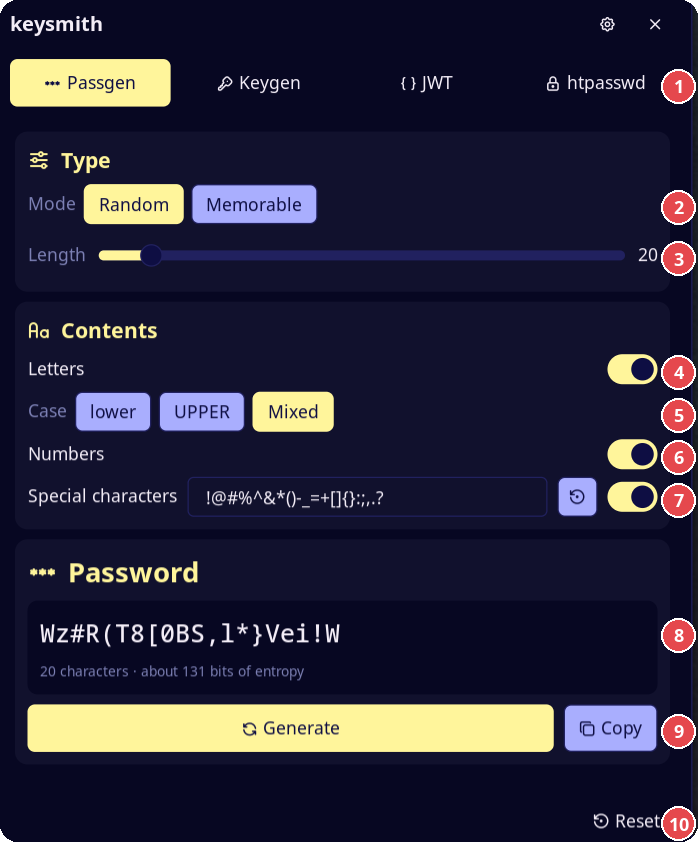
- Tabs: Passgen, Keygen, JWT and htpasswd.
- Mode: Random or Memorable.
- Length of the password, from 8 to 128.
- Letters on or off.
- Case of the letters: lower, UPPER or Mixed.
- Numbers on or off.
- Special characters on or off. The field lists the characters the generator can use. The restore button brings back the default list.
- The new password and the estimated entropy.
- Generate makes a new password. Copy puts it on the clipboard.
- Reset puts the options of the open tab back to their defaults.
- Random: length (8–128), letters with lower / upper / mixed case,
numbers, special characters. Each enabled set is always present.
With special characters on, a field lists the characters Passgen may use
(default
!@#%^&*()-_=+[]{}:;,.?). Remove the characters you do not want or add others, for example$. The field is saved in the plugin data folder; the restore button brings back the default. - Memorable: a passphrase of 3–10 words from the EFF large wordlist (7776 words, about 12.9 bits per word). Options: separator, capitalized words, a number at the end. Five words give about 65 bits.
The panel shows the estimated entropy of each result.
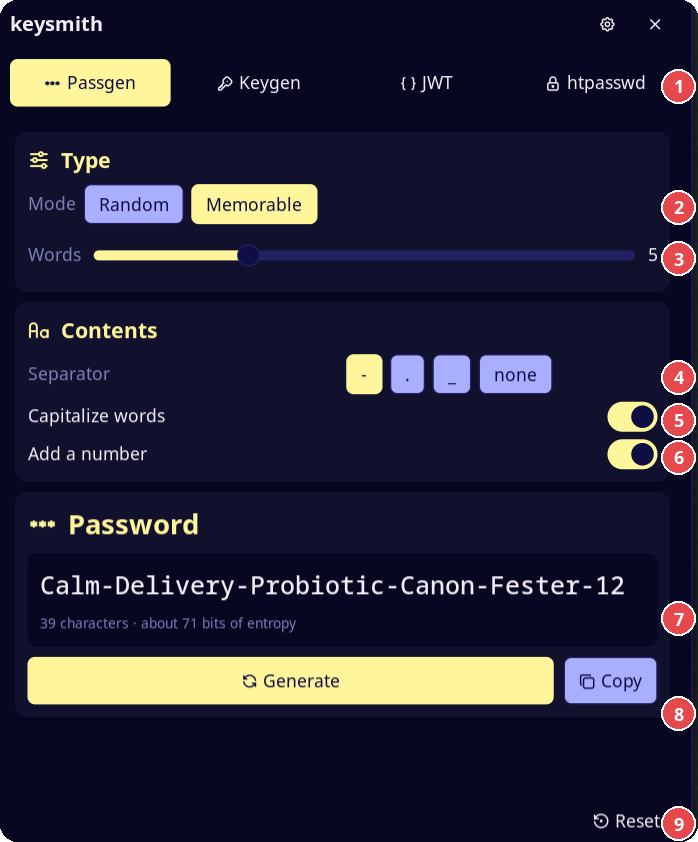
In Memorable mode, items 3 to 6 change: 3 is the number of words, 4 the
separator (-, ., _ or none), 5 capitalizes each word, and 6 adds a
two-digit number at the end.
Keygen
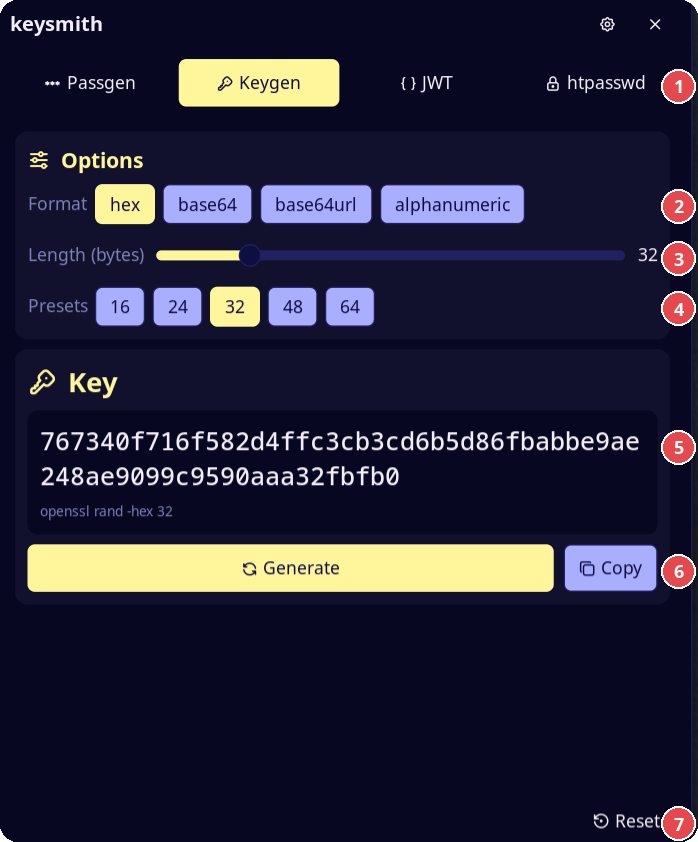
- Tabs.
- Format:
hex,base64,base64urloralphanumeric. - Length, in bytes (in characters for
alphanumeric). - Presets for the length: 16, 24, 32, 48 and 64.
- The new key and the command that made it.
- Generate and Copy.
- Reset.
Runs openssl rand for hex, base64 and base64url (no padding). The
panel shows the equivalent command, for example openssl rand -hex 32.
alphanumeric does not use openssl: it takes the same /dev/urandom bytes
as Passgen. The length is in bytes, or in characters for alphanumeric.
JWT
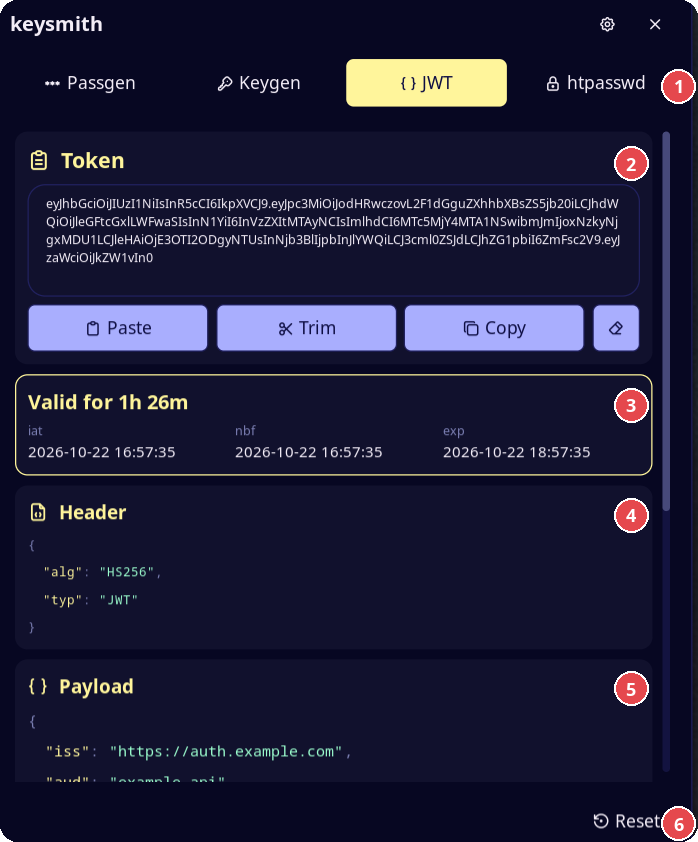
- Tabs.
- The token field. Under it: Paste, Trim, Copy and Clear.
- Validity of the token, and the
iat,nbfandexpdates. - Header, as indented JSON.
- Payload, as indented JSON. The signature is below it.
- Reset.
Decodes a JSON Web Token. It does not check the signature.
- Paste reads the token from the clipboard.
- Trim keeps only the token and removes text around it: quotes, JSON
fragments,
Bearer. The decoder also ignores that text, so Trim only cleans the field. - The header and the payload show as indented JSON in separate boxes, with
the key order of the token. Long values continue on the next line. A highlighted box above the JSON tells you if the token is
expired or how long it stays valid, and lists
iat,nbfandexpas dates. - Keys, strings, numbers and punctuation have different colors.
- Copy puts the decoded header and payload on the clipboard as one JSON
document:
{ "header": …, "payload": … }. - The signature shows as plain text, below the payload.
- Clear empties the field. The field also clears when the panel closes.
htpasswd
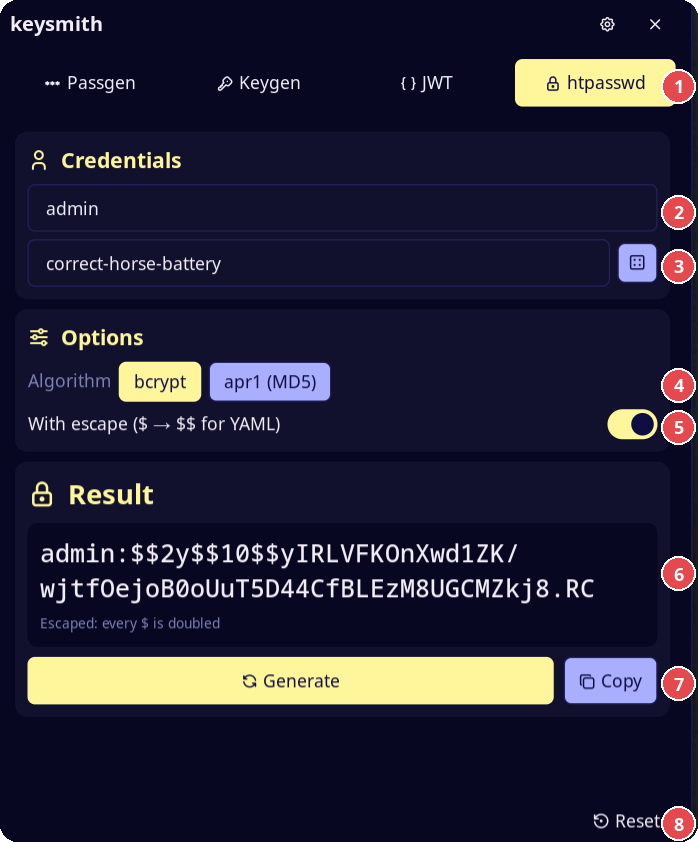
- Tabs.
- User name.
- Password. The dice button fills the field with 24 random characters.
- Algorithm:
bcryptorapr1. - With escape: doubles every
$. - The
user:hashline. - Generate and Copy.
- Reset.
Builds the user:hash line with htpasswd -n. Algorithms: bcrypt
(cost 10) and apr1 (MD5). The dice button fills the password field with 24
random characters.
With escape doubles every $ (same as sed -e 's/\$/\$\$/g'), so the
line can go in a YAML or Docker Compose file.
Reset
The Reset button at the bottom of the panel puts the options of the open tab back to their defaults and clears its result. On Passgen it also restores the default special characters. On htpasswd it clears the user and password fields. On JWT it clears the token field.
Settings
| Key | Type | Default | Description |
|---|---|---|---|
start_tab |
select | last |
Tab shown when the panel opens: last (the tab you used last) or a fixed one. |
copy_on_generate |
bool | false |
Copy each new secret to the clipboard when you press Generate, and show "Password copied", "Key copied" or "htpasswd copied". |
glyph |
glyph | key |
Bar icon. |
Notes
- Random data comes from
/dev/urandomthroughod. Characters and words are picked with rejection sampling, so none is more likely than another. htpasswdreads the password from stdin. The plugin creates a named pipe (htpasswd-<n>.fifo, mode 600, one per request) in its data folder, startshtpasswdwith the pipe as input and writes the password into it. The password is never in the command arguments and never stored in a file. The pipe is removed when the command ends and when the panel closes.- A clipboard manager can store a copied secret in its history.
- The screenshots show sample data.
Versions
| Version | Plugin API | Updated |
|---|---|---|
| v0.1.0 latest | 24 | Oct 22, 2026 |
Older versions stay installable on a Noctalia release whose plugin API is below the latest version's.