 Noctalia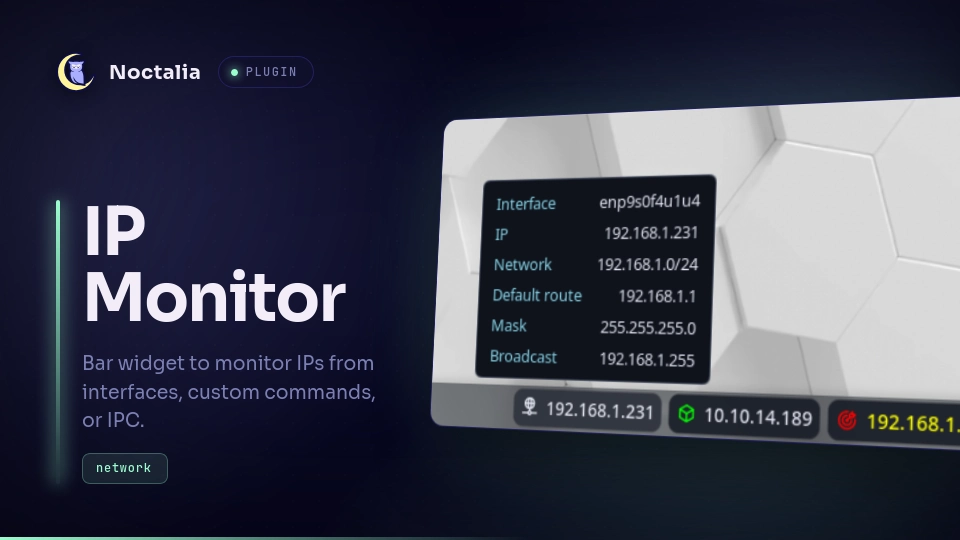
About
IP Monitor
A Noctalia bar and desktop widget to monitor network IPs. It supports fetching IPs from network interfaces, custom commands, or via IPC.
Plugin
| Field | Value |
|---|---|
| ID | 3ri4ng0ld/ip-monitor |
| Entries | Bar widget: widget, Desktop widget: desktop |
Requirements
ip(part ofiproute2): Required to resolve IP and gateway in Interface mode.curl: Required if using the default custom command to fetch public IPs.
Settings
Bar Widget Settings (widget)
| Setting | Type | Default | Description |
|---|---|---|---|
glyph |
glyph |
network |
The icon glyph displayed on the widget |
glyph_color |
color |
on_surface |
Color of the icon |
mode |
select |
interface |
Operating mode: Interface, Custom Command, or IPC |
iface |
string |
wlan* |
Network interface wildcard to fetch IP from |
custom_command |
string |
curl -s ifconfig.me |
Shell command to execute in custom command mode |
text_color |
color |
on_surface |
Color of the IP text |
name |
string |
"" |
A custom name to display alongside the IP |
ipc_id |
string |
default |
Identifier used to target this specific widget via IPC |
name_color |
color |
on_surface |
Color of the name text |
separator |
string |
- |
Separator symbol between IP and Name |
separator_color |
color |
on_surface |
Color of the separator |
hide_on_empty |
boolean |
true |
Hide the widget completely if no IP is found |
refresh_interval |
int |
60 |
Refresh interval in seconds (max 3600) |
hidden_fields |
string |
"" |
Comma-separated fields to hide in tooltip (e.g. network,mask). Options: iface, ip, network, gateway, mask, broadcast |
left_click_action |
select |
copy_ip |
Action to perform on left click (Copy IP, Copy Name, None) |
right_click_action |
select |
copy_name |
Action to perform on right click (Copy IP, Copy Name, None) |
Desktop Widget Settings (desktop)
| Setting | Type | Default | Description |
|---|---|---|---|
glyph |
glyph |
network |
The icon glyph displayed on the widget |
glyph_color |
color |
on_surface |
Color of the icon |
mode |
select |
interface |
Operating mode: Interface, Custom Command, or IPC |
iface |
string |
wlan* |
Network interface wildcard to fetch IP from |
custom_command |
string |
curl -s ifconfig.me |
Shell command to execute in custom command mode |
text_color |
color |
on_surface |
Color of the IP text |
name |
string |
"" |
A custom name to display alongside the IP |
ipc_id |
string |
default |
Identifier used to target this specific widget via IPC |
name_color |
color |
on_surface |
Color of the name text |
separator |
string |
- |
Separator symbol between IP and Name |
separator_color |
color |
on_surface |
Color of the separator |
hide_on_empty |
boolean |
true |
Hide the widget completely if no IP is found |
refresh_interval |
int |
60 |
Refresh interval in seconds (max 3600) |
ip_font_size |
int |
32 |
Font size for the IP and name text |
details_font_size |
int |
16 |
Font size for the network details text |
details_key_color |
color |
primary |
Color for detail label keys (e.g. Network, Mask) |
details_value_color |
color |
on_surface |
Color for detail values |
hidden_fields |
string |
"" |
Comma-separated fields to hide in details table (e.g. network,mask). Options: iface, ip, network, gateway, mask, broadcast |
Usage
Add the widget to a bar from Settings → Bar. Plugin options live in Settings → Plugins.
Modes
- Interface: Fetches the IP from a local network interface. The
Interfacesetting supports wildcards, for examplewlan*oreth*, and will select the first matching interface that has a valid IP address. - Custom Command: Runs a shell command to fetch the IP. For example,
curl -s ifconfig.mefor the public IP. - IPC: Listens to external events to set the IP and name.
IPC
The widget listens to the set event. By default, the widget is assigned the IPC ID default. To set the IP and name for a default widget, use the following command (you don't need to specify an ID in the JSON, it defaults to default):
noctalia msg plugin 3ri4ng0ld/ip-monitor:widget all set '{"ip":"192.168.1.5","name":"MyIP"}'
If you have multiple ip-monitor widgets in IPC mode and want to update them independently, you can change the IPC ID setting for each widget. Then, target them by passing their ID string in the JSON payload:
noctalia msg plugin 3ri4ng0ld/ip-monitor:widget all set '{"id":"my_vpn","ip":"100.64.0.1","name":"VPN"}'
noctalia msg plugin 3ri4ng0ld/ip-monitor:widget all set '{"id":"my_local_iface","ip":"192.168.1.5","name":"Ethernet"}'
Tooltips
Hovering over the widget displays detailed network information if available:
- Interface: Network interface name (e.g.
eth0) - IP: IPv4 address
- Network: Network range (e.g.
192.168.1.0/24) - Default route: Gateway address (e.g.
192.168.1.1) - Mask: Subnet mask (e.g.
255.255.255.0) - Broadcast: Broadcast address (e.g.
192.168.1.255)
[!TIP] You can selectively hide any of these fields by listing their internal keys (
iface, ip, network, gateway, mask, broadcast) separated by commas in the Hide Tooltip Options (for the bar widget) or Hide Details Options (for the desktop widget) configuration.
In IPC Mode, tooltip fields can be passed optionally in the JSON payload (either as top-level keys or nested inside a tooltip object):
noctalia msg plugin 3ri4ng0ld/ip-monitor:widget all set '{
  "id": "my_vpn",
  "ip": "100.64.0.2",
  "name": "Tailscale",
  "iface": "tailscale0",
  "network": "100.64.0.0/10",
  "gateway": "100.64.0.1",
  "mask": "255.192.0.0"
}'
Click Actions
By default, left-clicking the widget copies the IP address to the clipboard and right-clicking copies the display name.
These bindings can be changed or disabled from the Settings section in the widget's bar settings.
Versions
| Version | Plugin API | Updated |
|---|---|---|
| v0.0.1 latest | 3 | Aug 2, 2026 |
Older versions stay installable on a Noctalia release whose plugin API is below the latest version's.