 Noctalia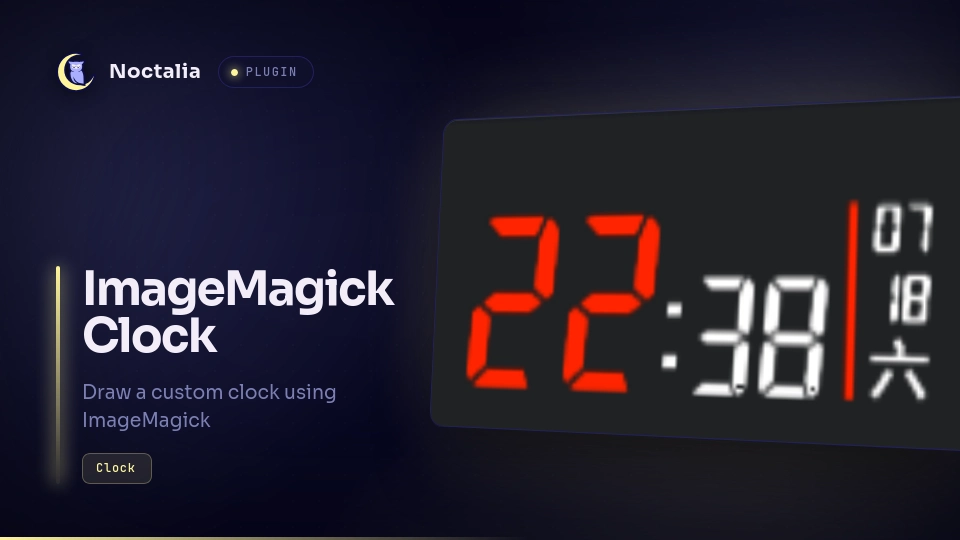
About
ImageMagick Clock
ImageMagick Clock draws a custom clock using ImageMagick (or any other CLI image drawing tool).
Plugin
| Field | Value |
|---|---|
| ID | jinliu/imagemagick-clock |
| Entries | Bar widget: clock |
Requirements
magickfromImageMagick.mvfromcoreutils.- (Optional) 7-Segment font for a classic digital clock look.
Usage
Add ImageMagick Clock from the Add-widget picker. The widget displays a
custom clock image generated by ImageMagick (or any other CLI image drawing tool).
The default command line is:
magick -size 270x100 canvas:black -transparent black -pointsize 128 -fill '#FF2400' -draw 'text 0,100 \"%H\"' -fill white -pointsize 84 -draw 'text 120,100 \":%M\"' -fill '#FF2400' -stroke '#FF2400' -strokewidth 5 -draw 'line 225,0 225,100' -strokewidth 0 -stroke white -fill white -pointsize 32 -draw 'text 235, 25 \"%m\"' -draw 'text 235, 60 \"%d\"' -draw 'text 235, 95 \"%a\"' '%output_file'
You can customize the command line in the widget's configuration to change how the clock looks. The "%output_file" placeholder will be replaced with the path to the file where the clock image should be saved. Other placeholders like "%H", "%M", "%a" will be replaced with the hour, minute, and day of the week, etc. See man strftime for the complete list of placeholders.
You might want to install the 7-Segment font to get a classic digital clock look. Add -font '7-Segment' to the command line after magick to use it. The command line would then look like this:
magick -font '7-Segment' -size 270x100 canvas:black -transparent black -pointsize 128 -fill '#FF2400' -draw 'text 0,100 \"%H\"' -fill white -pointsize 84 -draw 'text 120,100 \":%M\"' -fill '#FF2400' -stroke '#FF2400' -strokewidth 5 -draw 'line 225,0 225,100' -strokewidth 0 -stroke white -fill white -pointsize 32 -draw 'text 235, 25 \"%m\"' -draw 'text 235, 60 \"%d\"' -draw 'text 235, 95 \"%a\"' '%output_file'
If your locale uses characters that are not supported by the 7-Segment font (e.g., Chinese), you might want to set a different font before the last -draw command. For example:
magick -font '7-Segment' -size 270x100 canvas:black -transparent black -pointsize 128 -fill '#FF2400' -draw 'text 0,100 \"%H\"' -fill white -pointsize 84 -draw 'text 120,100 \":%M\"' -fill '#FF2400' -stroke '#FF2400' -strokewidth 5 -draw 'line 225,0 225,100' -strokewidth 0 -stroke white -fill white -pointsize 32 -draw 'text 235, 25 \"%m\"' -draw 'text 235, 60 \"%d\"' -stroke none -font Noto-Sans-CJK-SC-Bold -draw 'text 235, 95 \"%a\"' '%output_file'
(Note: You can list all available fonts on your system by running magick -list font.)
You can use any command-line drawing tool, not just ImageMagick, as long as it generates an image file at the specified output path. The plugin will call the command at the beginning of every minute to generate a new clock image for the next minute. Therefore, your command can take up to a full minute to generate one image, though I wouldn't recommend something that heavy.
Settings
| Setting | Type | Default | Description |
|---|---|---|---|
command_line |
string |
(too long, omitted) | The command line to draw the clock |
image_width |
int |
54 | The width of the clock image |
image_height |
int |
20 | The height of the clock image |
Versions
| Version | Plugin API | Updated |
|---|---|---|
| v1.0.0 latest | 3 | Jul 19, 2026 |
Older versions stay installable on a Noctalia release whose plugin API is below the latest version's.