 Noctalia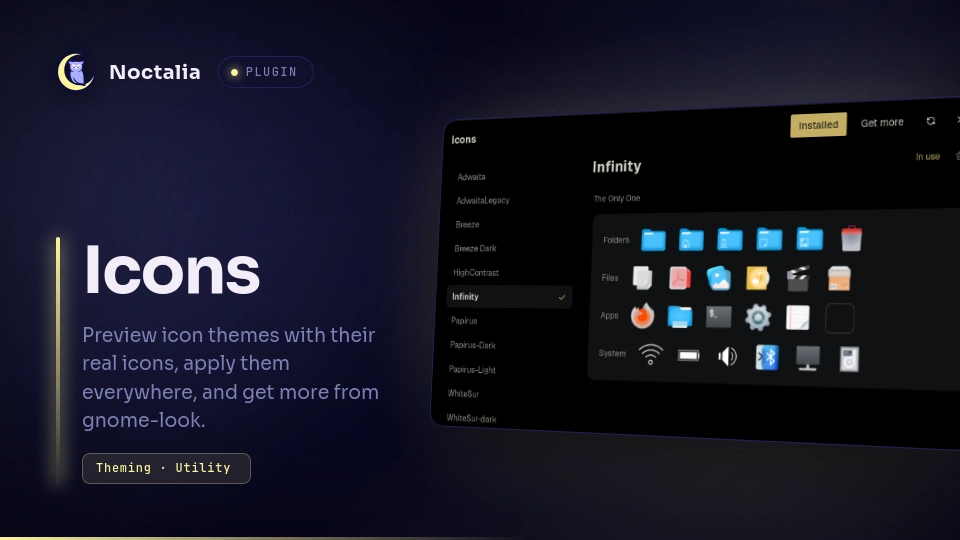
About
Icons
Pick an icon theme by looking at its real icons, apply it to GNOME, GTK, Qt and
KDE apps and to Noctalia's own dock and launcher at once, install new ones from
gnome-look.org, and recolor Papirus folders. No nwg-look or qt6ct editing
needed.
Plugin
| Field | Value |
|---|---|
| ID | vn1k/icons |
| Entries | Bar widget: widget; panel: manager; shortcut: shortcut; service: lifecycle |
Requirements
python3 runs the engine (bin/iconmgr.py, standard library only). zenity
is only needed for the Install from a folder picker; everything else works
without it.
Usage
Open the panel from the control centre tile (the shortcut entry, added under
the control centre in Settings), from the bar button (add the Icons widget
from the bar's widget picker; the panel opens right under it), or with:
noctalia msg panel-toggle vn1k/icons:manager
Installed lists every icon theme on the system, with variants folded under their theme (Papirus > Dark, Light; Breeze > Dark); the arrow opens a family. Pick one and the right side shows its own icons for folders, files, apps and system status, so you see what you get before using it. Use this theme applies it everywhere; the theme in use carries a check mark. If some places still use another theme, the panel says which ones, and Use brings them back in line.
For Papirus themes in your home folder, Folder color shows every folder color the theme ships, each as its own folder icon. Click one to recolor the folders; there is no script to run and no root needed.
Install from a folder (Choose folder…) takes a theme folder, or a
folder holding several themes (Papirus ships four), and installs all of them.
It does not unpack archives: extract a downloaded .tar.xz or .zip yourself
first, then choose the folder.
Get more searches gnome-look.org's icon themes, sorted by Popular, Newest or Top rated. Click a result to see its files, and Install one; the download runs in the background and the new theme opens in Installed when it is done.
Many variants are mostly links into their base theme (WhiteSur-light into WhiteSur, Papirus-Dark into Papirus), so Remove on a theme also removes the variants built on it, and says so before it does; nothing in that family may be the theme in use. A variant whose base theme is gone is flagged in the list and cannot be used: get the base theme again from Get more, or remove it.
Reset to system icons, at the bottom of Installed, removes the icon theme the plugin set and goes back to the system default. The first click explains what will happen and offers Cancel. Removing the plugin in Noctalia's settings does the same reset on its own; installed themes always stay.
Settings
| Setting | Type | Default | Description |
|---|---|---|---|
icon_dirs |
string_list |
empty | Extra folders to search for icon themes, on top of ~/.local/share/icons, ~/.icons and $XDG_DATA_DIRS/icons. |
Notes
What Use writes. Only the icon theme key, never anything else in a file:
| Place | Key | Reaches |
|---|---|---|
gsettings org.gnome.desktop.interface |
icon-theme |
GTK 4, libadwaita, portals (Flatpak apps), Noctalia |
~/.config/gtk-3.0/settings.ini, gtk-4.0/settings.ini |
gtk-icon-theme-name |
GTK apps, Noctalia |
~/.config/qt5ct/qt5ct.conf, qt6ct/qt6ct.conf |
[Appearance] icon_theme |
Qt apps, only if the file already exists |
~/.config/kdeglobals |
[Icons] Theme |
KDE apps, only if the file already exists |
Noctalia watches gsettings and the GTK files, so its dock, launcher and taskbar
change at once. Other apps pick the theme up when they restart. Flatpak apps
need nothing extra: they read the theme name through the portal and see
~/.local/share/icons inside the sandbox.
Files and folders. Themes are installed to ~/.local/share/icons/<name>,
copied with their symlinks intact. Remove and folder recoloring only ever
touch themes there, never a theme from /usr/share/icons. Only a Get more
download is ever unpacked, with Python's tarfile data filter (or a path check
for .zip): absolute paths, .. escapes and device files refuse the archive; a
symlink pointing out of it (some themes ship one into the author's own disk) is
skipped. Downloads and extraction use ~/.cache/iconmgr, cleaned up after each
install. gnome-look previews are kept in the plugin's data folder.
Network. Only Get more goes online: api.gnome-look.org for search
results, images.pling.com for previews, and pling's file servers for the
archive you choose to install. Nothing is sent but the search words.
Processes. The panel runs python3 bin/iconmgr.py, zenity for the pickers
and noctalia msg panel-open to come back after one. The engine runs
gsettings. The lifecycle service copies the engine into the plugin's data
folder on start, because Noctalia deletes the plugin folder before the
uninstall hook runs.
The engine is a plain CLI, so the same operations work from a keybind or a
script: bin/iconmgr.py apply Papirus-Dark, folders Papirus-Dark red,
browse --query tela. Every subcommand prints one JSON object.
Versions
| Version | Plugin API | Updated |
|---|---|---|
| v1.0.0 latest | 43 | Oct 28, 2026 |
Older versions stay installable on a Noctalia release whose plugin API is below the latest version's.