 Noctalia
About
Habitica
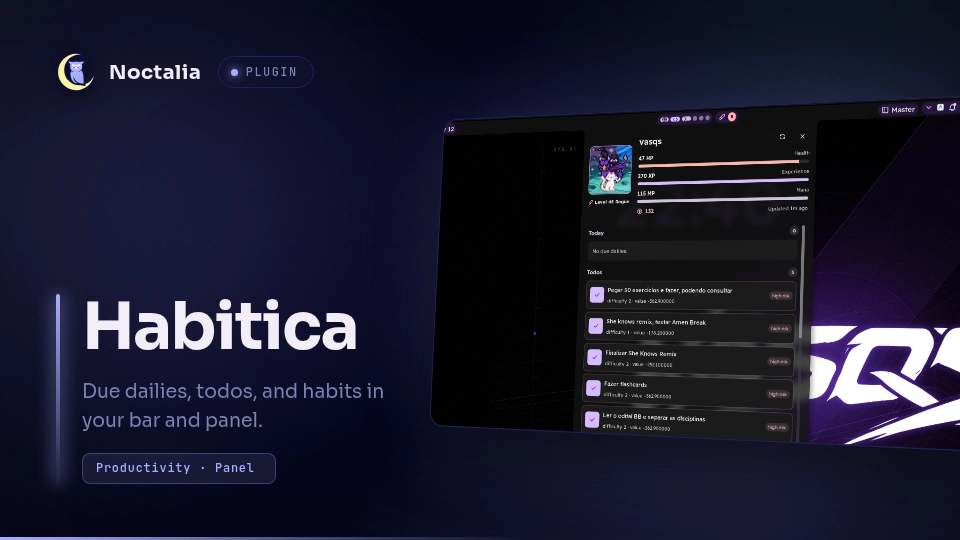
Habitica brings your Habitica account into the Noctalia bar and a panel. A
headless service talks to the Habitica API, keeps a local snapshot, and
publishes it through noctalia.state; the bar widget and panel only read that
snapshot, so both stay light and always agree.
The default view is intentionally focused: due dailies and open todos are first-class, while habits, checklist items, tag filtering, and colorization are opt-in. Scoring a daily, todo, habit, or checklist item updates Habitica and refreshes the snapshot. An avatar is composited from official Habitica sprite assets when ImageMagick is available.
Plugin
| Field | Value |
|---|---|
| ID | vasqs/habitica |
| Entries | Bar widget: bar; panel: panel; service: service |
The bar widget shows the pending count and opens the panel on left-click.
Right-click requests a refresh. The headless service owns HTTP access, caching,
avatar compositing, and the published snapshot. The panel shows account stats,
task lists, and scoring controls.
Requirements
- Noctalia 5.4 or newer (plugin API 43)
- A Habitica account and an API token
magick(ImageMagick 7) for avatar compositing. Without it the panel shows theswordglyph instead of your avatar; the rest of the plugin keeps working.
Noctalia provides noctalia.http, noctalia.state, and the Luau host API, so
the plugin has no library dependencies of its own.
Usage
Install and enable
Install Habitica from the Noctalia plugin store, or enable it from a configured plugin source:
noctalia msg plugins enable vasqs/habitica
Then add the bar widget to a bar and open the plugin settings to fill in your
Habitica User ID and API Token.
Bar widget
Left-click opens the panel. Right-click asks the service to refresh and shows a short notification. The widget displays:
- the number of due dailies plus open todos;
- a level or player glyph, depending on the bar configuration;
- an error or configuration state when the service cannot fetch data.
Hover the widget for the tooltip: player name, level, HP, XP, gold, task summary, and the last successful sync time. The notification badge, colorization, and icon style are controlled in settings.
Panel
Open the panel from the widget or with:
noctalia msg panel-toggle vasqs/habitica:panel
The panel shows:
- player name, class, level, HP, XP, MP, and gold;
- Today: due dailies with completion controls;
- Todos: open todos with completion controls;
- Habits (optional): score up/down controls;
- checklist rows under dailies and todos when checklist display is enabled.
Scoring a task sends the matching Habitica request and refreshes the snapshot. Tag filtering narrows dailies, todos, and habits to tasks carrying the selected Habitica tag UUID. The panel's refresh button forces an immediate sync.
Habitica credentials
- Sign in to Habitica.
- Open
Settings. - Open the
APIsection. - Copy the
User IDandAPI Token. - Paste both values into the Habitica plugin settings.
Requests send these headers:
x-api-userx-api-keyx-client: <user-id>-noctalia-habitica
Settings
Settings are plugin-level, so the bar widget, panel, and service share them.
| Key | Type | Default | Description |
|---|---|---|---|
habitica_user_id |
string | empty | Habitica User ID (x-api-user). |
habitica_api_token |
string | empty | Habitica API Token (x-api-key). |
refresh_interval |
int | 300 |
Background sync interval in seconds (60-3600). |
max_dailies |
int | 8 |
Maximum due dailies shown in the panel. |
max_todos |
int | 8 |
Maximum open todos shown in the panel. |
show_notification_badge |
bool | true |
Show the pending count on the bar widget. |
show_habits |
bool | false |
Add a Habits section with up/down scoring. |
max_habits |
int | 8 |
Maximum habits shown when habits are enabled. |
show_checklist_items |
bool | false |
Show and score checklist rows. |
enable_tag_filter |
bool | false |
Only show tasks carrying the selected tag. |
selected_tag_id |
string | empty | Habitica tag UUID used by the filter. |
colorization_enabled |
bool | false |
Apply theme colors to the bar icon and badge. |
colorization_icon |
select | primary |
Color role for the bar icon. |
colorization_badge |
select | error |
Color role for the pending badge. |
colorization_badge_text |
select | on_error |
Text color role for the pending badge. |
IPC
# Open or close the panel
noctalia msg panel-toggle vasqs/habitica:panel

# Force a refresh
noctalia msg plugin vasqs/habitica:service all refresh

# Score a task: score <task-id> <up|down>
noctalia msg plugin vasqs/habitica:service all score TASK_ID up

# Score a checklist item: checklist <task-id> <item-id>
noctalia msg plugin vasqs/habitica:service all checklist TASK_ID ITEM_ID

# Toggle the panel from the service
noctalia msg plugin vasqs/habitica:service all toggle
Notes
Network and files
The service calls the public Habitica API endpoints listed below, and downloads
the sprite images for the visible avatar layers from Habitica's asset host. It
writes habitica.json (the task and account snapshot) and the downloaded
sprites, plus the composited avatar.png, under the Noctalia plugin data
directory. Credentials live in Noctalia plugin settings, not in the repository.
Endpoints used:
GET /api/v3/user?userFields=stats,profile,preferences,items,notificationsGET /api/v3/tasks/user?type=dailysGET /api/v3/tasks/user?type=todosGET /api/v3/tasks/user?type=habitsGET /api/v3/tagsPOST /api/v3/tasks/:taskId/score/:directionPOST /api/v3/tasks/:taskId/checklist/:itemId/score
Avatar
Habitica avatars are a stack of transparent sprites. The service downloads the
visible layers once per avatar change and composites them with magick into
avatar.png inside the plugin data directory. If magick is unavailable or
compositing fails, the panel falls back to the sword glyph.
Privacy and security
- The API token is required to read your account and is stored in Noctalia plugin settings.
- The plugin does not intentionally log the token.
- The cache contains account and task data and lives in the Noctalia plugin data directory, not in the repository.
- The plugin only reads account/task data and scores supported tasks. It does not create, edit, or delete Habitica tasks.
Troubleshooting
- Configuration error: confirm both
habitica_user_idandhabitica_api_tokenare set, then refresh. - Requests fail: check the network and confirm the token is still valid in Habitica.
- No avatar: install
magickor ignore the sword fallback; avatar layers are fetched on the next successful sync. - Tag filter hides everything: clear
selected_tag_idor paste a valid Habitica tag UUID. - Stale data: force a sync with the panel refresh button or
noctalia msg plugin vasqs/habitica:service all refresh.
License
MIT. See LICENSE.
Versions
| Version | Plugin API | Updated |
|---|---|---|
| v2.0.0 latest | 43 | Nov 13, 2026 |
Older versions stay installable on a Noctalia release whose plugin API is below the latest version's.