 Noctalia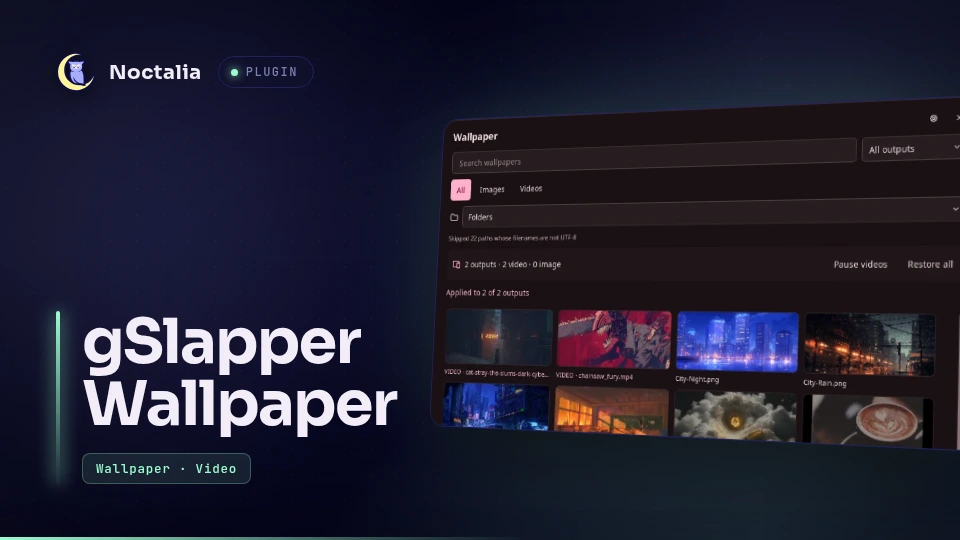
About
gSlapper Wallpaper
Choose images and video wallpapers from one picker. Apply one file to every detected output or select a different file for each connector.
Requires Noctalia v5 and plugin API 19. Noctalia v4 uses a different QML plugin format and will not list or load this source.
Video playback uses gSlapper instead of mpvpaper. gSlapper uses GStreamer rather than libmpv; its README documents lower CPU, memory, and GPU use than mpvpaper. Tests cover Niri, Hyprland, and Sway.
Plugin
| Field | Value |
|---|---|
| ID | nomadcxx/gslapper |
| Entries | Bar widget: wallpaper; panel: picker; service: service |
Requirements
findindexes the wallpaper roots- gSlapper 1.5.2 or newer provides the
gslappercommand and renders video wallpapers gst-launch-1.0creates image and video previewspkillcleans up a plugin-owned process if its socket stops respondingsocatsends gSlapper IPC commands
Arch Linux provides gst-launch-1.0 in gstreamer. Debian and Ubuntu provide
it in gstreamer1.0-tools. Preview generation can fail without blocking image
selection or video playback.
Install
Add the canonical repository as a custom plugin source:
- Open Settings → Plugins → Sources.
- Choose Add custom repository.
- Enter
https://github.com/Nomadcxx/noctalia-gslapper. - Open Settings → Plugins → Install and select gSlapper Wallpaper.
Or install it from a shell:
noctalia msg plugins source add gslapper git https://github.com/Nomadcxx/noctalia-gslapper
noctalia msg plugins enable nomadcxx/gslapper
Choose this source or the Noctalia community source. If you add both, Noctalia uses the copy from the last user source. Remove the other source with:
noctalia msg plugins source remove <source-name>
Usage
In Noctalia Settings, open your existing bar, choose a widget section, select Add Widget, then add gSlapper Wallpaper. You can remove Noctalia's Wallpaper widget if you want one wallpaper button.
Left-click the gSlapper widget to open the picker. Select All outputs or a
connector such as eDP-1 or DP-1, then choose an image or video. The All
view can pause assigned videos or restore every output.
Toggle the picker from a shell:
noctalia msg panel-toggle nomadcxx/gslapper:picker
The service indexes your image and video roots when Noctalia starts. It creates 224 by 126 JPEG previews in the plugin data directory. The picker shows 24 media files per page in a four-column grid and lists child folders in a separate selector.
Settings
| Setting | Default | Description |
|---|---|---|
| Video directory | ~/Videos/Wallpapers |
Root for video wallpapers. Noctalia's wallpaper directory supplies images. |
| Video scale | fill |
Uses gSlapper's fill, stretch, original, or panscan scaling mode. |
| When hidden | none |
Keeps playing unless you select Auto Pause or Auto Stop. |
| Loop videos | On | Restarts video playback at the end. |
| FPS cap | 30 |
Caps video wallpaper playback at 30, 60, or 100 FPS. |
| Fade between videos | Off | Enables gSlapper's fade transition. |
| Fade duration | 0.5 seconds |
Sets the transition duration when you enable fading. |
| Additional GStreamer options | Empty | Appends options to gSlapper's GStreamer option list. |
| Widget glyph | wallpaper-selector |
Changes the icon shown in the bar. |
The service restarts active video wallpapers after you change a playback setting.
Self-check
Run the built-in model and trust-boundary checks with:
noctalia msg plugin nomadcxx/gslapper:service all self-test
Notes
- The plugin starts one
gslapperprocess and one Unix socket under$XDG_RUNTIME_DIR/noctalia-gslapper/for each output with a video. - The plugin stores assignments, its self-check report, its media index, and cached preview JPEGs in Noctalia's plugin data directory. It makes no network requests.
- The picker skips filenames that do not use UTF-8.
- Static images use Noctalia's wallpaper renderer. For video assignments, the plugin disables Noctalia's wallpaper surface on that output while gSlapper owns it, then restores the native surface when you select Restore.
- Use Restore all before disabling or reloading the plugin. This stops its processes, removes its sockets, and re-enables Noctalia's wallpaper surfaces.
- The current plugin API does not report static wallpaper changes made outside this plugin, so its saved image assignment can become stale.
- Assignments follow connector names, not monitor serial numbers. Review them after GPU, dock, or cabling changes that rename outputs.
Versions
| Version | Plugin API | Updated |
|---|---|---|
| v0.1.2 latest | 43 | Oct 25, 2026 |
| v0.1.1 | 19 | Jul 29, 2026 |
Older versions stay installable on a Noctalia release whose plugin API is below the latest version's.