 Noctalia
About
Global Menu
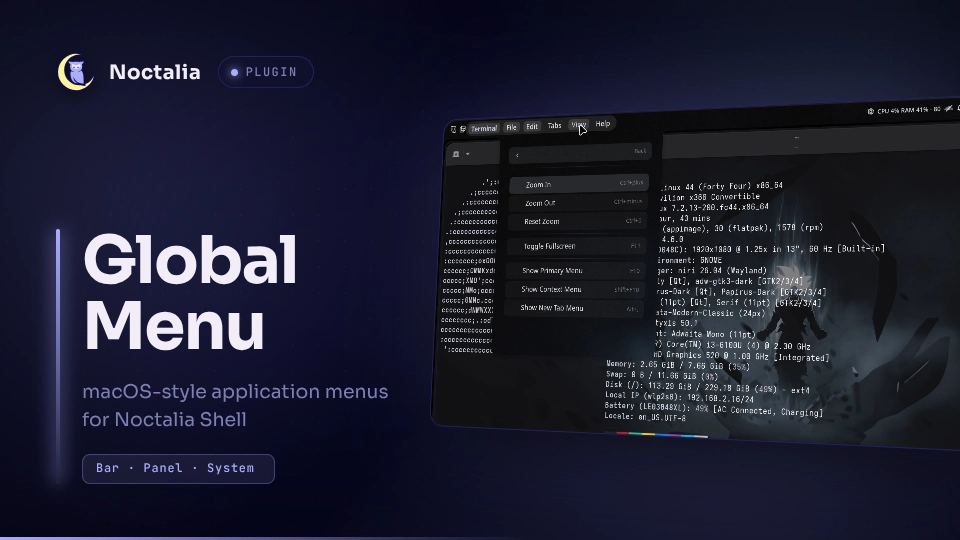
A macOS-style menu bar for Noctalia Shell. The focused application's menus move into the top bar: the app name plus one label per top-level menu, with a popup that renders the full menu tree — checkmarks, accelerators, submenus and keyboard navigation — and activates items in the real application. Clicking the app name opens a macOS-style application menu (About, Minimize, Maximize, Fullscreen, Resize and Quit), and menu labels that do not fit the bar move under a » button instead of being cut off.
Plugin
| Field | Value |
|---|---|
| ID | amancode22/global-menu |
| Entries | Bar widget: menubar; panel: menu; service: service |
Requirements
python3withpython3-dbusandpython3-gionPATH(the manifest declares exactly these). The plugin spawns its Python companion daemon automatically; you never run it by hand.wtypeonPATHif you want shortcut menus: item clicks either activate a GTK action on the application's own action bus (GIMP-style mappings) or synthesize real keystrokes into the focused window.- Window tracking uses the standard
wlr_foreign_toplevel_management_unstable_v1Wayland protocol, so any compositor that speaks it works identically — Hyprland, niri, sway, river, Wayfire, labwc, KWin, MangoWC and others. No compositor-specific IPC (hyprctl,niri msg,swaymsg, ...) is used. - For native menus, the application must either register with the AppMenu registrar (most Qt, Electron, Chromium and Firefox apps) or export a GTK menubar (GTK 3/4 apps). Applications that do neither fall back to curated shortcut menus or window/session actions.
Usage
Once enabled, open Noctalia's settings and add the Global Menu (menubar)
widget to your bar. The widget appears only when a window is focused.
- Click a menu label in the bar to open the popup on that menu; click the same label again (or re-click the app name) to close it. Switching labels while the popup is open closes and reopens it, so it re-anchors under the freshly clicked label like on macOS.
- Click the application name to open the app menu: About <app> (opens an info view with the app id, menu source and window state), Minimize, Maximize, Fullscreen (with live checkmarks), a Resize group (Restore Size, Maximize, Fullscreen) and Quit <app> — which activates the application's own Quit item when it exports one, and otherwise closes every window of the app.
- Inside the popup:
Up/Downmove the selection,Rightenters a submenu,Leftgoes back,Returnactivates. Clicks work too, and a back row with breadcrumbs appears inside submenus. - Menu labels that do not fit the bar's width budget stay reachable under the » button, which opens the popup with the overflowed menus listed.
- Open or close the popup from a terminal:
noctalia msg panel-toggle amancode22/global-menu:menu
Custom shortcut menus
Your own per-app mappings override the shipped ones. Drop JSON files with
the same format as the bundled mappings in daemon/shortcuts/apps.zip into:
~/.config/noctalia/global-menu/shortcuts/apps
To have them picked up, toggle any plugin setting (which triggers a config push) or reload the plugin. Changing the Shortcut menus setting instantly enables or disables this whole source in the daemon.
Settings
Plugin-level settings are edited under Settings → Plugins (the gear on the plugin row); the two widget settings are edited where the widget is added.
| Setting | Type | Default | Description |
|---|---|---|---|
show_app_name |
bool |
true |
Show the focused app's name in front of its menus. |
shortcut_menus |
bool |
true |
Curated menus for apps that export none; clicks activate GTK actions or send keystrokes (wtype). |
fallback_menus |
bool |
true |
Window and session actions for apps with no menu at all. |
max_menus |
int (widget) |
0 |
Hard cap on top-level menu labels in the bar; 0 shows every menu. |
bar_max_width |
int (widget) |
0 |
Max width in px for the app name and menu labels before the rest moves under »; 0 fits to half of the screen width. |
IPC
The service entry accepts two events (services have no output, so target
all):
noctalia msg plugin amancode22/global-menu:service all refresh
Re-requests the menu tree for the focused window.
noctalia msg plugin amancode22/global-menu:service all reload-shortcuts
Reloads custom shortcut mappings from
~/.config/noctalia/global-menu/shortcuts/apps.
Notes
- Spawned processes. A
python3companion daemon (daemon/globalmenu_daemon.py) is started with the plugin and owns all D-Bus and Wayland work; it is stopped when the plugin is disabled, reloaded or uninstalled. Shortcut activation may runwtype. - Network. The Luau entries talk to the daemon over
127.0.0.1only (loopback HTTP on an ephemeral port); no external hosts are contacted. - Files. Runtime state (pid file, cached menu data) lives under the
plugin's data directory; custom shortcut mappings are read from
~/.config/noctalia/global-menu/shortcuts/apps.
How it works
A service entry spawns the Python daemon and streams its JSON output. Menu sources, in order of preference per focused application:
com.canonical.dbusmenuvia the AppMenu registrarorg.gtk.Menus- Curated shortcut mappings (bundled in
daemon/shortcuts/apps.zip) - Fallback window and session actions
The bar widget renders the focused app's name and its top-level menu labels and hides itself entirely when there is nothing to show. Because the shell gives a bar widget no width to read, the strip is budgeted from the bar's output width (or the Menu bar width budget setting) using conservative text estimates.
Troubleshooting
- Widget never appears. Check that
python3-dbusandpython3-giare installed; on failure the plugin raises a notification saying exactly that. Plugin log lines carry the[global-menu]prefix. - "No menu for this window" in the popup. The focused app exposes neither a D-Bus menu nor a GTK menubar and shortcut/fallback menus are disabled (or the app has no curated mapping). Try enabling Shortcut menus and Fallback menus.
- Shortcut menu clicks do nothing. Install
wtype; it is the only way to synthesize keystrokes into a Wayland window without compositor-specific calls. - Menus are stale after changing an app's own settings. Toggle the popup closed and open, or reload the plugin, to force a fresh tree.
Credits
This plugin is a port of orbit-global-menu by Unmade760, adapted to run as a Noctalia Shell plugin. Special thanks to Unmade760 for making the original extension — this project would not exist without it.
License
GPL-3.0-or-later; see LICENSE.
Versions
| Version | Plugin API | Updated |
|---|---|---|
| v1.0.0 latest | 24 | Nov 11, 2026 |
Older versions stay installable on a Noctalia release whose plugin API is below the latest version's.