 Noctalia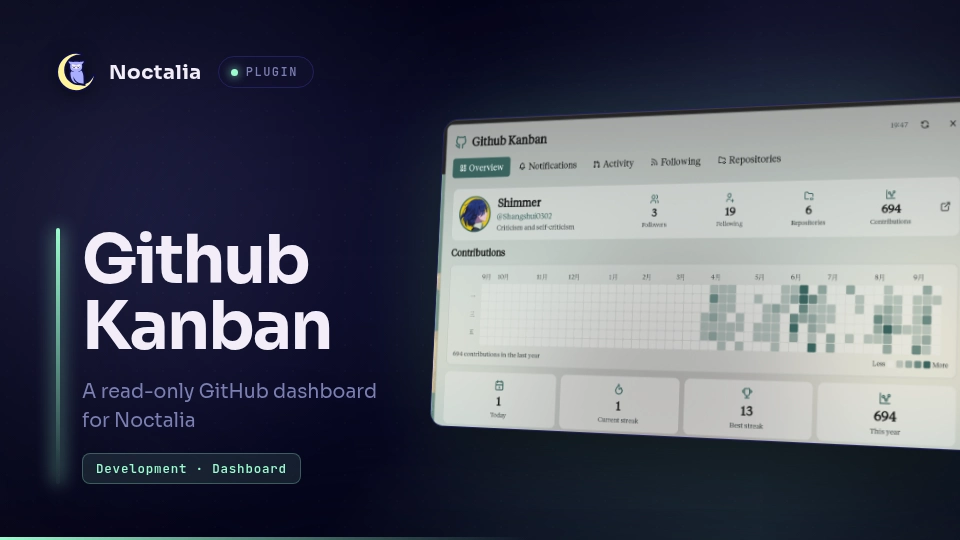
About
GitHub Kanban
GitHub Kanban is a GitHub dashboard for Noctalia with optional notification read-state synchronization. It brings profile and contribution data, notifications, following activity, pull requests, issues, repositories, and recent Actions runs into a themed panel; dashboard items open their canonical GitHub pages for further action.
Plugin
| Field | Value |
|---|---|
| ID | shangshui0302/github-kanban |
| Entries | Bar widget: github; panel: kanban; services: sync, notifications |
Requirements
- Noctalia with plugin API 43 or newer; tested on Noctalia 5.4.0.
gh, authenticated withgh auth login -h github.comxdg-open, to open GitHub pages in the default browser
Usage
Add the github widget to a Noctalia bar and click it to open the dashboard. Right-click the widget or use the panel refresh button to refresh immediately. The panel includes:
- Overview: profile, contribution totals, and an annual contribution heatmap.
- Notifications: recent read and unread notifications, filterable by read state and reason. Unread cards can show an accent border and status dot; the bar widget counts unread notifications only.
- Work: recent authored pull requests, requested reviews, issues created by or assigned to you, and Actions runs, with source and state filters.
- Following: public events from followed people and latest-release data for up to 100 recently starred repositories, grouped into height-limited cards with separate People and Repositories filters. GitHub does not expose the web dashboard's personalized feed as an API, so this view combines those two available data sources.
- Repositories: recently updated repositories available to the authenticated account.
Settings
| Setting | Type | Default | Range / options | Description |
|---|---|---|---|---|
refresh_interval_minutes |
select |
15 |
5, 15, 30 minutes |
Sets the automatic data refresh interval. |
default_dashboard |
select |
overview |
overview, notifications, work, following, repositories |
Chooses the panel view opened by default. |
bar_display_mode |
select |
both |
icon, count, both |
Chooses whether the bar widget shows its icon, unread count, or both. |
show_overview |
bool |
true |
— | Enables the Overview dashboard section. |
show_notifications |
bool |
true |
— | Enables the Notifications dashboard section. |
notification_sync_mode |
select |
legacy |
legacy, synced |
Keeps the original read-only dashboard refresh behavior, or enables independent notification refresh and GitHub read-state writes. |
notification_refresh_interval_seconds |
select |
120 |
60, 120, 300 seconds |
Sets the independent notification refresh interval in Synced mode. |
notification_refresh_on_open |
bool |
true |
— | Refreshes notifications when the panel opens in Synced mode. |
notification_mark_read_on_open |
bool |
false |
— | Marks an unread notification read on GitHub after its browser opener starts successfully in Synced mode. |
notification_history_days |
int |
30 |
1–90 days, step 1 | Limits read notification history to the selected recent period. All unread notifications remain visible and counted, regardless of age. |
notification_default_filter |
select |
unread |
all, unread, read |
Sets the initial notification read-state filter. |
show_activity |
bool |
true |
— | Enables the Work dashboard section. |
activity_history_days |
int |
30 |
1–365 days, step 1 | Limits work items fetched to the selected recent period. |
pr_default_filter |
select |
all |
all, created, review |
Sets the initial pull request filter. |
issue_default_filter |
select |
all |
all, created, assigned |
Sets the initial issue filter. |
show_following |
bool |
true |
— | Enables the Following dashboard section. |
following_card_max_height |
int |
260 |
140–500 px, step 20 | Limits the initial collapsed height of each Following person or repository card; expanding shows all items. |
following_user_limit |
int |
4 |
1–12, step 1 | Sets how many followed users are included in the feed. |
following_events_per_user |
int |
30 |
1–30, step 1 | Sets the maximum events fetched for each followed user. |
starred_repository_limit |
int |
100 |
10–100, step 10 | Sets how many recently starred repositories are checked for latest release data. |
following_include_prereleases |
bool |
true |
— | Includes prereleases in repository release cards. |
following_hide_bots |
bool |
false |
— | Excludes bot accounts from the followed-user feed. |
following_show_stars |
bool |
true |
— | Includes star events in the followed-user feed. |
following_show_pushes |
bool |
true |
— | Includes push events in the followed-user feed. |
following_show_issues |
bool |
true |
— | Includes issue events in the followed-user feed. |
following_show_pull_requests |
bool |
true |
— | Includes pull request events in the followed-user feed. |
following_show_releases |
bool |
true |
— | Includes release events in the followed-user feed. |
following_show_forks |
bool |
true |
— | Includes fork events in the followed-user feed. |
following_show_other |
bool |
true |
— | Includes event types not covered by the individual type toggles. |
following_ignored_users |
string_list |
[] |
GitHub login strings | Omits events from listed GitHub logins. |
following_ignored_repositories |
string_list |
[] |
owner/name strings |
Omits events and release cards for listed repositories. |
following_history_days |
int |
30 |
1–30 days, step 1 | Limits followed-user events to this many recent days. |
show_repositories |
bool |
true |
— | Enables the Repositories dashboard section. |
appearance_density |
select |
standard |
compact, standard, comfortable |
Changes the overall spacing and density of dashboard content. |
appearance_font_scale |
int |
100 |
80–130%, step 5 | Scales dashboard text relative to its base size. |
appearance_card_radius |
int |
9 |
0–24 px, step 1 | Sets the rounding of dashboard card corners. |
appearance_card_spacing |
int |
8 |
4–20 px, step 1 | Sets the gap between dashboard cards. |
appearance_card_border |
select |
subtle |
none, subtle, accent |
Sets the visibility and emphasis of card borders. |
appearance_card_background |
select |
tinted |
transparent, tinted, solid |
Sets a transparent, lightly tinted, or denser translucent theme background for dashboard cards. |
appearance_hover_effect |
select |
background |
none, background, border |
Selects the visual response when hovering over cards. |
appearance_secondary_text |
select |
truncate |
full, truncate, hidden |
Controls whether secondary text is shown fully, shortened, or hidden. |
appearance_time_format |
select |
relative |
relative, local, iso |
Formats displayed dates as relative, local, or ISO 8601 time. |
appearance_avatar_size |
select |
medium |
small, medium, large |
Sets the size of displayed avatars. |
appearance_avatar_shape |
select |
circle |
circle, rounded |
Sets the shape of displayed avatars. |
appearance_icon_style |
select |
theme |
color, theme, muted |
Chooses colored, theme-aware, or muted dashboard icons. |
appearance_show_empty_illustration |
bool |
true |
— | Shows illustrations when a section has no items. |
appearance_animations |
bool |
true |
— | Enables dashboard interface animations. |
heatmap_cell_size |
int |
13 |
8–16 px, step 1 | Sets the contribution heatmap cell dimensions. |
heatmap_cell_gap |
int |
1 |
1–4 px, step 1 | Sets the spacing between heatmap cells. |
heatmap_cell_radius |
int |
2 |
0–4 px, step 1 | Sets the rounding of heatmap cells. |
heatmap_levels |
select |
5 |
4, 5 levels |
Sets the number of contribution intensity levels. |
heatmap_show_months |
bool |
true |
— | Shows month labels above the contribution calendar. |
heatmap_show_weekdays |
bool |
true |
— | Shows weekday labels beside the contribution calendar. |
heatmap_show_total |
bool |
true |
— | Shows the annual contribution total. |
heatmap_show_legend |
bool |
true |
— | Shows the heatmap intensity legend. |
heatmap_empty_style |
select |
background |
background, outline |
Uses the standard subtle cell border or a stronger outline for zero-contribution days. |
heatmap_color_mode |
select |
noctalia |
noctalia, github, custom |
Chooses Noctalia, GitHub, or custom heatmap colors. |
heatmap_custom_level_0 |
string |
"" |
Color string; empty follows theme | Sets custom color for intensity level 0 when custom mode is selected. |
heatmap_custom_level_1 |
string |
"" |
Color string; empty follows theme | Sets custom color for intensity level 1 when custom mode is selected. |
heatmap_custom_level_2 |
string |
"" |
Color string; empty follows theme | Sets custom color for intensity level 2 when custom mode is selected. |
heatmap_custom_level_3 |
string |
"" |
Color string; empty follows theme | Sets custom color for intensity level 3 when custom mode is selected. |
heatmap_custom_level_4 |
string |
"" |
Color string; empty follows theme | Sets custom color for intensity level 4 when custom mode is selected. |
notification_unread_dot |
bool |
true |
— | Shows a status dot on unread notification cards. |
notification_unread_border |
bool |
true |
— | Highlights unread notification cards with a border. |
notification_read_opacity |
int |
100 |
40–100%, step 5 | Sets the opacity of read notification cards. |
activity_show_status_badges |
bool |
true |
— | Shows status badges on work items. |
activity_show_type_icons |
bool |
true |
— | Shows item-type icons on work items. |
activity_repository_emphasis |
bool |
true |
— | Emphasizes repository names in work item cards. |
following_event_spacing |
int |
5 |
2–12, step 1 | Sets vertical spacing between Following feed events. |
following_content_lines |
int |
2 |
1–5, step 1 | Sets the maximum lines shown for Following event content. |
repositories_layout |
select |
list |
list, grid |
Displays repository cards in a list or grid. |
repositories_show_language |
bool |
true |
— | Shows each repository's primary language when available. |
repositories_show_stats |
bool |
true |
— | Shows repository statistics such as stars and forks. |
overview_stats_layout |
select |
columns4 |
columns4, grid, compact |
Arranges the Overview statistics in four columns, a grid, or compact layout. |
Numeric ranges and steps are the values declared by the manifest. The five custom heatmap color strings accept #RRGGBB; blank values use the theme color. Settings controlling a view's appearance are shown when their corresponding view is enabled.
IPC
Toggle the panel:
noctalia msg panel-toggle shangshui0302/github-kanban:kanban
Refresh all service data:
noctalia msg plugin shangshui0302/github-kanban:sync all refresh
Notes
- Dashboard cache data is shown only after its account matches the current
ghidentity. A refresh verifies that identity again before publishing the collected sections; switching accounts clears the old sections. A failed section retains only the current account's previously verified data. A dashboard refresh that does not finish within two minutes releases its slot and reports a partial result, allowing the next manual or scheduled refresh to try again. Late replies from the expired round are ignored. - Following summaries are truncated at UTF-8 boundaries after bounded whitespace processing. Release candidates are filtered before the combined feed is limited to 20 entries, so excluded prereleases or ignored repositories do not displace eligible releases.
- The
syncservice makes read-only GitHub API network requests throughgh api, using the authentication already configured ingh. The notification service also usesgh api; in Synced mode only, explicit Mark as read / Mark current list as read actions, or opening a notification with Mark read when opening a notification enabled, sendPATCH /notifications/threads/{id}to GitHub. The batch action includes unread notifications across all pages of the current filtered list, excluding pending actions. Notification cards are shown in pages of 50 to keep every item reachable within the runtime UI limits; changing filters or reopening resets to the first page. The badge updates optimistically while a write is pending. Very large selections are queued in bounded batches instead of blocking the action callback. Failed writes restore unread state and can be retried; older in-flight responses cannot overwrite a local read action. An updated thread becomes unread again. Before writing, the service checks the current account and thread version. Pending actions are disabled. Legacy mode remains read-only and refreshes with the dashboard. The plugin does not read, store, or display an access token. Individual sources may fail independently; cached sections can remain visible while errors are reported. - Notification requests follow pagination to include the complete read history range (30 days by default) and all unread notifications. Unread items remain visible and counted even when older than the history range. Synced mode refreshes this data independently; opening the panel can also request a refresh. Conditional requests reuse unchanged pages, and refreshes respect GitHub's
X-Poll-Intervaland rate-limit headers. Repeated requests are coalesced. Notification responses are projected withgh api --jqand processed in small batches to stay within the runtime CPU budget. Read and cache checkpoints can advance within a short elapsed-time slice, with a fixed resume cap; expensive native decoding and serialization keep frame boundaries. This reduces waiting without changing GitHub polling limits. Snapshot validation and list projection also yield between batches; sorting uses native string keys, and notification IDs are indexed for bulk actions. When history and unread pages contain different versions of a thread, the newer version wins; list state and the badge use that same version. Large unread/pending snapshots are prepared in background ticks; local action deltas keep their counts current while writes continue. A refresh with no progress for two minutes retains the previous snapshot and retries after backoff; delayed replies from that refresh are ignored. Processing errors are logged and reported immediately, and invalid cached snapshots are discarded so they can be fetched again. A read-state action with no response for two minutes releases pending actions and cancels the remaining queue. Its outcome is reconciled through normal reads; an uncertain write is never replayed automatically. A fresh snapshot confirming a thread is read also clears that thread's write error. Late action replies cannot overwrite newer actions or change the current account. noctalia.downloaddownloads profile, followed-user, and repository-owner avatars from GitHub. The plugin cachesdashboard.json,notifications.json(account-scoped notification snapshots and confirmed local read versions), and downloaded avatars in its NoctaliapluginDataDir. Notification cache schema 2 stores encoded groups of at most 50 records, omits the duplicate unread snapshot, and saves in background update ticks. Schema 1 caches remain readable; unsupported or damaged caches are refetched. Stale cache jobs cannot overwrite newer account or action state, and cache-save failures are logged without blocking notification reads.- Clicking a dashboard item starts
xdg-openwith its GitHub URL. - Dashboard avatar downloads use account/refresh-specific destinations. Replaced, failed or obsolete downloads are removed when no displayed row references them; cleanup is restricted to paths created by the current service instance. The verified profile image is reused while its URL is unchanged.
- Panel configuration values are reused within one render. Event callbacks and later renders read fresh settings. Hidden panels keep incoming state without rebuilding their UI; reopening renders the latest state. Existing data-driven render throttling and appearance are preserved.
- The panel uses the manifest's fixed 860 × 620 dimensions. The current plugin UI API does not expose runtime resizing or sticky section headers. Contribution cells are auto-fitted to the panel width, so large cell/gap combinations are scaled down to prevent overlap in attached and floating placements. The Overview contributions section stretches to fill remaining panel height, distributing air inside its heatmap card while keeping the Contributions label attached to it. Event and release text is truncated before display to keep refreshes within budget. List responses (following events, search, repositories, Actions runs) are projected to displayed fields with
gh api --jqso decoding stays within budget. The heatmap footer is inset to the calendar width so its items align with the grid edges. - GitHub does not provide the web dashboard's personalized feed through an API, so the Following view combines public events from followed users with latest-release data from recently starred repositories. Repository scanning is bounded by the configured limit to keep refresh work and API use modest.
Versions
| Version | Plugin API | Updated |
|---|---|---|
| v0.2.7 latest | 43 | Oct 28, 2026 |
| v0.2.5 | 24 | Oct 21, 2026 |
Older versions stay installable on a Noctalia release whose plugin API is below the latest version's.