
About
GitHub Activity
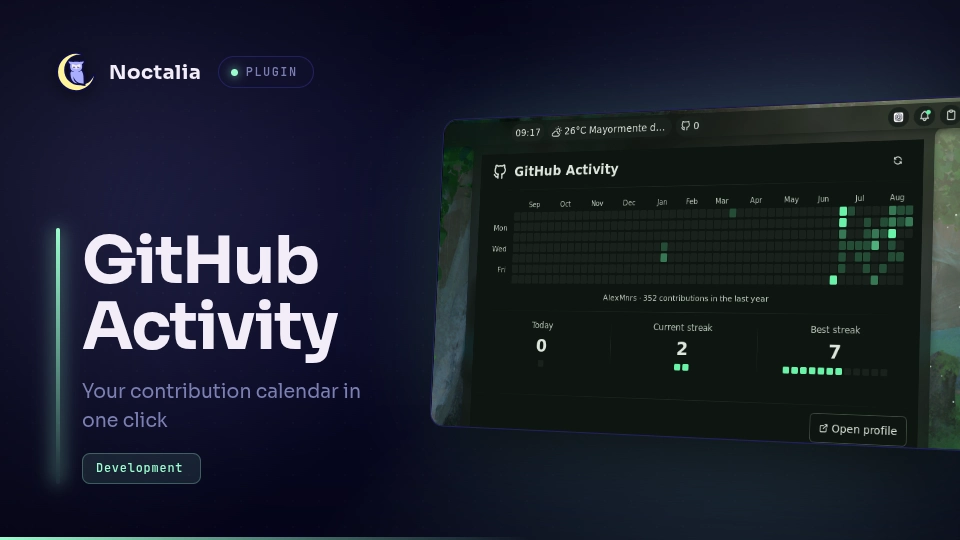
A native GitHub contribution calendar for the Noctalia v5 bar. Its compact widget can show today's contributions, the current streak, the annual total, or only the GitHub icon, and opens an adaptive, theme-aware annual heatmap on click.
Plugin
| Field | Value |
|---|---|
| Plugin ID | alexmnrs/github-activity |
| Entries | Bar widget: activity; panel: calendar; service: sync |
| Minimum Noctalia plugin API | 24 (Noctalia v5.0.0-beta.9) |
Requirements
- GitHub CLI (
gh), authenticated with the account whose activity you want to display. xdg-open(xdg-utilson Arch) to open the profile button.
Authenticate once before enabling the plugin:
gh auth login -h github.com
Usage
- Enable GitHub Activity in Noctalia's plugin manager.
- Add the
activitywidget to a bar from the widget picker. - Left-click the widget to open the annual calendar.
- Right-click the widget or use the panel's refresh button to refresh now.
Settings
| Setting | Options | Default |
|---|---|---|
| Automatic refresh interval | 15, 30, or 60 minutes | 30 minutes |
| Widget display | Icon and value, or icon only | Icon and value |
| Widget metric | Today's contributions, current streak, or annual total | Today's contributions |
| Show today's contributions | On or off | On |
| Show current streak | On or off | On |
| Show best streak | On or off | On |
| Show annual total | On or off | On |
| Show profile button | On or off | On |
Changing the interval applies it immediately and requests a refresh unless a request is already in progress. The widget tooltip and calendar panel show the last update time and selected automatic refresh interval.
Widget display and metric choices belong to each bar-widget instance. Multiple copies of GitHub Activity can therefore show different metrics. The metric selector is relevant only when the widget is configured to show a value.
Panel content choices apply to the shared calendar panel. Hiding the annual total leaves the hovered-day detail available. Hiding today's contributions, the current streak, and the best streak together adds row spacing and centers the ready content for a more legible focused view.
Plugin interface text comes from translations/en.json and is translated
through Noctalia Translate. Calendar month and weekday labels instead use
Noctalia's date formatter and follow the process LC_TIME locale.
The panel can also be toggled through IPC:
noctalia msg panel-toggle alexmnrs/github-activity:calendar
Request a refresh externally with:
noctalia msg plugin alexmnrs/github-activity:sync all refresh
Data and privacy
The plugin runs gh api graphql to request the authenticated account's
contributionCalendar. It never reads, writes, or displays a GitHub token.
Authentication remains entirely inside GitHub CLI.
The latest successful normalized calendar is cached in Noctalia's per-plugin data directory. The cache contains the public contribution dates, counts, levels, username, and fetch time; it contains no credentials. It lets the widget continue to show the last known activity when offline.
Troubleshooting
- GitHub CLI is required: install
github-cli(or your distribution'sghpackage). - GitHub CLI needs authentication: run
gh auth login -h github.com. - No data after a refresh: run
gh auth statusin a terminal, then retry. - The profile button does nothing: install
xdg-utilssoxdg-openis available.
Compatibility
Noctalia v5's plugin API is beta and can change before the stable release. This plugin targets API 24 and uses Noctalia's declarative panel and shared-state APIs only.
Versions
| Version | Plugin API | Updated |
|---|---|---|
| v1.4.0 latest | 24 | Aug 26, 2026 |
Older versions stay installable on a Noctalia release whose plugin API is below the latest version's.