
About
Git Companion
Monitor your git repositories from the Noctalia bar. See your open pull requests
and issues at a glance, and jump to any of them on the web without leaving your
desktop. Works with GitHub (via gh), GitLab (via glab) and
Gitea (via tea).
Plugin
| Field | Value |
|---|---|
| ID | tphilippot/git_companion |
| Entries | Bar widget: widget; panel: main; service: service |
Requirements
Install the CLI for the platform you want to monitor and sign in once:
gh— the GitHub CLI, forplatform = github. Rungh auth login.glab— the GitLab CLI, forplatform = gitlab. Runglab auth login.tea— the Gitea CLI, forplatform = gitea. Runtea login add --url https://git.example.com.git— only forplatform = gitea; see Gitea working directory below.xdg-open— opens a PR/MR or issue in your default browser when you click it in the panel.
You only need the CLI matching your chosen platform; all three are listed so the
requirement shows up regardless of which one you pick. No token is ever stored by
the plugin — each CLI keeps its own credentials.
Usage
Bar widget — add the widget entry to your bar to see a platform glyph plus
your open PR/MR and issue counts. Click it to open the panel.
noctalia msg panel-toggle tphilippot/git_companion:main
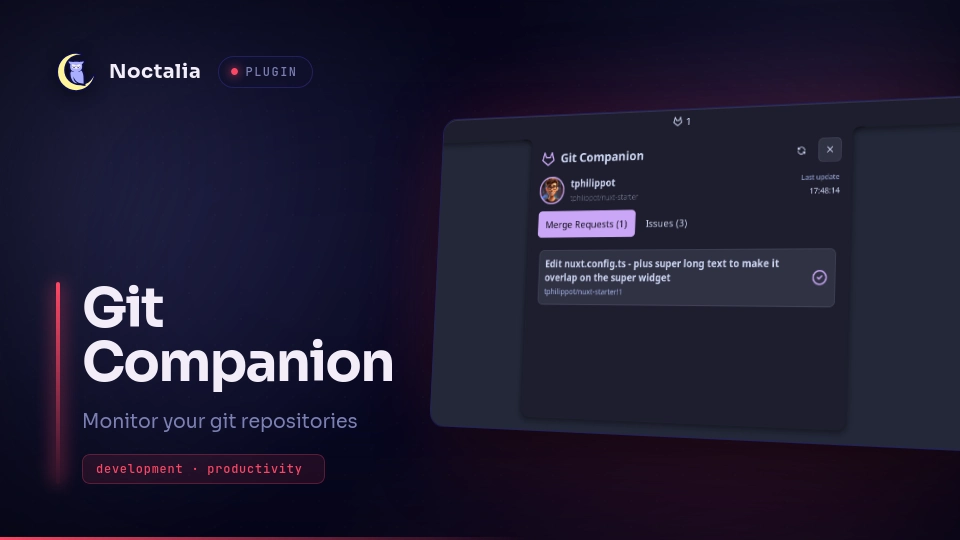
Panel — the header carries a refresh button that re-fetches immediately
and a close button. Below it, a row shows your avatar, your username and a
subtitle (your group if set, otherwise your repo, otherwise your profile bio),
with the last-update time on the right. The avatar and username appear once
the CLI resolves your account; the last-update time is always shown.
Then up to three tabs, each listing items by title and reference:
- Pull Requests / Merge Requests — the ones you authored.
- Issues — the ones assigned to you.
- Code Review — open, unmerged PR/MRs waiting on your review. Not available
on Gitea, where the tab is hidden;
teahas no review-requested filter.
On GitLab, a glyph at the end of a merge request card tells you where the discussion stands:
message— the MR has comments (user_notes_count > 0).message-report— an unresolved thread is waiting on someone (blocking_discussions_resolvedisfalse), which also blocks the merge.
Both come from glab mr list itself, so they cost no extra request. GitHub and
Gitea do not show these glyphs yet. Click an item to open it on the web in your
browser; the panel closes as it opens.
Each tab can be hidden with its show_* setting, and a hidden tab is not
fetched at all. Hide every tab and the panel says so instead of showing an empty
list.
Branch badges — a coloured chip in front of the reference of a PR/MR shows
the branch it targets, so a merge request into develop reads differently
from one into release/18.3.4 at a glance. Issues have no target branch and
never carry one. The chip requires a provider that reports the target branch,
which GitHub does not — see Notes.
Settings
| Setting | Type | Default | Description |
|---|---|---|---|
platform |
select |
github |
github (uses gh), gitlab (uses glab) or gitea (uses tea). |
gitea_login |
string |
"" |
Gitea only: which tea login to use, as listed by tea login list. Empty uses tea's default login. |
repo |
string |
"" |
Scope to one repo: owner/repo (GitHub, Gitea) or the project path (GitLab). Leave empty to use the group/owner. |
group |
string |
"" |
Filter by group (GitLab) or owner (GitHub, Gitea). Leave empty to use repo. |
refresh_interval |
int |
60 |
Seconds between automatic refreshes (minimum 10). |
bar_display_mode |
select |
both |
What the bar shows next to the glyph: none, prs (PRs/MRs only), issues (Issues only), or both. |
show_prs |
bool |
true |
Show the PRs/MRs tab. |
show_issues |
bool |
true |
Show the Issues tab. |
show_reviews |
bool |
true |
Show the Code Review tab. Ignored on Gitea, which cannot fill it. |
count_reviews_with_prs |
bool |
false |
Add the review count to the PR/MR number in the bar. Hidden while show_reviews is off. |
branch_badge_primary |
string_list |
["develop"] |
Branch patterns badged in the theme's primary accent. |
branch_badge_secondary |
string_list |
["release/*"] |
Branch patterns badged in the secondary accent. |
branch_badge_tertiary |
string_list |
[] |
Branch patterns badged in the tertiary accent. |
branch_badge_alert |
string_list |
["master", "main"] |
Branch patterns badged in the theme's alert colour. |
The four branch_badge_* lists decide the colour of the branch chip. Put one
branch pattern per entry: either an exact branch name (develop) or a prefix
ending in * (release/* matches release/18.3.4). The lists are checked in
the order above and the first match wins, so a branch listed under two
colours takes the earlier one. A branch matching nothing gets no chip.
The colour is the setting you put the branch in, so there is no colour to type. Adding a fifth colour requires a plugin change rather than configuration. The chips only appear for providers that report a target branch, which excludes GitHub — see Notes.
On GitHub the widget lists pull requests authored by you and issues assigned
to you. On GitLab it lists merge requests and issues authored by you — both
GitLab lists are filtered by author, not by assignee. On Gitea both lists are
authored by you too: its cross-repository search rejects an assignee filter
unless a single repo is set. The Code Review tab is filtered by requested
reviewer on GitHub and GitLab, and includes drafts; Gitea has no such filter.
Gitea working directory
tea resolves its context by running git rev-parse --show-toplevel before it reads
--login or --repo, so every one of its repo-scoped commands fails when the working
directory is not a git repository — and a background service has no such directory. Any
repository satisfies it, so on the first Gitea refresh the plugin runs git init once in
an empty tea-ctx folder inside its own data directory and runs tea from there. Nothing
is committed to it and it is never touched again.
Other Gitea-compatible forges (Forgejo, Codeberg) expose the same v1 API and should work
through tea as well, but they are not tested here.
show_reviews is the master switch for the Code Review feature: turned off, the
tab disappears, nothing is fetched for it, and count_reviews_with_prs has no
effect. The bar tooltip always lists issues, PRs/MRs and reviews separately, so
a folded count is never ambiguous.
IPC
noctalia msg plugin tphilippot/git_companion:service all refresh
Re-fetch PRs/MRs and issues immediately. The service is a singleton, so it is
addressed with the all target. Results land in the panel automatically when the
fetch completes.
Notes
- Network: each refresh calls the forge API through the installed CLI
(
gh search prs/issues,glab mr/issue list, ortea issues list --kind pulls/issues), scoped by yourrepoorgroupsetting. One call per visible tab, so hiding a tab removes its request. The Code Review tab usesglab mr list --reviewer=@meorgh search prs --review-requested=@me;teaoffers no equivalent, so the tab is hidden on Gitea. Your avatar is then downloaded from the forge; on Gitea it comes from the instance's public<instance>/<user>.pngroute, so it needs no token. - Branch badges are not available on GitHub. The chip needs each item's
target branch, which the provider has to report.
glabreturns it with every merge request.gh search prshas no base-branch field at all, and it is the only GitHub call that works across a whole owner, so pull requests fetched from GitHub render without a chip.teais in the same position: none of the fields it can print for a search carries a base branch, so Gitea items have no chip either. This is a per-provider capability rather than a setting: thebranch_badge_*lists stay configured and apply to any provider that does report a target branch. - Processes: the service spawns
gh,glaborteafor fetches, plus a one-timegit initon Gitea; the panel spawnsxdg-open(non-blocking) when you click an item. - Filesystem: the service downloads your profile picture to the plugin's own
data directory, at
~/.local/state/noctalia/plugins/data/tphilippot/git_companion/avatar(it followsNOCTALIA_STATE_HOMEif you set it), so the panel can show it next to your username. It is re-downloaded only when the avatar URL changes, and the file persists until you delete it. On Gitea the same directory also holds the emptytea-ctxrepository described above. Nothing else is written: the PR/MR and issue lists are in-memory only and are cleared when the plugin stops. - GitLab scope: GitLab requires a
repoorgroupscope in settings; the service shows an error notification if neither is set. GitHub and Gitea both search across all your repositories when no scope is set. - Failed fetches: when a CLI call fails, the panel keeps showing the items it
last fetched and reports the failure in a strip above them, quoting the CLI's
own message — so a mistyped
reporeads asError: not foundrather than a silently empty tab.
Versions
| Version | Plugin API | Updated |
|---|---|---|
| v1.3.0 latest | 23 | Sep 18, 2026 |
Older versions stay installable on a Noctalia release whose plugin API is below the latest version's.