 Noctalia
About
Gamepad Display — Technical Reference
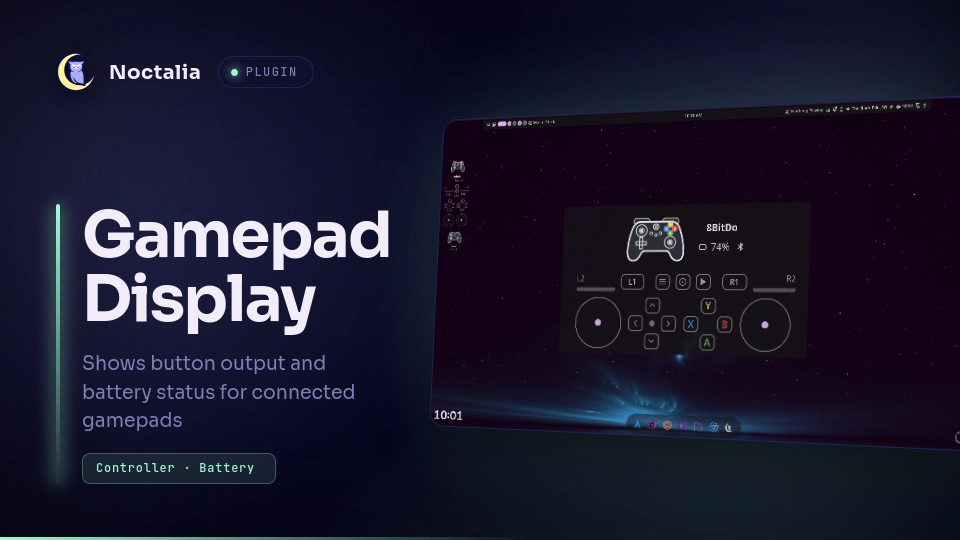
A live controller display for Noctalia Shell. The desktop widget shows the pad you are actually using, its model-specific artwork, battery and connection state, and every button, stick, trigger and D-pad direction as you use them.
Built for KineticWE's noctalia-kwe v5 build (tested live on 5.3.0) and the
upstream Noctalia v5 plugin API.
Plugin
| Field | Value |
|---|---|
| ID | tylorismusic/gamepad-display |
| Display name | Gamepad Display |
| Version | 1.3.0 |
| Entries | Services battery + listener, desktop widget inputs |
| Plugin API | 17 |
| Licence | MIT |
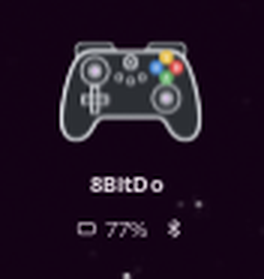
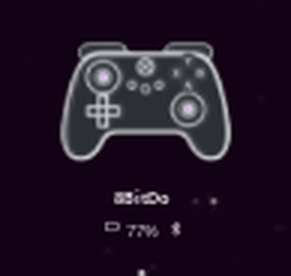
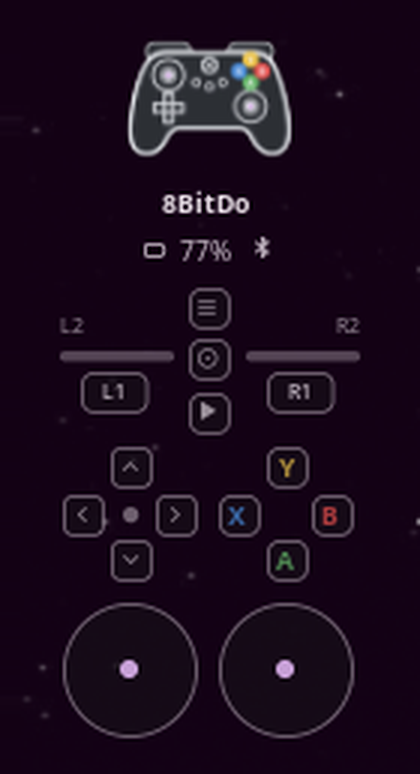
Display modes
| Battery only | Compact | Full |
|---|---|---|
 |
 |
 |
Supported controllers
| Model | USB / Bluetooth IDs | Artwork and buttons | Notes |
|---|---|---|---|
| DualSense | 054c:0ce6 |
DualSense art, PlayStation glyphs | USB and Bluetooth |
| DualSense Edge | 054c:0df2 |
DualSense art, PlayStation glyphs | USB and Bluetooth |
| DualShock 4 | 054c:05c4, 054c:09cc |
DS4 art, PlayStation glyphs | USB recommended (see below) |
| 8BitDo Ultimate 2C | 2dc8:301b (BT), 2dc8:310a (USB receiver) |
Xbox art, A/B/X/Y letters | Bluetooth and 2.4 GHz receiver |
| Generic XInput-style pad | any evdev pad with ABS_X |
Xbox art, A/B/X/Y letters | Capability-driven axis mapping |
Virtual pads (Sunshine, libvirtualhid, uinput, Steam virtual controllers) and
the extra motion/touchpad nodes Sony pads expose are ignored, so a streaming
session cannot hijack the widget.
When several pads are connected, the one you touched last is shown. Plugging a pad in also takes it over. Until something is touched, Sony pads win over 8BitDo, which wins over generic XInput pads.
Features
- Live input state — face buttons, shoulders, analog triggers, both sticks
with press (
L3/R3), D-pad, and the extraCreate,Options,PS, touchpad-click and mute buttons. Updates at up to 50 Hz while you play. - Model-specific artwork — DualSense/Edge, DualShock 4 and Xbox-style drawings are generated from SVG templates into the plugin data directory and recoloured from your settings.
- Correct face labels — PlayStation shapes for Sony pads, Xbox
A/B/X/Yletters for 8BitDo and XInput pads. - Capability-driven mapping — stick and trigger axes are read from each
device's evdev capabilities, so the 8BitDo's non-standard
ABS_Z/ABS_RZ/ABS_GAS/ABS_BRAKElayout works without a special case. On that layoutABS_BRAKEis the left trigger andABS_GASthe right one, matching the pedal convention; verified on an Ultimate 2C over Bluetooth. - 8BitDo and XInput face buttons — Xbox-layout pads report physical X
(left) as
BTN_NORTHand Y (top) asBTN_WEST, the opposite of the PlayStation positions, so those codes are swapped automatically. Sony pads keep their triangle/square layout and shapes. - Battery in the header — percentage plus charging and USB/Bluetooth
glyphs, read from kernel
power_supply(Sony) or BlueZBattery1(Bluetooth pads). XInput receivers without a battery node simply omit it. - Centered header — controller art, model name and battery sit centered above the input rows; the widget is labelled Gamepad Display in the desktop-widget picker.
- Three display modes (the
display_modesetting):battery— header and controller artwork only (minimal footprint).compact— artwork with lit face buttons, D-pad, L1/R1 and L3/R3, plus trigger bars above it (no separate input grid).full— the complete input display: triggers, buttons, sticks and D-pad.
- Button lighting in compact mode — the face buttons, D-pad directions, L1/R1 and L3/R3 light up on the controller artwork. They are baked into the SVG as cached variants keyed on the 12 digital inputs, so a press only swaps a file path instead of regenerating artwork inside Noctalia's per-render CPU budget.
- No hidraw contention — the input reader only uses
/dev/input/event*, so it runs alongsideds4u, Steam Input, and the plugin's own battery service without competing for HID reports. - Low-battery notifications — optional, handled by the separate battery service at a configurable threshold.
Architecture
Two headless services and one desktop widget:
| Entry | File | Job |
|---|---|---|
Service battery |
battery.luau |
Runs code/ds_battery_daemon.py; DualSense battery, charging state, ds4u integration and low-battery notifications |
Service listener |
inputs.luau |
Runs code/ds_inputs_daemon.py --stream; publishes live input state |
Desktop widget inputs |
inputs_card.luau |
Renders the card and generates the controller artwork |
State flow:
/dev/input/event* ──► ds_inputs_daemon.py ──► JSON lines ──► inputs.luau
                                                              │
                                                              ▼
                                                    noctalia.state "inputs"
                                                              │
                                                              ▼
                                                       inputs_card.luau
The input daemon also keeps a state file fresh, so the widget can pick up the current pad after a shell restart. The daemons are single-instance: a lock file prevents a stale copy from surviving a shell restart.
The battery service is independent. It still speaks ds4u IPC and hidraw for
Sony battery reads and notifications, but the widget's battery readout comes
from the input service so it also works for 8BitDo and XInput pads.
Requirements
- Noctalia Shell v5 with plugin API 17 or newer (
noctalia-kwetested) python3(Python 3, standard library only — no pip packages)- Read access to the kernel evdev nodes (
/dev/input/event*) - Optional:
ds4ufor Sony battery IPC and profile/rumble features - Optional:
busctl(systemd) for reading the battery level from BlueZ when a pad exposes no battery node of its own - Optional: the udev rule below if you want the battery service to read DualSense hidraw nodes directly
Input permissions
Most desktops grant the active seat access to input devices automatically via
uaccess ACLs. If the widget only shows the dim gamepad icon and never a controller, check the
nodes and test one:
ls -l /dev/input/event*
sudo evtest /dev/input/eventN   # pick the gamepad node
If your user cannot open the node, add yourself to the input group and log
back in:
sudo usermod -aG input "$USER"
The input reader never opens hidraw, so no controller-specific udev rule is needed for the live display.
Optional DualSense hidraw rule (battery service)
Only needed for the battery service's direct HID reads and ds4u coexistence:
sudo tee /etc/udev/rules.d/70-dualsense.rules >/dev/null <<'EOF'
SUBSYSTEM=="hidraw", ATTRS{idVendor}=="054c", ATTRS{idProduct}=="0ce6", MODE="0664", GROUP="input", TAG+="uaccess"
SUBSYSTEM=="hidraw", ATTRS{idVendor}=="054c", ATTRS{idProduct}=="0df2", MODE="0664", GROUP="input", TAG+="uaccess"
EOF
sudo udevadm control --reload-rules
sudo udevadm trigger --subsystem-match=hidraw
Unplug/replug USB pads or reconnect Bluetooth afterwards.
Install
- In Noctalia, open Settings → Plugins → Browse Plugins, find Gamepad Display and click Add to Noctalia.
- Open Settings → Desktop → Toggle Editor and add Gamepad Display. Choose a
display_mode:battery,compactorfull.
To install from a local checkout instead, link or copy this directory to
~/.local/share/noctalia/plugins/gamepad-display (the directory name must match
the part of id after the /), then run:
noctalia msg config-reload
noctalia msg plugins enable tylorismusic/gamepad-display
If the widget was added before, place it again from the desktop-widget editor. Re-enabling a plugin can reset its saved placement, so re-check the box position after toggling the plugin.
A box of roughly 240 × 152 logical pixels shows the full card at 100% scale on a 1080p output. The widget scales its content down if the box is smaller.
Usage
- Open Settings → Plugins, find Gamepad Display and enable it. Both
services (
batteryandlistener) start with the plugin; no separate step is needed. - Open Settings → Desktop → Toggle Editor and add Gamepad Display.
Place the box where you want it and choose a
display_mode. - Connect or wake a controller. The last pad you touch is the one shown; the battery service can post a low-battery notification when enabled.
The widget (inputs) is the only user-facing entry - there is no bar widget,
panel, shortcut or launcher provider. The battery and listener services run
headless; battery uses the shared low_threshold and notify_low settings.
Settings
Plugin-level (shared by the battery service and widget):
| Key | Default | Description |
|---|---|---|
low_threshold |
20 |
Show the low-battery state and notify at or below this percentage |
notify_low |
true |
Send a desktop notification when the battery first reaches the threshold |
Desktop widget:
| Key | Default | Description |
|---|---|---|
accent_color |
primary |
Stick dots, trigger fills and pressed highlights |
text_color |
on_surface |
Model name and labels |
muted_text_color |
on_surface_variant |
Battery text, unpressed glyphs and hints |
show_battery |
true |
Show the battery percentage and charging glyph in the header |
illustration_color |
#e8ebef |
Controller line-art colour |
controller_body_color |
#2c3035 |
Controller body fill |
controller_body_opacity |
1.0 |
Body fill opacity (0 = line art only) |
controller_stroke_width |
2.8 |
Outline and button-edge thickness (0.5–8) |
vertical_layout |
false |
Stack the triggers above L1/R1 and the sticks below the face buttons instead of the wide side-by-side layout |
display_mode |
full |
battery (header + artwork only), compact (lit buttons on the artwork + trigger bars) or full (complete input display) |
Colour settings accept a #rrggbb value or a Noctalia palette role such as
primary, on_surface or on_surface_variant. Palette roles follow the live
theme; the generated artwork is rewritten when a colour changes.
IPC
The battery service accepts these events:
noctalia msg plugin tylorismusic/gamepad-display:battery all buzz
noctalia msg plugin tylorismusic/gamepad-display:battery all cycle-profile
noctalia msg plugin tylorismusic/gamepad-display:battery all switch-profile "Profile name"
noctalia msg plugin tylorismusic/gamepad-display:battery all restart
buzzrumbles the active pad through ds4u IPC or a direct HID output report.cycle-profileswitches to the next saved ds4u profile.switch-profile <name>switches to the named ds4u profile.restartrestarts the battery daemon.
Notes
- Profile switching uses the running ds4u daemon when it answers. If it does not,
the battery service writes
~/.config/ds4u/settings.json, settingprofileto the chosen name and keeping the other keys, and applies that profile's lightbar and player LEDs directly over HID. - The daemons write only their own state and lock files under
$XDG_RUNTIME_DIR, generated controller SVGs under the plugin data directory, and the ds4u settings file above. They do not download anything and make no network calls.
Diagnostics
Runtime state:
$XDG_RUNTIME_DIR/noctalia-dualsense-inputs.json   # model, connection, battery, buttons, sticks
$XDG_RUNTIME_DIR/noctalia-dualsense-inputs.lock
$XDG_RUNTIME_DIR/noctalia-dualsense-battery.json
$XDG_RUNTIME_DIR/noctalia-dualsense-battery.lock
Read the live state:
jq . "$XDG_RUNTIME_DIR/noctalia-dualsense-inputs.json"
Run the input daemon manually (stop the service first, otherwise the lock makes the manual copy exit):
python3 code/ds_inputs_daemon.py            # keep the state file fresh
python3 code/ds_inputs_daemon.py --stream   # print one JSON line per frame
python3 code/ds_inputs_daemon.py --demo     # fake pad for layout work
Service logs:
journalctl --user -f | grep -i dualsense
Troubleshooting
| Symptom | Fix |
|---|---|
| Only the dim gamepad icon is shown | No pad is being detected: check /dev/input/event* permissions with evtest; the daemon rescans every 2 seconds |
| Wrong controller shown | Touch or press the pad you want; the last active pad wins |
| No battery on an 8BitDo USB receiver | The xpad receiver exposes no battery node; Bluetooth mode reports battery through BlueZ |
| DualShock 4 over Bluetooth not detected | Use USB; the DS4 does not answer BlueZ's generic SDP browse reliably |
| Sony battery missing | Install the hidraw udev rule and reconnect, or install ds4u |
| Widget blank after a config change | noctalia-kwe msg config-reload; manifest changes need plugins disable + plugins enable |
| Widget says Python is missing | Install python3; the plugin uses only the standard library |
| Plugin disabled itself after install | Enable tylorismusic/gamepad-display in Settings → Plugins |
Fork notes
Published fork: https://github.com/tylorismusic-commits/lgl-noctalia-widgets
This fork extends the upstream LGL DualSense card with:
- DualShock 4 (USB) and 8BitDo Ultimate 2C (Bluetooth + USB receiver) support
- a kernel-evdev input reader that never touches hidraw
- capability-driven axis mapping and the Xbox-style face-button remap
- model-specific controller artwork and Xbox letter buttons
- a centered header with model name, battery and connection state
- the Gamepad Display widget name and input-focused settings surface
The old battery-only desktop card is no longer registered; the battery service and its notifications are still included.
Credits and licence
Controller protocol and ds4u integration informed by deadYokai's
ds4u. The desktop-card approach was
inspired by Jahrek's
Steam Controller Plasma widget.
Packaged for Noctalia by LGL; this fork maintains the gamepad input display.
MIT — see LICENSE.
Versions
| Version | Plugin API | Updated |
|---|---|---|
| v1.3.0 latest | 17 | Nov 15, 2026 |
Older versions stay installable on a Noctalia release whose plugin API is below the latest version's.